Chrome embedded chrashes during multiple concurrent file uploads (RDM Ent. 2021.1.44.0 x64)
Chrome embedded chrashes during multiple concurrent file uploads (RDM Ent. 2021.1.44.0 x64)

Hi,
I've made a video. The point where the video ends is the point where the RDM application crashed. I've tried five times and could reproduce the crash, sometimes it's when preparing the upload on AP 4, sometimes on AP 3 or AP 2. It could have something to do with the concurrent uploading of files via chrome embedded in multiple open tabs.
VIDEO link: https://youtu.be/6_R7f7xVmO4
It worked without crashes in the past. (I came from an 2019.xx version)
Please fix this bug. Thank you.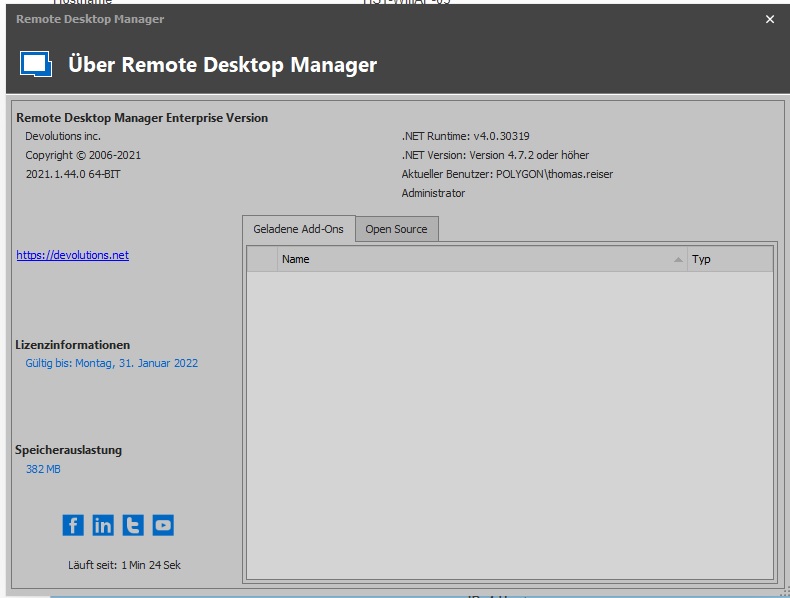
version.jpg
All Comments (25)
I've tried again and I'm now stuck here:
My PC isn't out of memory - even though it looks alike.
Window handle dump:
Hello,
Thank you for contacting us on that matter!
Do you have any crash reports in your Event Viewer? If so, could you please provide them to us via private message? Also, would it be possible for you to create a portable installation of RDM and see if these crashes still occur? To do so, you will need to do the following:
1- Download the .zip file below:
https://remotedesktopmanager.com/home/thankyou/rdmbin
2- Create a new folder on your Desktop
3- Extract the content of the .zip file into the folder created at #2
4- Go in this folder once the .zip file has been extracted and run remotedesktopmanager64.exe
5- Enter your current serial
Best regards,
James Lafleur
RDM made those crashes in eventvwr:
Name der fehlerhaften Anwendung: RemoteDesktopManager64.exe, Version: 2021.1.44.0, Zeitstempel: 0x61284696
Name des fehlerhaften Moduls: ntdll.dll, Version: 10.0.18362.267, Zeitstempel: 0xc00f8a30
Ausnahmecode: 0xc0000374
Fehleroffset: 0x00000000000f9269
ID des fehlerhaften Prozesses: 0x27e4
Startzeit der fehlerhaften Anwendung: 0x01d7a2e71ad6b08c
Pfad der fehlerhaften Anwendung: C:\Program Files (x86)\Devolutions\Remote Desktop Manager\RemoteDesktopManager64.exe
Pfad des fehlerhaften Moduls: C:\Windows\SYSTEM32\ntdll.dll
Berichtskennung: aea094a2-3389-44ca-a0cc-cf6df87ff25f
Vollständiger Name des fehlerhaften Pakets:
Anwendungs-ID, die relativ zum fehlerhaften Paket ist:
#
Anwendung: RemoteDesktopManager64.exe
Frameworkversion: v4.0.30319
Beschreibung: Der Prozess wurde aufgrund einer unbehandelten Ausnahme beendet.
Ausnahmeinformationen: Ausnahmecode c0000005, Ausnahmeadresse 00007FFA3259AC7F
#
Anwendung: RemoteDesktopManager64.exe
Frameworkversion: v4.0.30319
Beschreibung: Der Prozess wurde aufgrund einer unbehandelten Ausnahme beendet.
Ausnahmeinformationen: Ausnahmecode c0000005, Ausnahmeadresse 00007FFA3259AC7F
Stapel:
bei EO.Internal.khxy.dvdy(ojso)
bei EO.Internal.khxy.dvdy(ojso)
bei EO.Internal.khxy.ufuy(IntPtr, System.String, System.String, Boolean)
bei EO.Internal.khxy.ufuy(IntPtr, System.String, System.String)
bei EO.WebBrowser.WebView.kurp(EO.Internal.tqpe, EO.Internal.samc)
bei EO.WebBrowser.WebView.kusx(EO.Internal.tqpe, EO.Internal.samc)
bei EO.WebBrowser.WebView.kusw(EO.Internal.tqpe, EO.Internal.samc)
bei EO.WebBrowser.WebView.kurb(EO.Internal.tqpe, EO.Internal.samc)
bei EO.Internal.tqpe.bixg(EO.WebBrowser.WebView, EO.Internal.tqpe, Int32, IntPtr, IntPtr)
bei EO.WebBrowser.WebView+argv.yjrp(IntPtr, Int32, IntPtr, IntPtr, Boolean ByRef)
bei EO.Internal.kibx.hlja(IntPtr, Int32, IntPtr, IntPtr, Boolean ByRef)
bei EO.Internal.kibx+idjz.wjgi(IntPtr, Int32, IntPtr, IntPtr, IntPtr, IntPtr)
bei System.Windows.Forms.UnsafeNativeMethods.DispatchMessageW(MSG ByRef)
bei System.Windows.Forms.UnsafeNativeMethods.DispatchMessageW(MSG ByRef)
bei System.Windows.Forms.Application+ComponentManager.System.Windows.Forms.UnsafeNativeMethods.IMsoComponentManager.FPushMessageLoop(IntPtr, Int32, Int32)
bei System.Windows.Forms.Application+ThreadContext.RunMessageLoopInner(Int32, System.Windows.Forms.ApplicationContext)
bei System.Windows.Forms.Application+ThreadContext.RunMessageLoop(Int32, System.Windows.Forms.ApplicationContext)
bei Devolutions.RemoteDesktopManager.Program.Main(System.String[])
Hello,
Thank you for your swift reply!
As per the crash logs, you have provided us, this issue is caused by a Faulting module in Windows:
{code:java}
Faulting module path: C:\WINDOWS\SYSTEM32\ntdll.dll
{code}
Per the information we have gathered on that matter, this issue is tied to Windows and not RDM itself.
For this reason, the only thing we can suggest is to run the following tools:
1-Run the .Net Framework Repair Tool: https://www.microsoft.com/en-ca/download/details.aspx?id=30135
2-Run SFC Scannow - https://support.microsoft.com/en-us/kb/929833
For more information on that matter, please refer to this external link:
https://answers.microsoft.com/en-us/windows/forum/all/app-crash-with-ntdlldll/9aa59f80-99a1-4f3c-b2f0-7eb72df05b2a
Best regards,
James Lafleur
Hello James,
sorry, but I cannot agree with this conclusion. You'll often see error reports including "ntdll" because that's the module most likely shown by Windows if some program (in this case RDM) has done heap corruptions or access violations. Those events point at wrong program or plugin code, so you definitely have to check the RDM chrome embedded wrapper code in this case.
Thanks for reviewing again.
Hello,
No problem! I will contact our Engineering Department on that matter and see what can be done. In the meantime, would it be possible for you to create a portable installation of RDM and see if this issue still occurs with it?
Also, what type of Data Source are you currently using?
Best regards,
James Lafleur
Yes, I'll try with the portable version the days and get back.
@James Lafleur
I've tried the portable RDM on a fresh Win10 installation in a virtual machine - same crash happens. Here's the video:
https://youtu.be/iU69vfiE-2M
Hello,
Thank you for your quick reply!
I will transfer this information to our engineering department and get back to you shortly.
Best regards
James Lafleur
Hello,
I'm giving a hard guess at this issue and I think It's possibly RDM not having admin rights to access the file explorer of windows to let you choose where you want the download files to be. Could you give it a try with RDM launched as admin?
That would explain why that window was blank.
EDIT: Nevermind after seeing the video on youtube you posted, I do not think that's the case. Im going to dig and try to reproduce the issue by getting the file explorer like you did.
Best Regards,
Alexandre Roy
@Alexandre Roy fyi I'm already running within an admin account from Windows, but RDM is not running elevated. I think admin privileges are not the cause here because if I do the flash process "file selection, file upload, confirm on web gui" for one access point, it has a high chance to work without crash. If I do exactly the same process multiple times "as concurrently I can", the probability of crashing seems a lot higher to me. Permissions and explorer are okay, there's nothing different in my steps (like seen on the video) between AP 1 to 5 web UI flashing.
@u3000,
I've tried to replicate your issue using a website where it let me upload files to convert mp4 to mp3 but no luck so far.
Regards,
Alexandre Roy
@Alexandre Roy
Would it be of any usefulness if we do a remote session together and replicate the issue?
@u3000,
Not for now thanks. I feel it has to do with the website itself but Im trying out the same scenario with your config.
It would sure be useful If I could do it on the same website but I don't think It's an option for security reasons.
I'll let you know how my tests turn out next Monday.
Regards,
Alexandre Roy
A small question before the weekend hit, what is your Operating system that you run RDM on?
Regards,
Alexandre Roy
@Alexandre Roy
Both tested systems are Win10 Pro x64.
Hello,
Not going to lie, I'm unable to reproduce at the moment, i'll ask James to contact you for your configuration file, see if I got a better luck crashing the app with Ntdll32.
Also I should mention, if the issue reside with "Chromium", our third party used for chrome web browser, we'll need to show them that issue in order for them to fix it and then
we would need to update RDM in order to have that fix pushed. That makes me think, I'll check Chromium forums to see if they have user reporting a similar error.
Regards,
Alexandre Roy
@Alexandre Roy Thank you for the insights. I think we are together on a good way with that exotic problem. Checking the chromium forums might be a good idea, it seems to me like a UI-stress test what I'm doing - even if I do it at human speed like shown on the video it's maybe too fast for what chromium expects in the multiple instance use case. If I do it very slow one after another, the crash doesn't happen.
I'm also okay if you show them the video and give them some material. How do I have to exactly export my config so you can use it for your tests and how can I send it in privately?
Hello,
I just sent you a private message with the steps that I would like you to follow in order to provide us a sanitized copy of your remotedesktopmanager.cfg file.
Best regards,
James Lafleur
@James Lafleur
Ok, I sent the file "RemoteDesktopManager.cfg" via your file drop service.
Thank you for the file and thank you for putting up with this issue,
Hopefully I'll be able to replicate the issue with the config file, and stress test like these are very welcome :).
Regards,
Alexandre Roy
@u3000,
I doubt we asked you to try the beta version of RDM https://remotedesktopmanager.com/home/thankyou/rdmsetupbeta, that's the .exe installation link. you can find MSI and ZIP version on the website. So yeah there's a chance the issue would be fixed already because chromium got updated on this version.
Should be 2021.2.7.0 version
Regards,
Alexandre Roy
@Alexandre Roy
To be clear about that: I was advised to reproduce another bug (WMI inventory fails and dialog cannot be closed, no "OK" clicking possible) on the recent BETA 2021.2.7.0 by your support team ( Etienne Lord - Ticket DEVO-36101 ). I didn't try the BETA in relation to this forum ticket.
Let us know if you can reproduce the issue on the beta whenever.
Regards,
Alexandre Roy