Firefox

The company I work for has moved to RDM. My team uses IT software that strictly works with Firefox. I read about how it is deprecated from past posts. Is there any recommendation to get this software to work in RDM?
Thank you.
All Comments (7)
Hello ejordan,
If I've understood correctly, you're currently using "Web Browser (HTTP/HTTPS)" entries and trying to autofill credentials on websites that only work with the Firefox browser, is this correct?
If that's the case, I would simply recommend launching the entry in "External" display mode and using our "Devolutions Web Login" extension to autofill the credentials, this extension is available on Firefox and can be downloaded from here: https://devolutions.net/web-login
We also have the following knowledge base article to assist you with the installation: https://kb.devolutions.net/rdm_web_login_extension_firefox_installation.html
Once installed, you should simply be able to go in your entry "Properties", change the "Display" to "External" and enable the option "Enable Devolutions Web Login".
Let me know if this helps,
Best regards,
Samuel Dery
Thank you, I was able to get it to work this way. The only difference is now when it launches the external browser, it is prompting me for credentials to login and was not before.
Hello ejordan,
Thank you for your reply.
I see, could you go in your "Devolutions Web Login" "Settings" under "Remote Desktop Manager" in the "Actions" tab and make sure the option "Automatically retrieve credentials on page load" is enabled?
To do so, simply press the plugin icon and go under "Settings"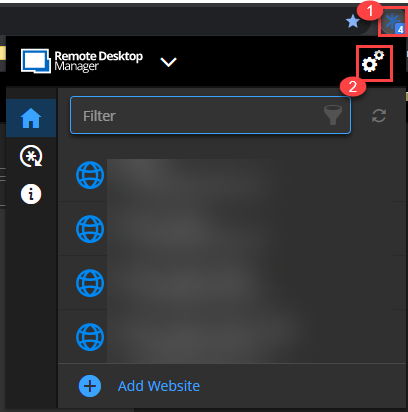
Once done, access the "Remote Desktop Manager" menu and go under the "Actions" tab where you will be able to activate this option, when complete press "Save" to apply the change.
Let me know if this helps,
Best regards,
Samuel Dery
Forum36063.png
I have only been using this software about 10 days. This is what my login screen looks like. I have been searching for the "Devolutions Web Login" "Settings" under "Remote Desktop Manager" in the "Actions" tab and I do not see this. I do not see an actions tab located anywhere.
Here is what my screen looks like:

Hello ejordan,
My apologies for the confusion,
The screenshot I provided are taken directly from the Devolutions Web Login extension in my browser and not from RDM this is why you're unable to find this section in RDM, I would like to confirm if you're already installed Devolutions Web Login in your browser?
The extension would be needed in order to autofill the credentials externally.
Let me know,
Best regards,
Samuel Dery
Thank you Samuel,
I was able to figure out and set it up. For some reason, I cant figure out what I did, It is defaulting to Edge browser now.
Should it still be asking for credentials? The Edge browser is asking for them even though I set it up not to.

Here is where I have firefox set as well.
Hello ejordan,
Thank you for your reply detailed reply,
The "Web (HTTP/HTTPS)" option you've changed is used by the "Web Browser (HTTP/HTTPS)" entry type which is why it is not affecting your "Website" entry, to change the browser used by this entry type simply go in the "More settings" section of your entry "Properties" you can leave it to "Default" which will use your system default "Browser" or select "Firefox directly.
That being said, are you still experiencing issues with the credentials not being auto-filled? From the screenshot of your entry "Properties", I can see you've configured the "Credentials" to "Inherited" do you encounter the same issue when using "Custom" and configuring them directly in the entry?
Best regards,
Samuel Dery