Windows Screen Sizing Options within RDP Connections

there is a general issue with the windows screen sizing option and RDP. with mstsc the screen sizing (in %) is only applied in the RDP session in full screen mode, not in window mode.
it seems that Devolution RDP Manager also applies the correct sizing in Windows Mode, no matter if embedded or "abgedockt" (sorry, i am using the german version and don't know how it is named in english.
that's a good thing on one hand but i'd like to understand how this is done and if this is a microsoft feature or some kind of tweak. i need to know how far i can trust the Devolutions connection to act like a mstsc connection for debugging processes. i am using remote display analyzer for connection debugging and i can not see any difference (which is good) between microsoft mstsc (left) and devolution rdp (right) besides the screen sizing (dpi scale) which works on the right, my local setting is 150%.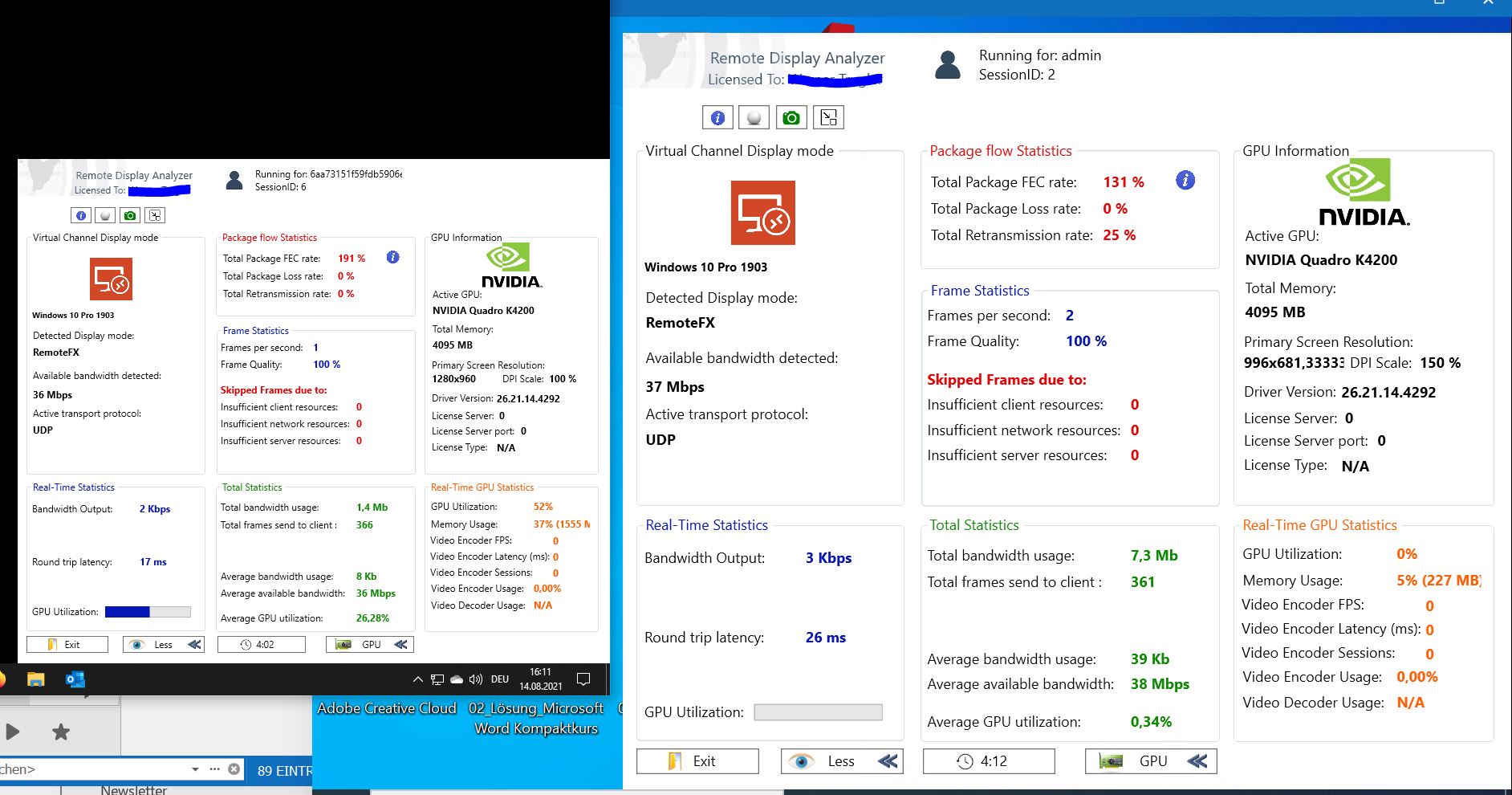
rdpscale.JPG
All Comments (6)
Hello I.P.
From my understanding, RDM use "Microsoft RDP ActiveX" for Embedded/Undocked connections which could explain why some behavior may be different from mstsc.
That being said, I suspect that if you change the "Display" mode to "External" you will experience the same behavior you normally do.
Let me know if you have further questions,
Best regards,
Samuel Dery
Hello Samuel,
Thank you for your answer, but it seems to be a bit different.
My Screenshot is from an undocked RDM session, i am not sure what you mean with "external". can i set this somewhere? or is it "abgedockt" in german? this is what i am comparing.
i see that RDM uses the mstscax.dll from windows\system32 folder, so i think the behaviour should be the same as with mstsc.
don't get me wrong, i like RDM's behaviour better than the one with mstsc, i just need to understand the reason in a technical point of view. which .dll method/option is called from RDM wrapper to produce this (better) behaviour?
Hello I.P.
The "External" display which I'm referring to can be found directly in your entry "Properties" in the same dropdown menu in which you can find "Abgedockt" which is the "Undocked" option. Here is a small screenshot of what I'm referring to in German.
That being said, I've contacted our engineering department regarding your query and they will be looking into this.
We will be providing you a response in this thread shortly.
Best regards,
Samuel Dery
Hello Samuel,
Yes, you are right. With "external" the RDP Connection is launched with mstsc and shows the expected behaviour - DPI Scale like client in full screen, DPI Scale 100% in windowed session.
RDM Connection uses DPI Scale like client in windowed session (no matter if undocked or docked) as well.
It is not possible for me to find any settings in RDM or in mstsc to create the same DPI Scale behaviour in windowed RDP sessions. if i would know how to force mstsc to use client DPI scale it would be a solution, if other way round as well.
i guess (that's my only conclusion right now) that RDM calls a RDP method in mstscax.dll (like "use_dpi_scale_windowed") which is present in the dll but mstsc does not make use of it.
Hello,
As you suspect, we set two different properties in the ActiveX: DesktopScaleFactor and DeviceScaleFactor.
This was originally done to fix issues that occured mainly in environments with High DPI screens. We made a blog post about it: https://blog.devolutions.net/2016/08/smart-resizing-and-high-dpi-issues-in-remote-desktop-manager
According to Microsoft's documentation, DesktopScaleFactor is available as an mstsc.exe display parameter, but I'm not sure if the DeviceScaleFactor is: https://docs.microsoft.com/en-us/windows-server/remote/remote-desktop-services/clients/rdp-files
Hopefully this helps answer your questions!
Regards,
Hubert Mireault
Hello Hubert,
Thank you very much for the explaination, this explains all behaviours i am facing.
Unfortunately mstsc shows no reaction on desktopscalefactor and devicescalefactor seems not to exist at all as a display parameter in .rdp files.
So RDM handles High DPI screens much better than mstsc does and nowadays you are using a scale factor on many screens.
I am very happy with RDM so far and i will keep up searching for a mstsc replacement which can handle these options as well. if you know any i am glad if you let me know.
thanks again for the quick and accurate response.
kind regards,
Werner