Remote Desktop Window Size

On all of my remote desktop sessions I have selected Display/Remote desktop size = 1024 X 768. However, when I open the session, it comes up fully maximized taking up my whole screen. 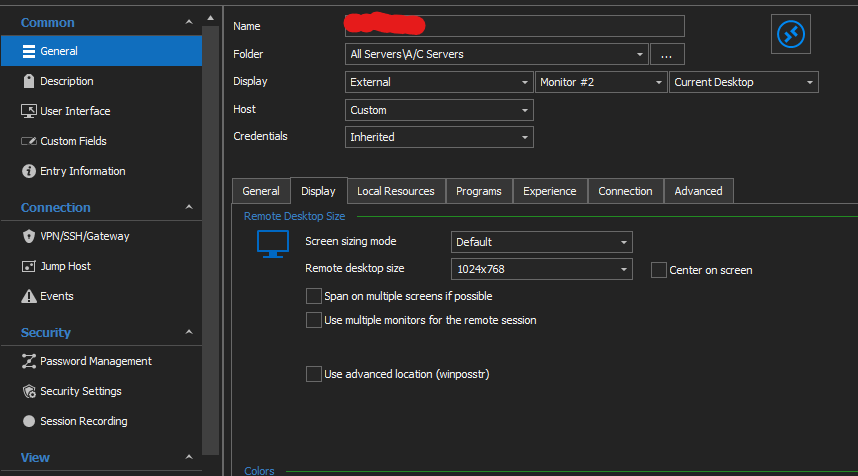
Screenshot 2021-08-11 085541.png
All Comments (12)
Hello,
I have a few additional questions which you can hopefully answer.
- Which version of RDM are you using?
- Which type of data source are you using?
Also, I'm wondering if you encounter the same issue when changing the "Screen sizing mode" to "Smart Reconnect".
Let me know,
Best regards,
Samuel Dery
Screenshot 2021-08-11 085541.png
Hello,
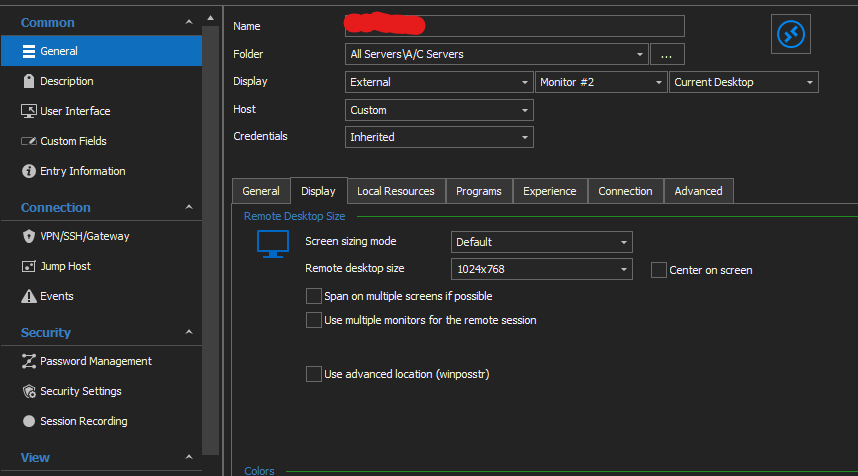
Could you try the configuration below? 
After setting up this configuration, please restart the connection with the remote host.
Best regards,
Jeff Dagenais
No change. I still get it full window size.
Hello Marioh1,
Am I correct in assuming the result was the same when using the "Smart reconnect" option?
I would also like to confirm which version of RDM you're using? You can find your version number by going under the "Help" tab and pressing "About".
Let me know,
Best regards,
Samuel Dery
This started to happen when I updated to the latest version.
I think I'm experiencing the same thing. As always, I automatically started to work around this problem when it first occurred already a few months ago. I was too lazy to dive in to the problem and just pressed "Switch monitor" every time I was connected to the Remote Desktop.
This morning I took the time to see why my RDP session is continiously opening on my left screen instead of my right screen. First I upgraded to 2021.1.41 (free version). Whatever I change in my template or RDP-session object, it does not change anything in the behaviour. It always takes the settings from Options > Types > Remote Dekstop.
Now I've changed my monitor in the options and it's working fine for me. But it would be ideal if the object-specific settings would override the general setting. That way I can direct some RDP sessions to the left screen and some to the right screen.
Hello,
Thank you for providing your version marioh1, I've been unable to reproduce the behavior using RDM 2021.1.41.0 with the following configuration:
If you still encounter this issue with the same configuration I would like you to try using a portable version of RDM, To do so, you will need to do the following:
1- Download the .zip file below:
https://remotedesktopmanager.com/home/thankyou/rdmbin
2- Create a new folder on your Desktop
3- Extract the content of the .zip file into the folder created at #2
4- Go in this folder once the .zip file has been extracted and run remotedesktopmanager64.exe
5- Enter your current serial
Let me know the results,
Thank you for your input Dennis K!
The monitor the session is being launched on can indeed be changed directly in entry "Properties" as you can see in my provided screenshot above at "#1" the session is launched on "Monitor #2" when options are left to default it will refer to the configuration under "Fille" -> "Options" -> "Types" -> "Remote Dekstop".
Hopefully this helps,
Best regards,
Samuel Dery
Hi Samuel, after more testing I found my solution.
When File > Options > Types > Remote Desktop > Display mode is set to "Configured", it wil check the object properties for the screen configuration. When a screen is selected within the general options, the object properties will be ignored.
Might be working-as-designed, but in that case it's not designed intuitive :). I would prefer a situation that it works the other way around. Defaults in the options, override in the object properties.
For me it's cleared up. Maybe marioh1 also has some configuration set under options which function as an override for the object properties.
Hello Dennis K,
Thank you for your input,
I see, indeed, perhaps it will be helpful for marioh1 also.
I'm glad you were able to find a solution!
Best regards,
Samuel Dery
Thank you for your support. I decided to go the nuclear option. I have RDM on two workstations and both computers use the same account. Only on once computer I have the problem I described above. So, I figured it has something to do with my computer. I uninstalled RDM, removed the installed folder from C:\Program Files(x86), and removed every "Devolutions" entry in the registry. After this, I rebooted my computer and reinstalled it. It works fine now.
Thanks.
Hello marioh1,
I'm glad to hear that you were able to resolve the issue!
Best regards,
Samuel Dery