ssh login / signed publickey / privatkey

Hello,
is it possible with RDM.
We have to Login over ssh with a signed publickey and privatkey like
ssh -i ~/.ssh/cloud-azure/signed-cert.pub -i ~/.ssh/id_rsa [username]@[IP vomServer]
Thanks for help
All Comments (11)
Hello,
I'm not sure I get this right, but could it be possible that the public key is the one of the host? (for verification)
If so, set the "pub" file in "Set Host Public Key button in the General tab of your SSH Session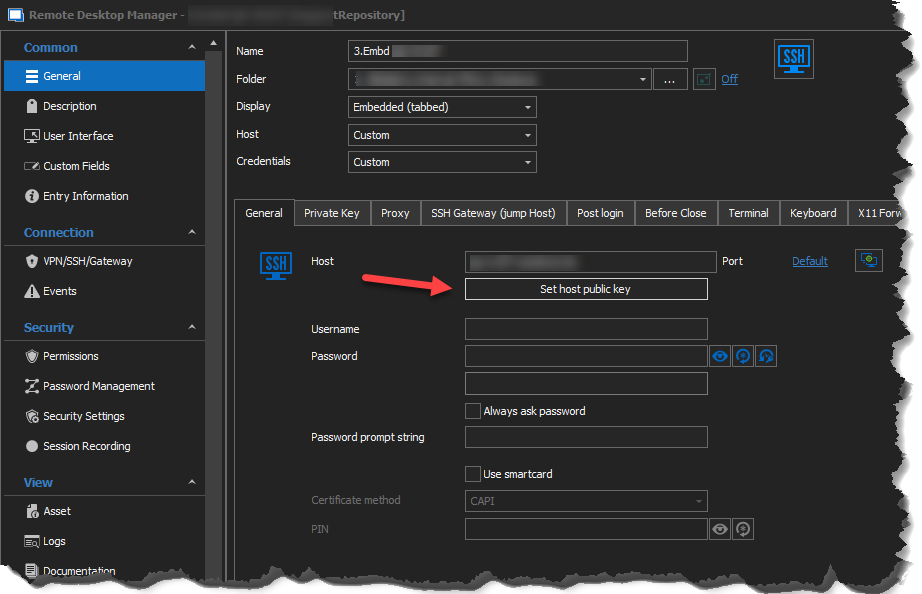
You can then set you Private Key in the Private Key tab.
I hope this helps, please let us know!
Best regards,
Alex Belisle
2021-08-09_15-57-59.png
Hello,
https://www.vaultproject.io/docs/secrets/ssh/signed-ssh-certificates
Point: Client SSH Authentication
Philipp
Hello,
Got it, I don't think it is supported yet...
However, I filed a ticket to add this feature, we'll keep you in touch.
Unfortunately, the engineer in charge is out of the office and will be back in 2 weeks or so.
Thanks for reporting this!
Best regards,
Alex Belisle
Hello,
you have news?
thanks for feedback.
Hello,
The ticket is currently assigned to one of our developers. We are hoping to be able to add this for our next major version, planned for release early next year.
Regards,
Hubert Mireault
Hello
Any news about this? Starting from January first we are only able to log via SSH using signed certificates. That makes RDM pretty useless at the moment.
Regards,
Nadine
Hello,
We are going to start working on this soon. It may not make it in to the first stable release of RDM 2022.1 (the beta is currently out) but it should make it in soon after.
Regards,
Hubert Mireault
Hi Philipp,
We have added the private key certificate internally. It should be available starting with version 2022.1.11.0
Regards,
Jean-Francois Duchesne
Hello
May I ask where we can get this version? In only see this "Version 2021.2.29.0 | 141.7 MB | 2022-02-02" when I go to the download page. This is what RDM would update to via the "Check for Updates" button on my installation as well.
Thanks in advance,
Nadine
Hi Nadine,
You should be able to download the beta version 2022.1.10.0 on our website (https://devolutions.net/remote-desktop-manager/home/download).
If you are using the free edition you will sadly have to wait for the official release which happens to be schedule for this week.
Best regards,
Jean-Francois Duchesne
Hi Nadine,
You should be able to download the beta version 2022.1.10.0 on our website (https://devolutions.net/remote-desktop-manager/home/download).
If you are using the free edition you will sadly have to wait for the official release which happens to be schedule for this week.
Best regards,
Sorry, I didn't scroll down far enough...I'm using the enterprise version, so I'll check out the beta