Double-click select in terminal

Hi,
I am looking for a setting to change the behavior of mouse double-click when selecting text in a terminal. When I double-click over a word I see in a terminal output, only part of the text is selected. It looks like hyphens, forward slashes, columns, and some other characters (in general it looks like any special character) all behave like a kind of separator. I remember in gnome terminal they called it select-by-word, and you could actually change what characters you considered separator.
Thanks,
Miki.
All Comments (23)
Hello,
I have a few questions about your configuration which you can hopefully answer,
- Which version of RDM are you using?
- Which type of data source are you using?
- Which type of entry are you using?
If you go under "File" -> "Preferences" -> "Types" -> "Terminal" you can find some options relating to the "copy" which may help in your case.
Let me know,
Best regards,
Samuel Dery
Hi Samuel,
I use the free version of 2021.1.10.0 on a MacBook.
My data source is SQLite.
My question was about an SSH session entry.
I couldn't find anything under Remote Desktop Manager Free -> Preferences -> Types. I was also lookin under User Interface, but without luck.
Interestingly, select by double-click works as I expect on a Windows machine, so perhaps it's not even a RDM setting, but operating system related.
Thank you,
Miki.
Hello,
The settings I'm referring to would be under "File" -> "Preferences" -> "Types" -> "Terminal" Here is a small screenshot that will hopefully help:
From testing on my side, double-clicking text in the terminal seems to highlight the word being hovered If I double-click once again on the highlighted word the full line is highlighted is this also the behavior you're experiencing?
Best regards
Samuel Dery
Yes, that I found, and this is how it looks.
But these are not the ones I was looking for.
What you describe is not exactly how it works in my terminal. If I double-click over a word, it is selected, but the problem is that a word like "openhab-alexa-v3" would be considered three words, and if I double-click over "alexa", I only get alexa selected.
Also, double-clicking over the selected word again would no cause the entire line selected. However, triple-clicking over anything in a line selects the entire line.
Hello miklosgal,
We opened a ticket in development to investigate the issue. We will look into it and see if something can be done about it.
We will keep you updated on the progress.
Best regards.
Michel Lambert
Thanks a lot!
Just one more thing regarding my hypotheses about this possibly be an operating system related problem. Double-clicking actually selects the whole word as expected, if I do it in iTerm2. Although, it is apparently iTerm2 "doing the magic", as I can see this setting in iTerm2's preferences.
So, it is indeed not operating system related setting, it seems.
Hi miklosgal,
I can't see the image you've attached. What is the name of the setting in iTerm?
Best regards,
Xavier Fortin
It seems like all my screen shots "disappeared". Perhaps a time limited screen shot storage for "newbies"? ;-)
Anyways, the setting is under iTerm2->Preferences->General: "Characters considered part of a word: /-+\~_.".
Just in case the screen shot works, I pasted it below again, too.
Hi,
Yes, I ended up figuring it out while browsing through iTerm preferences ;)
Thanks for coming back nonetheless!
Best regards,
Xavier Fortin
Hi miklosgal,
It's been a while. I just wanted to inform you that RDM 2022.1.13.0 is now available. There is now a "Double-click delimiters" option: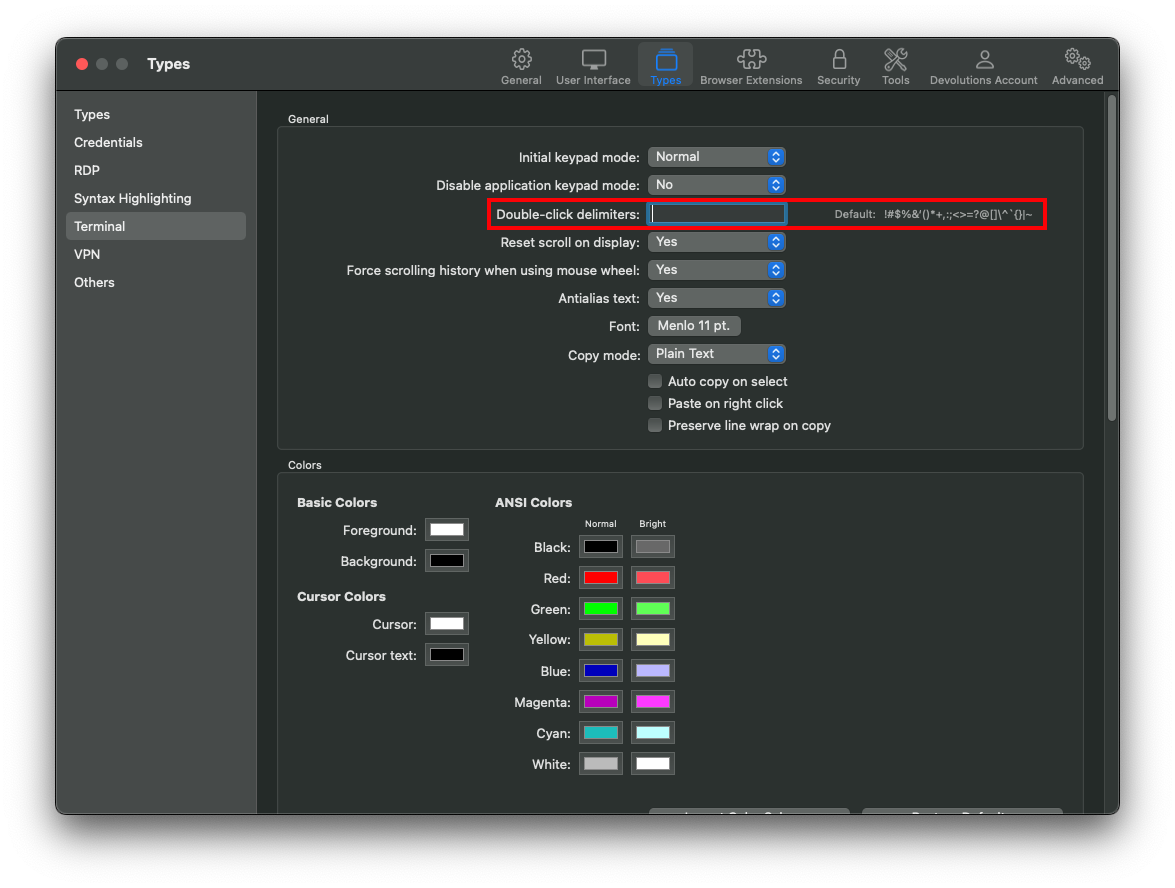
The option works opposite to iTerm (you set the delimiter instead of choosing the characters that should not be considered delimiter). All the default delimiters are in the label to the right. If you just want to add or remove from it, you can copy the value of the label and add or remove from it. Leaving the field empty will uses the default.
Best regards,
Xavier Fortin
Delimiters.png
I still cannot get this to work on RDM 2022.2.9.0
in iTerm2 I have the default set as
iTerm2->Preferences->General: "Characters considered part of a word: /-+\~_.".
And in RDM I have it blank
File --> Preferences --> Types --> Terminal --> Double-Click Delimiters
I have ALSO tried adding
File --> Preferences --> Types --> Terminal --> Double-Click Delimiters --> /-+\~_.".
The results are the same.
I have closed/re-opened RDM and the results are the same.
Hello,
do you use the Legacy Engine? You can know this by going in Preferences > Types > Terminal: 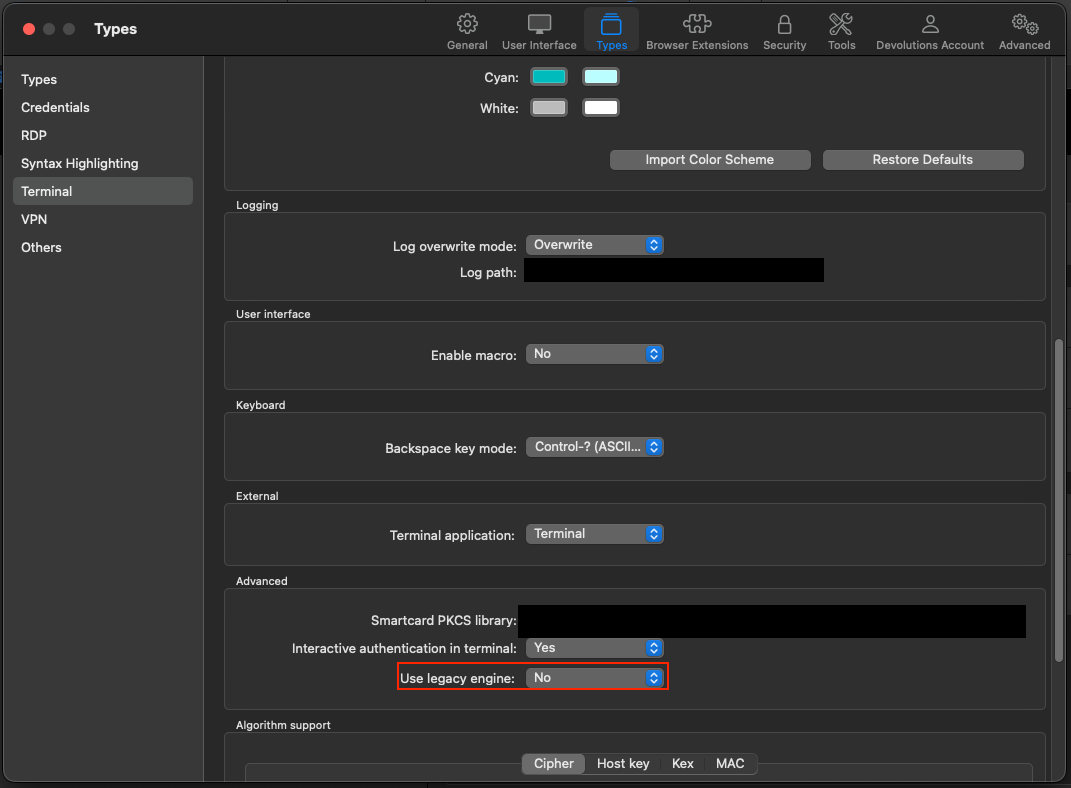
We'll investigate further to see what can cause this.
Best Regards,
Antoine Mauger
Screenshot 2.png
I have v2022.2.9.0
I was not using the legacy engine.
I did the following:
- changed it to NO.
- Closed and re-opened RDM
That worked!
That was the only 'feature' that bugged me. RDM is WAY better than Royal TSX!
I would add this to the support portal KB also.
*I also work in IT as an L2 Support Engineer! :-)
Hi benpatridge,
Glad to hear this resolved your issue!
We intend to phase out the legacy engine eventually, but some users had some issues with the new engine, so we had to revert. Sorry for the confusion on this 😅
Do not hesitate if you have any other issues or requests!
Best regards,
Xavier Fortin
Something broke in mine again? It very well could be my own fault but I have NO idea what may have changed??
I have RDM 2022.02.12.0
I am using Legacy Engine and the same setup I mentioned above.
I have terminal application set to iterm2
But I have also tried terminal
Ideas?
Hi benpatridge,
Could you elaborate? It's the double-click delimiter that doesn't work anymore? Are you aware of any recent changes you might have made (related or not)? Did you just update to a different version?
Best regards,
Xavier Fortin
I do not believe it is related but I was trying to figure out how make it so when I copy/paste log entries that it does not automatically add a carriage return upon pasting. I went over every single setting in RDM and iTerm2, and finally I found the answer and added it to my blog https://datastorageguy.com/2022/10/10/iterm2-adds-line-break-when-copying-text/
However, my current issue is:
in iTerm2 when I (for example)
Look at the following screen output
-rw-r--r-- 1 root root 16384015 2022-10-06 10:48 messages
-rw-r--r-- 1 root root  1428067 2022-09-11 00:01 messages-20220911.1662822061.gz
-rw-r--r-- 1 root root  1427877 2022-09-18 00:01 messages-20220918.1663426861.gz
-rw-r--r-- 1 root root  1427889 2022-09-25 00:01 messages-20220925.1664031661.gz
-rw-r--r-- 1 root root  1539657 2022-10-02 00:01 messages-20221002.1664636462.gz
If I double click on "2022" in log file name messages-20221002.1664636462.gz it will highlight the entire filename messages-20221002.1664636462.gz
However, when I go into RDM (and yes I have the Terminal set to iTerm2) and I double click the same log file it only highlights messages-20221002.1664636462.gz
I have the default "Double-click delimiters" set.
I have even tried adding a dash "-" by it self.
In iTerm2 under Preferences ---> "Characters considered part of a word" I have
/-+\~_.:
I verified the above delimiters are under my settings in RDM
/-_.!#$%&‘()*+,:;<>=?@[]\^`{}|~
When I compare iterm2 vs RDM using iterm2 for Terminal Application Type, after further testing, Ii appears the main issue is that RDM does not recognize delimiters
-:/.
Why that stopped working I am unsure?
First, I'd just like to mention that the Terminal settings (where you selected iTerm2) will have no impact on this issue. The only thing this setting controls is which external terminal is use when launching a session in External Mode.
Secondly, can you confirm that the you have the "Use legacy engine" settings still set to "No"? This is very important, the "Double-click delimiters" settings is only available with this engine.
Lastly, and most importantly, the "Double-click delimiters" settings works in the opposite way than the iTerm2 "Characters considered part of a word" one. In RDM, the characters in this options are considered separators, they will prevent the selection from going "further". If you want "-" to be included in a word, it should not be added to the setting. With the default value (!#$%&‘()*+,:;<>=?@[]\^`{}|~/), I have, in RDM the same behaviour you described having with iTerm2.
Please, do tell me if this is not clear or if you need further assistance.
Best regards,
Xavier Fortin
Upgraded to 2022.2.15.0 and set it back to Legacy=No and now it works.
It is interesting because previously when troubleshooting I was asked to set it Legacy=Yes.
I noticed that it does not highlight what you double click. Not sure if there is a setting for that, but I am glad it is working now.
One more question, when you make global preferences do you always have to exit all your terminals, close and restart RDM
You do not have to restart RDM, but you do need to relaunch all currently opened terminal entries as the setting is applied on the session launch.
I noticed that it does not highlight what you double click. Not sure if there is a setting for that, but I am glad it is working now.
Can you elaborate on what you mean? Could you provide a screenshot?
Best regards,
Xavier Fortin
There isn't really much to show.
- Double click on the filename "phonehome_archive_TGCS-160108-0464-20221018172335-0400-SupportBundle-Interactive.zip.never-uploaded"
- It does not highlight it
- Right click on the next line
- It pastes as expected.

I figured it out.
Glad to hear it!
Best regards,
Xavier Fortin