Double-click select in terminal

Hi,
I am looking for a setting to change the behavior of mouse double-click when selecting text in a terminal. When I double-click over a word I see in a terminal output, only part of the text is selected. It looks like hyphens, forward slashes, columns, and some other characters (in general it looks like any special character) all behave like a kind of separator. I remember in gnome terminal they called it select-by-word, and you could actually change what characters you considered separator.
Thanks,
Miki.
All Comments (23)
Hello,
I have a few questions about your configuration which you can hopefully answer,
Which version of RDM are you using?
Which type of data source are you using?
Which type of entry are you using?
If you go under "File" -> "Preferences" -> "Types" -> "Terminal" you can find some options relating to the "copy" which may help in your case.
Let me know,
Best regards,
Samuel Dery
Hi Samuel,
I use the free version of 2021.1.10.0 on a MacBook.
My data source is SQLite.
My question was about an SSH session entry.
I couldn't find anything under Remote Desktop Manager Free -> Preferences -> Types. I was also lookin under User Interface, but without luck.
Interestingly, select by double-click works as I expect on a Windows machine, so perhaps it's not even a RDM setting, but operating system related.
Thank you,
Miki.
Hello,
The settings I'm referring to would be under "File" -> "Preferences" -> "Types" -> "Terminal" Here is a small screenshot that will hopefully help:

From testing on my side, double-clicking text in the terminal seems to highlight the word being hovered If I double-click once again on the highlighted word the full line is highlighted is this also the behavior you're experiencing?
Best regards
Samuel Dery
Yes, that I found, and this is how it looks.
But these are not the ones I was looking for.
What you describe is not exactly how it works in my terminal. If I double-click over a word, it is selected, but the problem is that a word like "openhab-alexa-v3" would be considered three words, and if I double-click over "alexa", I only get alexa selected.
Also, double-clicking over the selected word again would no cause the entire line selected. However, triple-clicking over anything in a line selects the entire line.
Hello miklosgal,
We opened a ticket in development to investigate the issue. We will look into it and see if something can be done about it.
We will keep you updated on the progress.
Best regards.
Michel Lambert
Thanks a lot!
Just one more thing regarding my hypotheses about this possibly be an operating system related problem. Double-clicking actually selects the whole word as expected, if I do it in iTerm2. Although, it is apparently iTerm2 "doing the magic", as I can see this setting in iTerm2's preferences.
So, it is indeed not operating system related setting, it seems.
Hi miklosgal,
I can't see the image you've attached. What is the name of the setting in iTerm?
Best regards,
Xavier Fortin
It seems like all my screen shots "disappeared". Perhaps a time limited screen shot storage for "newbies"? ;-)
Anyways, the setting is under iTerm2->Preferences->General: "Characters considered part of a word: /-+\~_.".
Just in case the screen shot works, I pasted it below again, too.
Hi,
Yes, I ended up figuring it out while browsing through iTerm preferences ;)
Thanks for coming back nonetheless!
Best regards,
Xavier Fortin
Hi miklosgal,
It's been a while. I just wanted to inform you that RDM 2022.1.13.0 is now available. There is now a "Double-click delimiters" option:
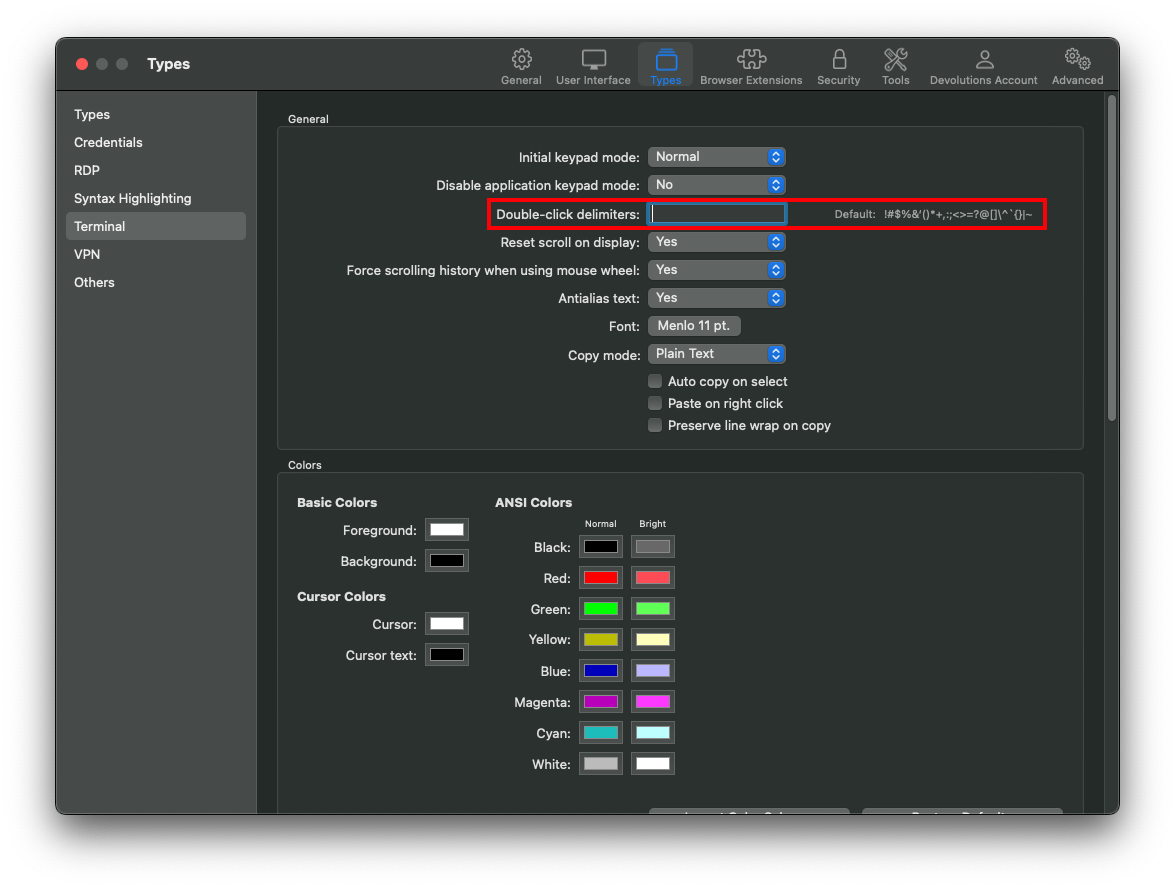
The option works opposite to iTerm (you set the delimiter instead of choosing the characters that should not be considered delimiter). All the default delimiters are in the label to the right. If you just want to add or remove from it, you can copy the value of the label and add or remove from it. Leaving the field empty will uses the default.
Best regards,
Xavier Fortin
I still cannot get this to work on RDM 2022.2.9.0
in iTerm2 I have the default set as
iTerm2->Preferences->General: "Characters considered part of a word: /-+\~_.".And in RDM I have it blank
File --> Preferences --> Types --> Terminal --> Double-Click DelimitersI have ALSO tried adding
File --> Preferences --> Types --> Terminal --> Double-Click Delimiters --> /-+\~_.".The results are the same.
I have closed/re-opened RDM and the results are the same.