Security Breach - MFA Bypass
Hi,
We are using SQL Server, AD Authentication with a FORCED requirement for MFA.
We just discovered a security breach to our RDM database: A user was able to bypass another users MFA by simply installing the RDM Package on a new machine, connecting to the existing SQL Database as the effected user and creating a NEW Google Authentication MFA key which has nothing to do with the users google authenticator.
How can we make sure that the MFA key is not on a PER MACHINE basis?
Kind Regards,
Sam
All Comments (11)
Hello Sam,
The 2FA is configured on the local machine. If you wish to use the same 2FA on a different machine, you would need to copy your original RemoteDesktopManager.cfg file on the other workstation.
This file is located in %localappdata%\Devolutions\RemoteDesktopManager.
If you would like to manage your 2FA at the user level, this can be accomplish using Devolutions Server as your backend data source.
For more details on this product, please consult http://server.devolutions.net/
Best regards,
Richard Boisvert
Is it possible for you to understand that that this literally means that 2fa is ineffectual? Clearing a profile, deleting that file, using another machine all VOID 2fa - as such this is no longer 2fa.
Hello Sam,
To configure 2FA at the user level, the only other option apart from Devolutions Server, is with a SQL Azure data source with an O365 authentication paired with the Microsoft MFA.
Unfortunately, the other data sources type can only have 2FA configure at the application level.
Best regards,
Richard Boisvert
Hi Richard,
Thank you for getting back to me. I see that you say in the current implementation this is how RDM 2FA works.
I am hoping that you could understand that anyone with malicious intent (as has been in our case) only actually needs one of the forms of authentication, not two as is required for Two Factor Authentication as it is implemented currently for RDM - not really sure you can call this 2FA anymore.
Storing an extra column in any form of the database (RDM native/SQL etc) that has a 2FA key next to the user seems to be a pretty simple fix to the ability to bypass 2fa to me.
Don't get me wrong - I am sure there is a lot of development going on right now with high priorities, but I would have thought security would be up there.
Sam
So you are aware, we are based 2100km from the local City with intermittent connectivity (satellite) and power supply issues. Cloud solutions do not work in our environment.
Hello Sam,
We've been discussing your scenario internally and we agree that it would be a good improvement to RDM to store the 2FA information in the database. We've opened a ticket to work on this. The caveat is that a malicious user, if they have the database credentials, would still be able to log in to the database by connecting to it directly (instead of through RDM).
The best security we can provide is through DVLS (which is an on-premise solution), since it acts as a layer between the user and the database. The user will not know the actual credentials to the database, and the 2FA is managed by the server itself.
Regards,
Hubert Mireault
Thanks Hubert, I see how SQL access at all does not prevent any MFA protection. I have been racking my brain as to how we could potentially disable this possibility from a customer point of view (application deny access, firewalls, trusted hosts, SQL program name/logon triggers, SQL application roles), but have also contacted sales about DVLS.
Has 2FA already been improved in the latest version of RDM?
Hello,
With RDM 2022.3 (currently in beta), we now store the 2FA configuration for SQL Server datasources in the database itself. Keep in mind that the caveat I mentionned in my previous post still applies: a malicious user that knows the credentials to the database will still be able to access the database by connecting directly and bypassing the 2FA. There isn't much we can do about that, and this is why we recommend DVLS (on-premise solution) or Password Hub (cloud solution) if this is a concern for you.
Regards,
Hubert Mireault

Original Poster here.
Have tried the beta version as follows:
When editing the DB then entering the old 2FA details, it shows success. When you save and try to go into the database I get a message "You need to configure 2-factor authentication to get access to this data source" - This is happening for all users, as we required ALL users to use 2fa (RDM Database setting). When editing the connection (or even adding a new connections) selecting the correct sql db then selecting 'Active Directory Authentication' there is NO 2FA option able to be selected.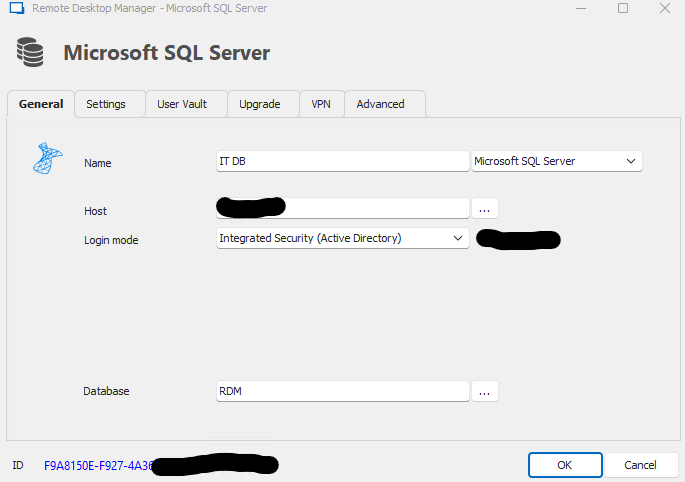
Screenshot 2022-10-27 091218.png
Hello,
You can now set the 2FA under File - My Account Settings - Data Source MFA.
But note that there is a bug with the "Force 2FA on datasource" at the moment, even if the 2FA is set. A ticket is open for a fix
Best Regards,
Etienne Lord