SSH connections fail with code 10057L

Hello,
First of all, thanks for this excellent product. As an admin with both Windows and Linux VMs I use it a lot.
I had an old version (2019 or so) on my old laptop, and all my SSH connections worked great. I got a new computer recently and installed 2021.6.10.1, and now I cannot connect to any of my recently-created AWS instances.
The following appears in the log:
[2021-07-16 12:43:48 PM] Devolutions Protocols version: 2021.6.10.1 Windows
[2021-07-16 12:43:48 PM] Starting SSH, verbose level: 2
[2021-07-16 12:43:48 PM] Setting up connection
[2021-07-16 12:43:48 PM] Connecting to port: 22 (IPv4)
[2021-07-16 12:44:09 PM] SSH Error sending raw output
[(10057L) A request to send or receive data was disallowed because the socket is not connected and (when sending on a datagram socket using a sendto call) no address was supplied.]
[2021-07-16 12:44:09 PM] Disconnection in progress
[2021-07-16 12:44:09 PM] Disconnecting
The machines are all running CentOS 7.5 and I am able to connect to all of them with PuTTY. I'd love to be able to get these working in RDM. I've tried enabling all algorithms and disabling the "skip environment variable setup" option which seemed to work for others, but it didn't work for me.
Thanks in advance for your help.
-Alex
All Comments (21)
Hello,
Thank you for contacting us on that matter!
Are you using the Free or the Enterprise edition of RDM? Also, have you tried to run the following script and see if this issue persists?
$Connection.Terminal.AlgorithmSupportMode = "Custom"
$Connection.Terminal.SshAlgorithmCipherList = "aes256-gcm@openssh.com=True;aes128-gcm@openssh.com=True;aes128-cbc=True;aes192-cbc=True;aes256-cbc=True;rijndael-cbc@lysator.liu.se=True;3des-cbc=True"
$Connection.Terminal.SshAlgorithmHostKeyList = "ssh-dss=True"
$Connection.Terminal.SshAlgorithmKexList = "diffie-hellman-group14-sha1=True;diffie-hellman-group-exchange-sha1=True;diffie-hellman-group1-sha1=True"
$Connection.Terminal.SshAlgorithmMaclist = "hmac-sha1-96=True;hmac-sha1=True;hmac-md5-96=True;hmac-md5=True"
$RDM.Save();
To run this script on your SSH Shell entry in RDM, please do the following:
1- Right-click on the problematic entry then select Edit - Edit (Special Actions) - Custom PowerShell Command and paste the following script
2- Click OK.
3- A notification should confirm the success of the script, click OK and retest your session.
Best regards,
James Lafleur
Hello,
Thanks for your quick response.
I tried the above script, and the result is the same. :(
I'm using the free edition.
Thanks,
-Alex
Hello Alex,
Thank you for your swift reply!
In that case, would it be possible for you to create a portable installation of the latest version of RDM Free and then follow the steps listed in the help topic once again?
To do so, you will need to do the following:
1- Download the .zip file below:
https://remotedesktopmanager.com/home/thankyou/rdmfreebin
2- Create a new folder on your Desktop
3- Extract the content of the .zip file into the folder created at #2
4- Go in this folder once the .zip file has been extracted and run remotedesktopmanagerfree.exe
5- Enter your current serial
6- Follow the steps in this help topic to enable the missing algorithm:
https://kb.devolutions.net/rdm_ssh_algorithm_support.html
7- See if the same error occurs if you launch your SSH connection
Best regards,
James Lafleur
Hi James,
Thanks for the tips. I tried this and unfortunately the result was the same.
Thanks,
-Alex
Hello Alex,
Would it be possible for you to provide me a screenshot o your File -> Options -> User Interface -> Types -> Terminal? Just make sure to fully expand the window in order for every option to be shown.
Best regards,
James Lafleur
Please see here. Alignment might be a bit off near the end as I had to stitch two screenshots together (wouldn't fit entirely on my screen).
Thanks!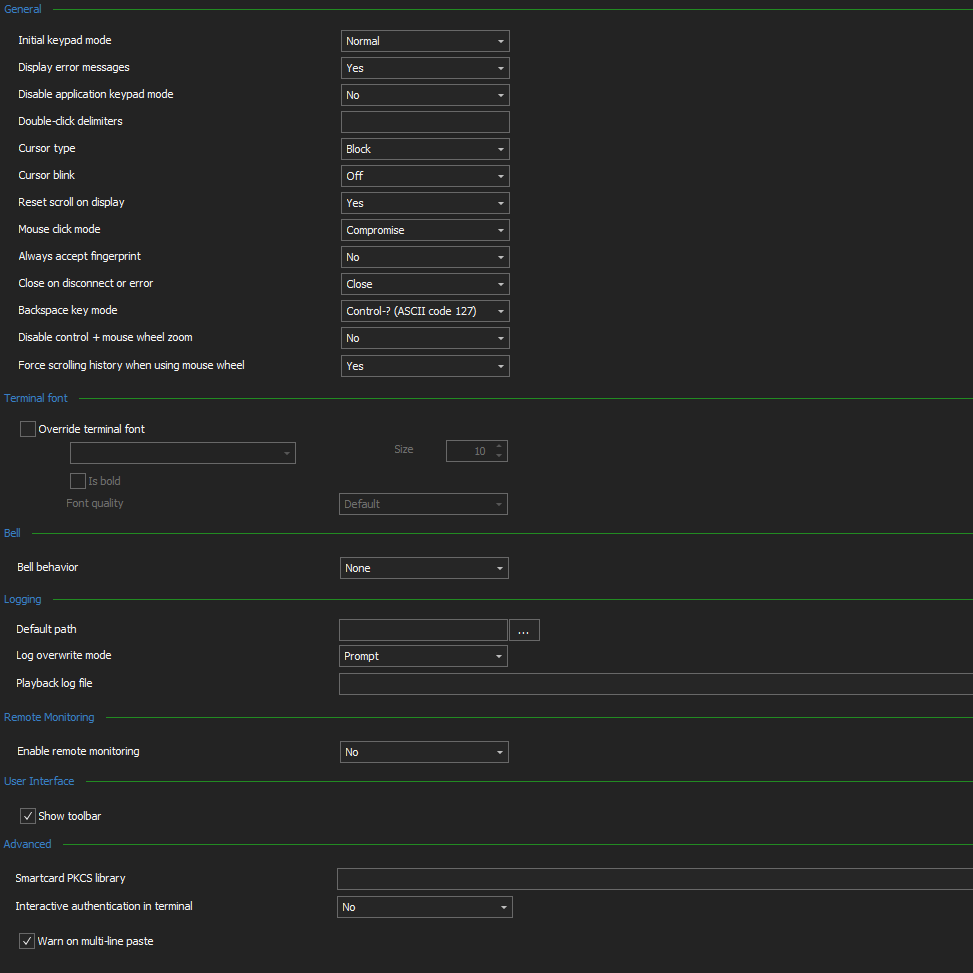
remotedesktopmanager-terminalview.png
Hello,
Thank you for this screenshot! According to it, this issue does not seem to be related to the configuration you have there. After doing some research on this error:
[(10057L) A request to send or receive data was disallowed because the socket is not connected and (when sending on a datagram socket using a sendto call) no address was supplied.]
I have found the following link that may help you with this: https://stackoverflow.com/questions/14940553/a-request-to-send-or-receive-data-was-disallowed-because-the-socket-is-not-conne. Would it be possible for you to consult it and see if it helps?
Best regards,
James Lafleur
Hi, with the new version my ssh connections work after enabling all the algorithms, but I do get a lot of disconnections after some time, especially on ssh port forwarding sessions, with the 10057L error, which I didn't have before. Could this be related? If not, sorry to hijack the thread. Is there anything I can do to keep the connection alive, reconnect etc?
Thank you.
Hello Claudiu,
If you are looking to keep your connection alive, I would recommend using the "Ping Interval" feature which can be found under the "Advanced" section of your SSH Shell entry. From there, simply set a value to your "Ping Interval" and enter what you would like to see in your console when it pings your connection in the "Ping String" field.
Let us know if that helps!
Best regards,
James Lafleur
Okay, I figured this out, and the cause is completely unrelated to RDM. :)
The issue was the PPK files. When I said my new instances stopped working, the problem was not that I updated RDM or changed my EC2 images, but that I updated PuTTY. As of version 0.75, it uses a new key format (v3) which appears to be unsupported in the version of RDM I am using. So any keys I generated using puttygen since the update don't work.
I have converted my new keys to the v2 format, and RDM is now working fine. Perhaps in the future you might consider supporting v3 PPK keys, but for now, everything works.
Thanks for all your help!
Hello Alex,
Thank you for providing us this information! A ticket has already been opened with our Engineering Department in order to add this new key format in RDM. We will update this thread as soon as it will be added to RDM.
Best regards,
James Lafleur
Hello Alex,
I wanted to let you know that support for using PPK3 format will be available in RDM 2021.2, releasing this autumn.
Regards,
Hubert Mireault
For anybody else having this issue:
[(10057L) A request to send or receive data was disallowed because the socket is not connected
After a couple hours messing around, I found out that I had to specifically use IPV4 in the "Internet Protocol" area (Under Advanced). Problem immediately was fixed.
Hi all ,
I have the same problem, I run script above without success, I try any suggestions from this forum nothing helped. I try connect to Ubuntu 20.04, I am connected to CiscoAnyConnect VPN.
(10057L) A request to send or receive data was disallowed because the socket is not connected and (when sending on a datagram socket using a sendto call) no address was supplied.
Hello Martin,
Thank you for reaching out to us regarding this.
I have a few questions which you can hopefully answer.
- Which version of RDM are you using?
- Which type of data source are you using?
That being said, I'm also wondering if you could follow this knowledge base article to generate some logs of this issue:
https://docs.devolutions.net/kb/remote-desktop-manager/how-to-articles/send-ssh-logs-verbose/
I will provide you with a secure link in a private message so that you can send us the logs.
Let me know,
Best regards,
Samuel Dery
Hi Samuel,
thank you for your reply but I am so stupid :) I enter wrong IP address .... I am so sorry, my mistake.
In logs I have only this
[5. 5. 2023 15:57:00] Devolutions Protocols version: 2023.4.26.1 Windows
[(10057L) A request to send or receive data was disallowed because the socket is not connected and (when sending on a datagram socket using a sendto call) no address was supplied.]
[5. 5. 2023 15:57:00] SSH Error reading raw input
All working now.
I am sorry again.
Hello Martin,
Thank you for your reply,
No problem, I'm glad to hear you were able to resolve the issue,
If you have further questions let me know,
Best regards,
Samuel Dery
Hello, I have the same issue, could you help, please? I am trying to connect to the server in a private vpc via a Linux server accessible from the Internet. Free RDM.
[25-May-23 7:45:39 PM] Sending channel open confirmation: 0/2
Local write error, ending connection 10.211.82.205:3389 <- 127.0.0.1:3390
[(10057L) A request to send or receive data was disallowed because the socket is not connected and (when sending on a datagram socket using a sendto call) no address was supplied.]
[25-May-23 7:46:01 PM] Sending channel close request: 0/2
[25-May-23 7:46:01 PM] Received channel close request: 0/2
[25-May-23 7:46:01 PM] Channel is closed: 0/2
[25-May-23 7:46:01 PM] Error writing to local end of tunnel
Hello,
Thank you for reaching out to us regarding this,
I have a few questions which you can hopefully answer.
- Which version of RDM are you using?
- Which type of data source are you using?
Also, can you confirm that your configuration is the same as the one you would use outside RDM?
Let me know,
Best regards,
Samuel Dery
Sorry to bother you, everything is working :)
It was an error with IP addresses
Hello,
Thank you for your reply,
No problem, I'm glad to hear that it is now working!
Best regards,
Samuel Dery