Replacement of RDP session

Hello there, I noticed the entry "Event" in the RDM which might help me to solve my task. On some customer systems we are not allowed to log in via RDP anymore or with restrictions. Therefore I display a message in the "before connection" and point this out. Now I would only have to react to the events
i.) the user enters the correct passcode and we connect via RDP
ii.) he does something else and I use an alternative PowerShell script
iii.) he ends the session and we do nothing.
From the logic there are the events "Before Open", "After Open", "Before Close", "After Close".
Maybe other event handlers would be useful.
Since there is no documentation about this, at least I did not find any, I ask myself what I can do with the mode "variable".
Another idea is to intercept the user interaction with PowerShell and then either start the session with Open-RDMSession or use the alternative PowerShell script.
Thanks in Advance
Regards: Diksha
All Comments (1)
Hello,
Thank you for contacting us on that matter!
What other event handlers would you like to see added in RDM? Could you please provide us more details on what you would like to accomplish with them?
As for the variables? Are you referring to the list of supported variables that can be displayed if you click on the "Variables" button at the bottom left corner of your entry?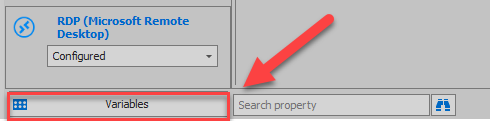
As for your last idea, this is not something that I have seen in RDM so far, if you would like to try to build such a script, I would recommend consulting our PowerShell Repository: https://forum.devolutions.net/forums/42/remote-desktop-manager--powershell-repository along with our GitHub Repository: https://github.com/Devolutions/RDMSamples-ps
Best regards,
James Lafleur
Variables.png