Command Line Local and Automatic Run Typing Macro

Is there a way to have a command-line local (local computer not remote) and have it automatically run a typing macro after it runs the command? We have a CLI application that asks for a password and we want to do the following steps all automatically
1) launch the cmd window
2) run command
3) have cmd window stay open
4) send username and password through a typing macro
Just can't figure out how to do #4 automatically with the other steps.
All Comments (5)
Hello,
This is possible from the Entry Property -> Events, in your case, look for After Open.
You can read more about this here:
https://kb.devolutions.net/rdm_event_auto_typing_macro.html
Let us know if this helps!
Best regards,
Alex Belisle
Correct me if I"m wrong, but the command line and powershell (local) do not have events. Or at least I do not see them in the left pane of the entry properties as I do for others.
Hello,
You may need to enable the Advanced Mode in the entry property, but it is there :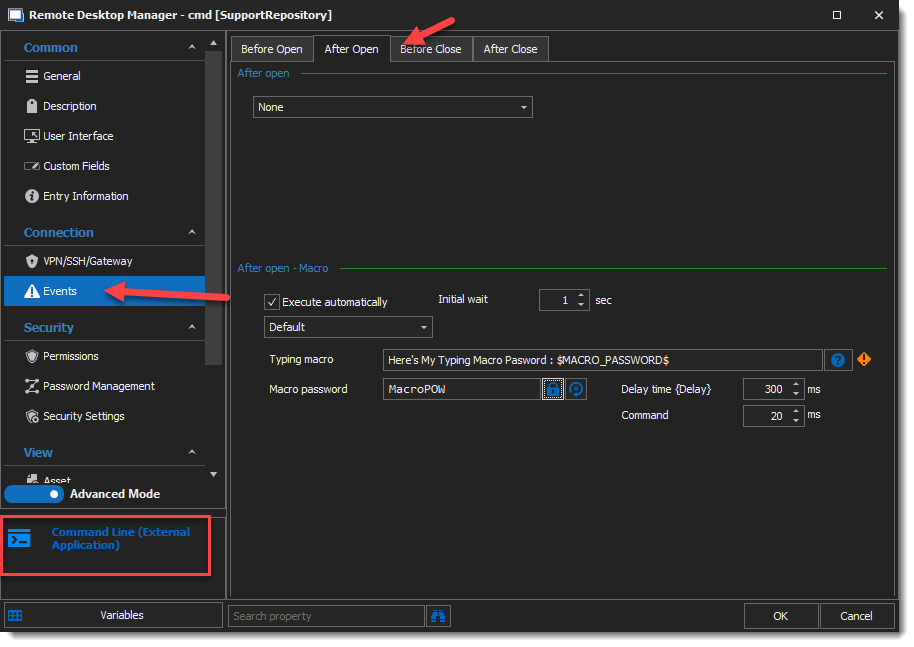
And since we're here, here's the result :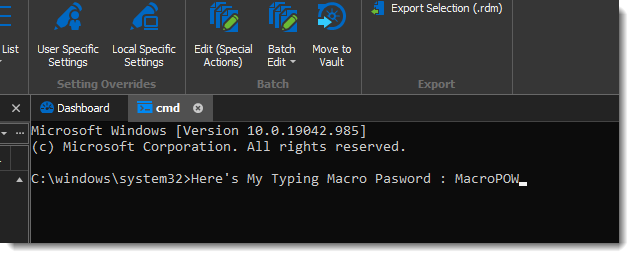
I hope this is what you were looking for!
Best regards,
Alex Belisle
2021-06-09_14-43-05.png
2021-06-09_14-37-02.png
Interesting, if you use Command Line entry under MacroScript/Tool then you do not get events. However, if you use Command LIne event MIscellaneous then you do get the events.
Appreciate the help and hopefully, this helps someone else.
Hi!
Indeed, the macro/script/tools serve a quite different but interesting purpose...
It would allow you to run a script against another entry, or set the Macro / script / tools created beforehand in the "Event" section instead of typing it in every session.
Glad I could help!
Best regards,
Alex Belisle