Lastpass not working again

We can't login via lastpass in RDM anymore. We get the error that RDM can't connect to LastPass.
If we login directly on the lastpass site it works. Version 2021.1.34 and 35 and also older versions. 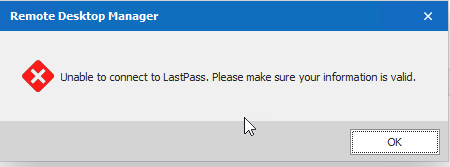
last.png
All Comments (16)
Hello,
Thank you for contacting us on that matter! I would like to ask you a few questions to help us determine what could be causing this error.
- Do you have any errors tied to your LastPass entry under Help > Application Logs? If you do, could you please provide us a screenshot of the error message?
- Are your LastPass accounts tied to your Active Directory?
Best regards,
Gabriel Degrandpré
Hello Gabriel
Yes there are errors like this:
PasswordManagerAccess.Common.InternalErrorException: HTTP request to 'https://lastpass.com/login.php' failed with status 429
at PasswordManagerAccess.LastPass.Client.PerformSingleLoginRequest(String username, String password, Int32 keyIterationCount, Dictionary`2 extraParameters, ClientInfo clientInfo, RestClient rest)
at PasswordManagerAccess.LastPass.Client.Login(String username, String password, ClientInfo clientInfo, IUi ui, RestClient rest)
at PasswordManagerAccess.LastPass.Client.OpenVault(String username, String password, ClientInfo clientInfo, IUi ui, IRestTransport transport)
at PasswordManagerAccess.LastPass.Vault.Open(String username, String password, ClientInfo clientInfo, IUi ui)
at Devolutions.RemoteDesktopManager.Managers.LastPassManager.c88ee53ecd70f21e5a2621984343bae99(String c4c707ece3170514f8504b161d5b38c17, String ceb81d1ee93f91e0bc57f34876c263863, Boolean c06f2bd74e27c85997b826df248287031, LastPassTwoFactorAuthenticationTrustMode c628b37b122c7043169639f3bb6eaad57)
at Devolutions.RemoteDesktopManager.Managers.LastPassManager.c55b8c06aba9f90c1d8da4c3874f9254a(CredentialsConnection caaf45d46a41951024171ab0324bc974f, CredentialResolveMode c03d482aa63766e72891d559741b1cc43)
No our Lastpass account is not tied to any AD Accounts.
Best regards
Patrick
Hello,
Thank you for your response! Typically, the error message you received occurs because Remote Desktop Manager is considered like a new device accessing LastPass for the first time. After encountering this error, you should normally receive an email titled "LastPass Security Notification" where you can approve the connection and allow RDM to connect to your LastPass account. Once the approbation is given, you should no longer get this error.
Let me know if that helps or if the issue occurs even after approving RDM's connection!
Best regards,
Gabriel Degrandpré
Hi Gabriel
I know these emails but did not get one... Also it was working without problems until yesterday. And now none of any our devices are working anymore. Last time LastPass changed something at the API level. Does it still work for you?
Best regards.
Patrick
Hi Gabriel
It's a huge problem for us. We are now without lastpass for 3 days and need to enter all credentials manually which consumes a lot of time.
It's also very weird, as it works one time, and does not the next time. And we never get any emails from lastpass about it.
Thanks for your help.
Best regards.
Patrick
I also googled the error from above: PasswordManagerAccess.Common.InternalErrorException: HTTP request to 'https://lastpass.com/login.php' failed with status 429
429 seems to be "too many attempts" but we always had a lot of attempts and never a problem.
Hello,
We are currently unable to reproduce this issue with our test accounts, but we are investigating. As you mention, it's very possible that they changed something in their API and we have to change our integration.
Since it might help us diagnose it faster, is the issue intermittent, or does it happen every time you try to connect to LastPass? Also, do you have any 2FA configured on the account? Any other information relating to the "authentication" configuration of your account?
Regards,
Hubert Mireault
On Tuesday, it was every time we tried to login. Now it seems intermittent.
We don't use 2factor but a very long password. Here are our settings.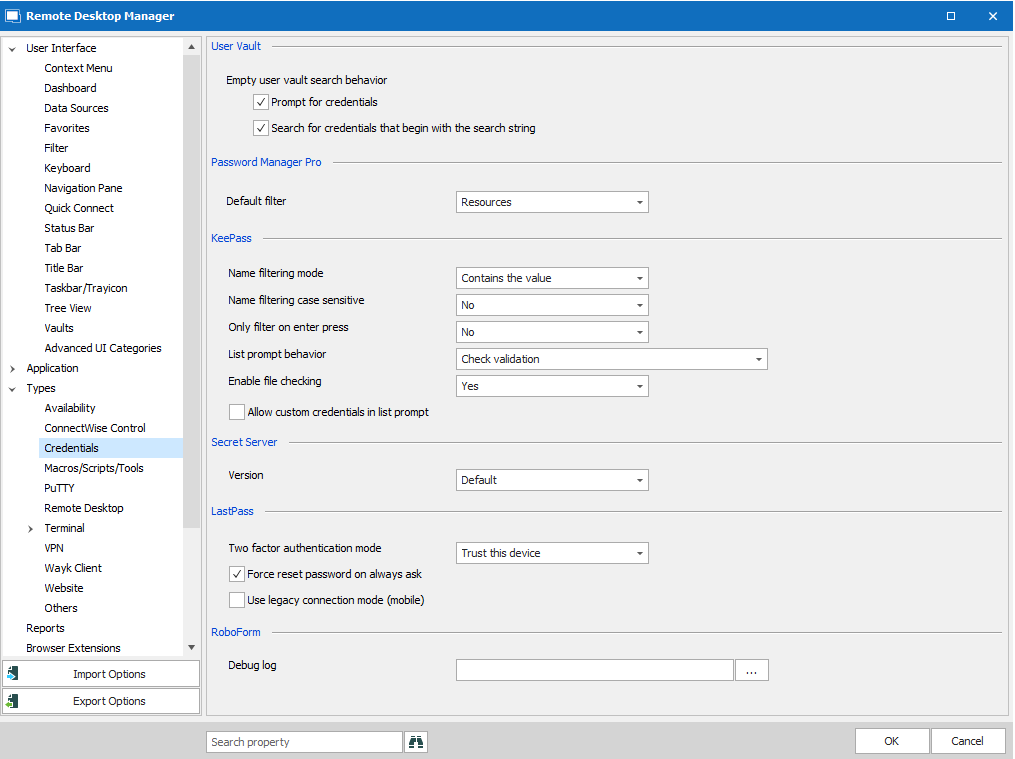
Best regards
Patrick
E95E44ED-5D67-4B1D-B9C2-A58801D2D819.png
Hello,
So after investigating, we arrived at the same conclusion as you did from your research, it does seem to point at a "too many requests" in some fashion.
Are you the only user of that LastPass account, or is it shared between multiple users? Are those users all behind a proxy that would make it so all requests to the account come from the same IP? That could be a cause of the issue, especially if the issue is intermittent.
Otherwise, are there any network-related changes in your company that happened around the same time the LastPass integration in RDM has started to fail? Maybe it could clue us in to the cause of this issue.
Another thing to note, I noticed that you have the option "force reset password on always ask". By using this option, RDM can't cache the LastPass vault, which means we have to make a brand new call to LastPass every time you perform an action that requires the LastPass entry to be resolved. Could you try unchecking this option, and seeing if this helps?
Regards,
Hubert Mireault
Hello Hubert
We checked all the settings and found that one user was using legacy connection mode and he was authenticated as Android device instead of command line. We changed that, and it's working now everywhere. But we are not sure if just that was the problem. Perhaps also LastPass had problems.
But you should get a medal for the hint about the "force reset" as we never wanted that or checked that additionaly. It always took so long to authenticate and now it's much faster! You gave us a real performance boost, thank you so much!
Could you also explain the options for the two factor settings? We disabled 2factor because we did not want to do a 2factor confirmation for every login. Is it possible to do it only once per day for example? If yes we would enable 2factor again.
Thanks a lot and best regards.
Patrick
Hello Patrick,
Very glad to hear that you seem to have found a fix to the issue! It's very possible that the legacy connection option (which tries to connect you as a mobile device) was the culprit. I'll look into confirming this on my end as well.
I'm happy that I could improve you and your team's workflow without meaning to! 😀 The only thing to be wary of is that the cache is only reset when you restart RDM (it is only kept in memory, not saved on disk). This means that if you add new credentials to your LastPass, you will need to restart the application to see this credential appear in the list.
As for the 2FA settings, as far as I know it's not possible to specify how long the token will work for. The options at the moment go as follow:
- Don't trust this device: It will always ask for your 2FA every time you connect to LastPass with a specific account.
- Trust this device: RDM will save the 2FA trust token in its settings, and will try to use it as long as it's valid. I'm not even sure if this token expires, but it can be revoked on your LastPass account.
- Trust this device (clear on application close): Similar to the Trust This Device mode, the difference is that the token will be cleared when you close RDM. This means the 2FA will be prompted once for your account, then keep this token until you close RDM. Due to the way these trust tokens work, it might make a lot of different trust tokens on your LastPass account.
Since you'll be using the cache, I think that setting "don't trust this device" might work fine for you if you don't mind being prompted again once you restart RDM. I encourage you to test these settings and find out what combination works best for you.
Regards,
Hubert Mireault
Hi Hubert
Thanks a lot for your explanation, that helps a lot!
Cheers
Patrick
Hi Hubert
We can't login via Lastpass anymore today. We still get the same error. I also opend a ticket with lastpass now, so they can check what is blocking the user.
Just to let you know, that the legacy setting was not the solution.
Best regards.
Patrick
Hello Patrick,
Thanks for the update, it's unfortunate it wasn't the solution. Out of curiosity, do all of your users now use the cache (by removing the option for the "force reset")?
Regards,
Hubert Mireault
Hi Hubert
Yes I've sent them the option today. But there was an update and we needed to restart RDM. I think if it would have stayed open, perhaps it would stay cached.
Does it caches just all the passwords or only the ones which werde used during a session?
Best regards.
Patrick
Indeed, the cache would have been kept without an RDM restart.
As for what it caches, it's the entire vault. This allows RDM to use this same cache with all of the entries that are using the same LastPass account. This is why it should reduce the amount of calls to LastPass drastically.
Regards,
Hubert Mireault