Add an ability to use Yubikey PIV/PKCS as SSH key
1 vote

Screenshot to show how its implemented by others.
Would be great to have one app for rdp and ssh.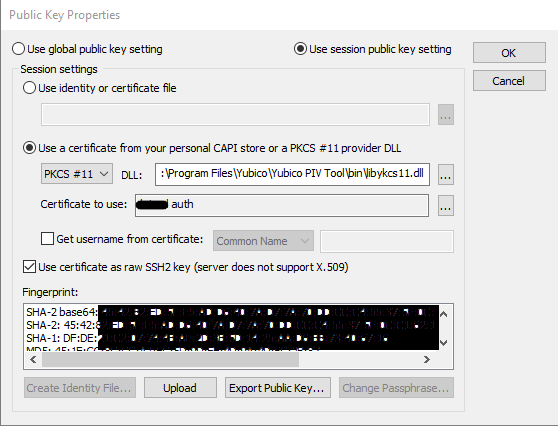
key1.png
All Comments (8)
Hello,
We discussed this and from our understanding, we are halfway to supporting what you'd like.
Currently in the SSH entry, you can check "use smartcard", where you can perform this type of authentication:
In your case, the PKCS DLL can then be configured in File > Options > Types > Terminal, under "Smartcard PKCS library".
What we're missing at the moment is a way to specify the certificate in the entry. The way it currently works, RDM tries all the certificates currently available on the Yubikey to authenticate with.
I've opened a ticket so we can add this in RDM.
Regards,
Hubert Mireault
Hello,
Did configuration as instructed no success.
Server:
sshd[1847380]: Connection closed by authenticating user zzz zzz.zzz.zzzz.zzzz port 50620 [preauth]
Client:
An unexpected error occured. Error code : FAIL_PERMISSION_DENIED
(-3) Permission denied: security settings prevent the operation to complete.
Important part is “Use certificate as raw SSH2 key (server does not supportX.509)”
Maybe it would make sense to add checkbox “Use as SSH key” near “Use smartcard” and rest configuration would happen under tab “Private Key”
For those who will come across this and testing.
After installing “Yubico PIV Tool” it’s important to add System Properties > Environment Variables > System Variables > Pat > “C:\Program Files\Yubico\Yubico PIV Tool\bin”
Thanks for the additional details, I've added this information to our ticket.
Regards,
Hubert Mireault
I confirmed with our terminal engineer and we should already be using the certificate as an SSH2 key, so it's weird why it's not working.
To give us more information, would you be able to follow the instructions here and send us the logs with a verbose level 2 of your SSH entry with the Smartcard: https://kb.devolutions.net/rdm_send_ssh_logs.html
Regards,
Hubert Mireault
Instructions fulfilled.
Please have a look at this again, I asked for the same functionality some days ago :)
https://forum.devolutions.net/topics/50470/ssh-with-yubikey-and-signed-openssh-certificate
Hello,
The feature has been implemented internally, and should be available in version 2026.2.9.
Regards,