Configuration of VNC with VPN/SSH/Gateway - no properties for "Sicherers Gateway verwenden" (use savety gateway)
Configuration of VNC with VPN/SSH/Gateway - no properties for "Sicherers Gateway verwenden" (use savety gateway)

Hello
we also want to use VNC with ssh tunnel, but the properties for "Sicheres Gateway verwenden"(use savety gateway) like RDP in not present.
If there for VNC any other SSH Tunnel configuration?
RDM Version 2021.1.31.0
br
Johann
All Comments (3)
Hello Johann,
Thank you for contacting us on that matter!
While the "Secure Gateway" option is not available with the VNC entry, you can still configure an SSH Tunnel under the "VPN/SSH/Gateway" section of your entry, just make sure to select the following options":
Once this is done, you will be able to go under the "Settings (SSH)" tab and configure your SSH Tunnel:
Let me know if that helps!
Best regards,
James Lafleur
Hello James
This is the configuration, what I tested.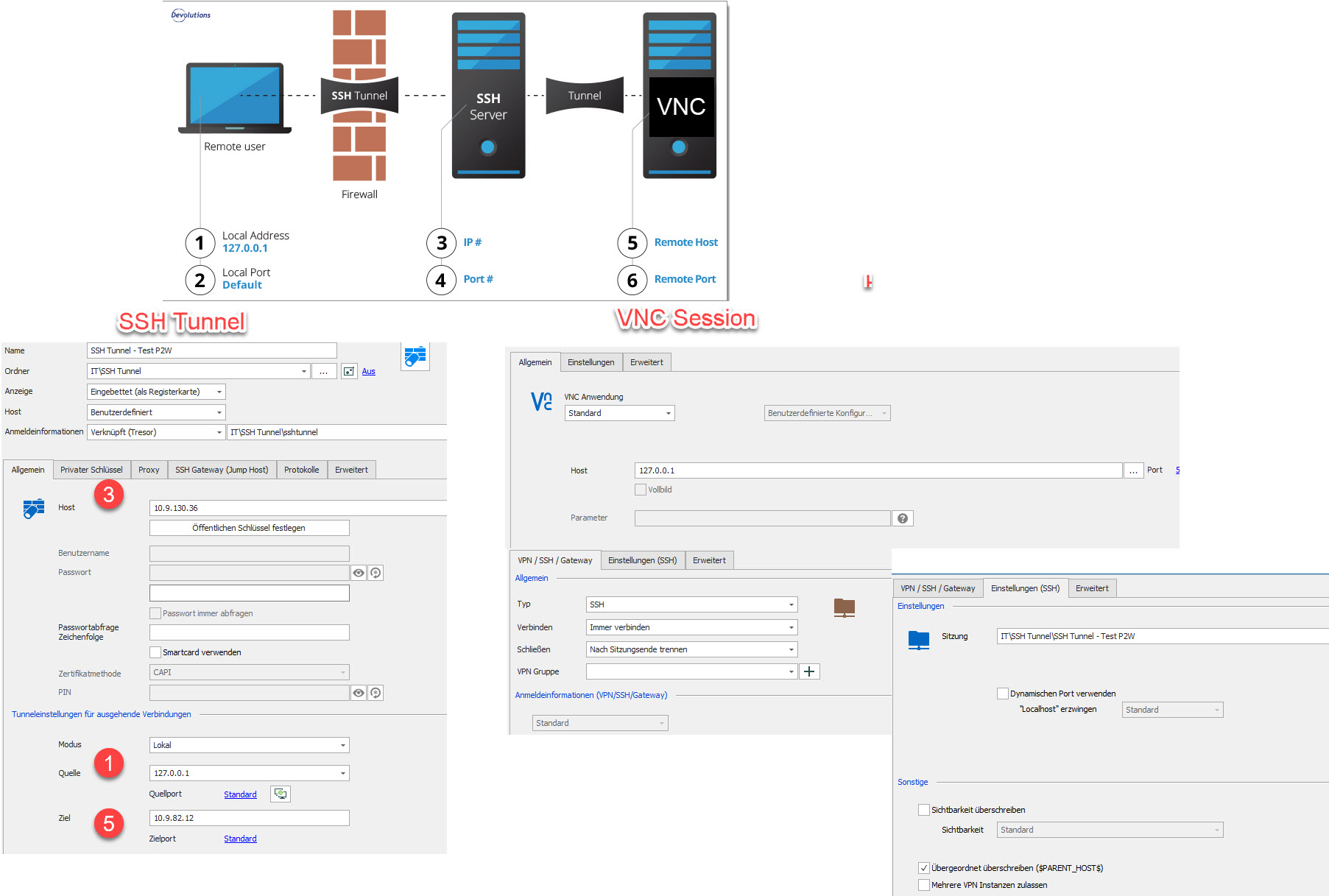
is this what you mean ?
So, on SSH Tunnel the remote host and on VNC session Localhost - then I need for every remote host a separate ssh tunnel.
br
Johann
02-06-_2021_15-19-41.jpg
Hello Johann,
Thank you for your quick reply! It is indeed what I meant.
If you would like to have multiple entries use the same SSH Tunnel, you could configure the SSH Tunnel under the "VPN/SSH/Gateway" section of one of your folders and set the entries it contains to inherit this configuration.
To do so, please follow these steps:
1- Go in the properties of the parent folder, under the "VPN/SSH/Gateway" -> "VPN/SSH/Gateway", use the "+" sign to create a "VPN Group". This feature will allow you to leave your SSH Tunnel opened as long as it is used by a connection contained inside this folder. For more information, please consult this link: https://kb.devolutions.net/rdm_vpn_group.html
2- Go under the "Settings (SSH)" tab and use the ellipsis button to select your SSH Tunnel entry and save these changes.
3- Go in the properties of the connections entries stored in this folder, under the "VPN/SSH/Gateway" section, and make sure that they are set to "Inherited":
This can be done manually in each entry or with the Batch Edit feature. To use this feature, please refer to this link: https://help.remotedesktopmanager.com/commands_batchedit.html
Now, when one of these connections is launched in RDM, the SSH Tunnel that you have configured in the parent folder will be used to establish the connection and in doing so, you won't have to configure the SSH Tunnel on each of your entries.
Let me know if that helps!
Best regards,
James Lafleur