RDM User Group Permissions

Hi,
I am currently in the trial period for the RDM Enterprise Edition on version 2021.1.30.0. Our RDM setup is connected through a Devolutions Online Database. Our end goal is to use this tool to organize all of our different server RDP connections in my organization.
I have two questions for access tied to specific user groups or user based permissions. Basically, I only want certain groups of users to access specific servers in the database and not others based upon their group permissions.
- Can Groups be created in the RDM Online Database setup we have and the access assigned to said Groups?
- Can we tie in my Active Directory in anyway for Group Role access to our Devolutions Online Database?
Thanks.
All Comments (1)
Hello,
Thank you for contacting us on that matter!
Since the Devolutions Online Database Data Source relies on the Security Groups, which is deprecated for the other types of Advanced Data Source, its flexibility is limited.
Please find my answers to your questions below:
1- Can Groups be created in the RDM Online Database setup we have and the access assigned to said Groups?
With the Security Groups, you will need to create a group, let's say "Support", add your users inside it and give them the permissions that you want to grant them. This can be done by going under Administration (1) -> Security Groups (Legacy) (2) -> Select your Security Group (or create it using the "+" icon) (3) -> Assign Rights (4)
From there you will be able to assign this group to a folder and in doing so, the members of this Security Group will have access to this folder according to the permissions that are granted to them in your Security Group.
To do so, select your a folder in your Navigation Pane -> Right-Click -> Properties -> Permissions -> Use the dropdown next to "Security Group (Legacy)" to select the Security Group you wish to set on it and click on "Ok" to apply this setting: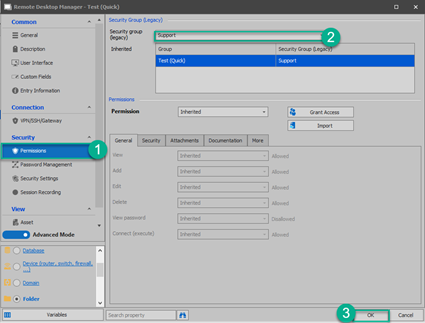
*To easily manage your Security Groups, we recommend creating 1 per department and to create a folder structure for each of these departments. That way, you will be able to assign each Security Group to their respective folder.
2- Can we tie in my Active Directory in anyway for Group Role access to our Devolutions Online Database?
This cannot be achieved with the Devolutions Online Database Data Source. To benefit from the AD In integration feature, you would need to opt for the DEvolutions Server solution instead. For more information, please consult this link: https://server.devolutions.net/compare
Best regards,
James Lafleur
SecurityGroup.png