Nested SSH Tunnel

Hi,
We have a number of servers that each act as a jump box to a customer site.
We want to restrict access to those servers so that they can only be accessed from a single server.
In RDM we need to be able to setup a connection like so:
Macbook -> SERVER1 (SSH) -> SERVER2 (SSH) -> Customer Site (RDP)
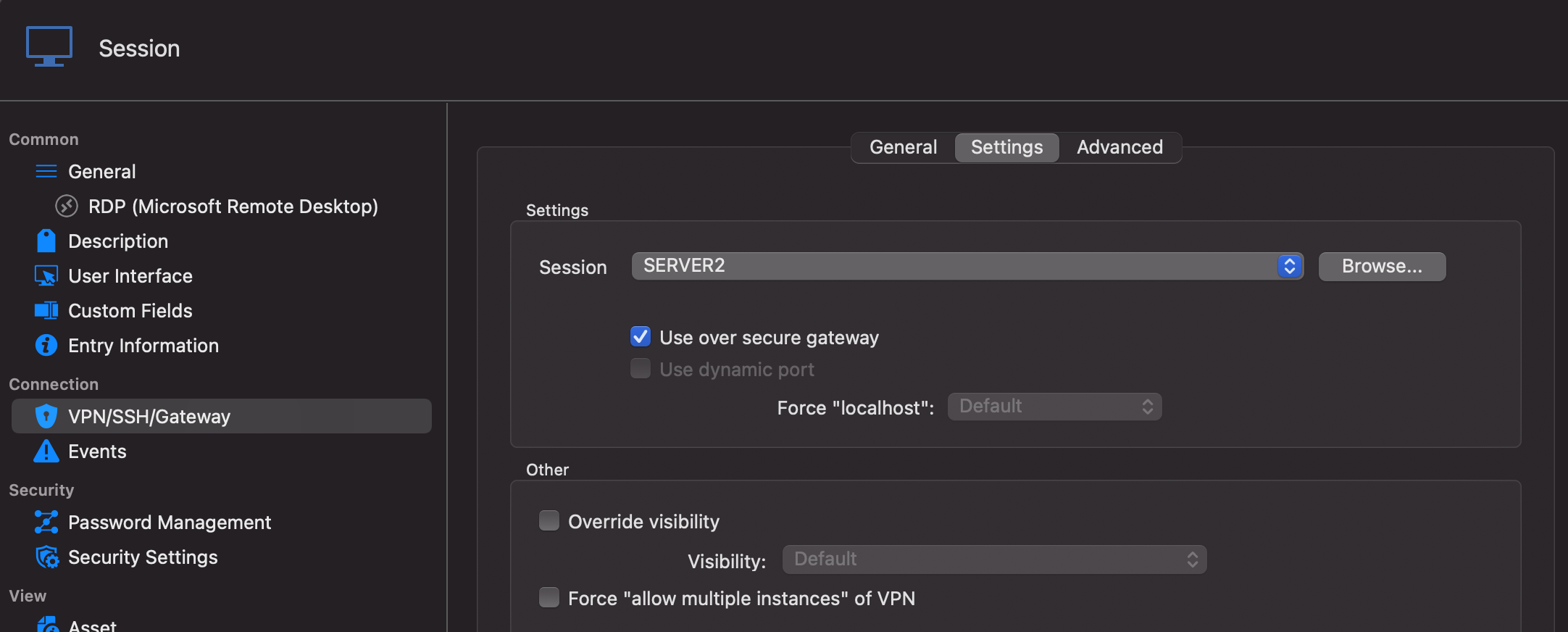
I'm able to setup the RDP connection with a SSH Tunnel (with Use over secure gateway ticked), which points to SERVER2. For single hops this works like a charm.
When looking at the configuration for SERVER2, I am also able to associate a SSH connection, which points to SERVER1, but here there is no option to select 'Use over secure gateway') and the connection doesn't work.
CUSTOMER Gateway config: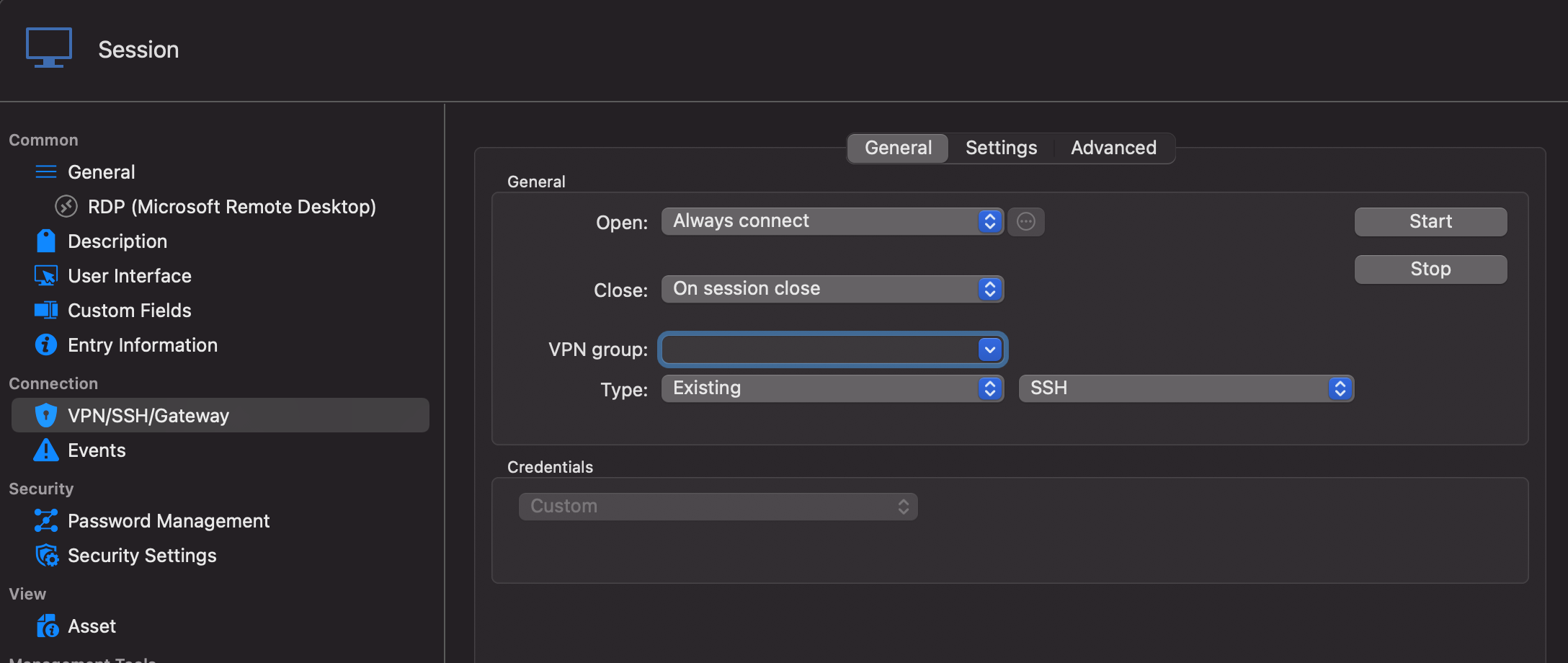
SERVER2 Gateway config: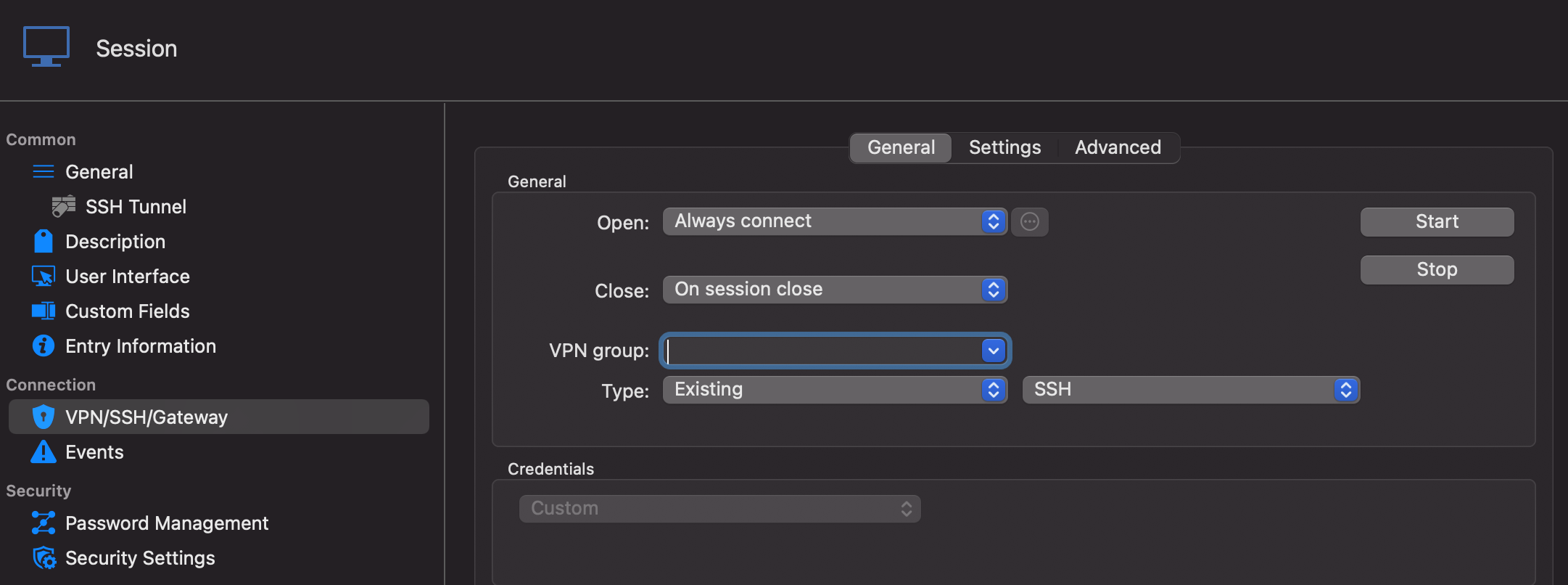
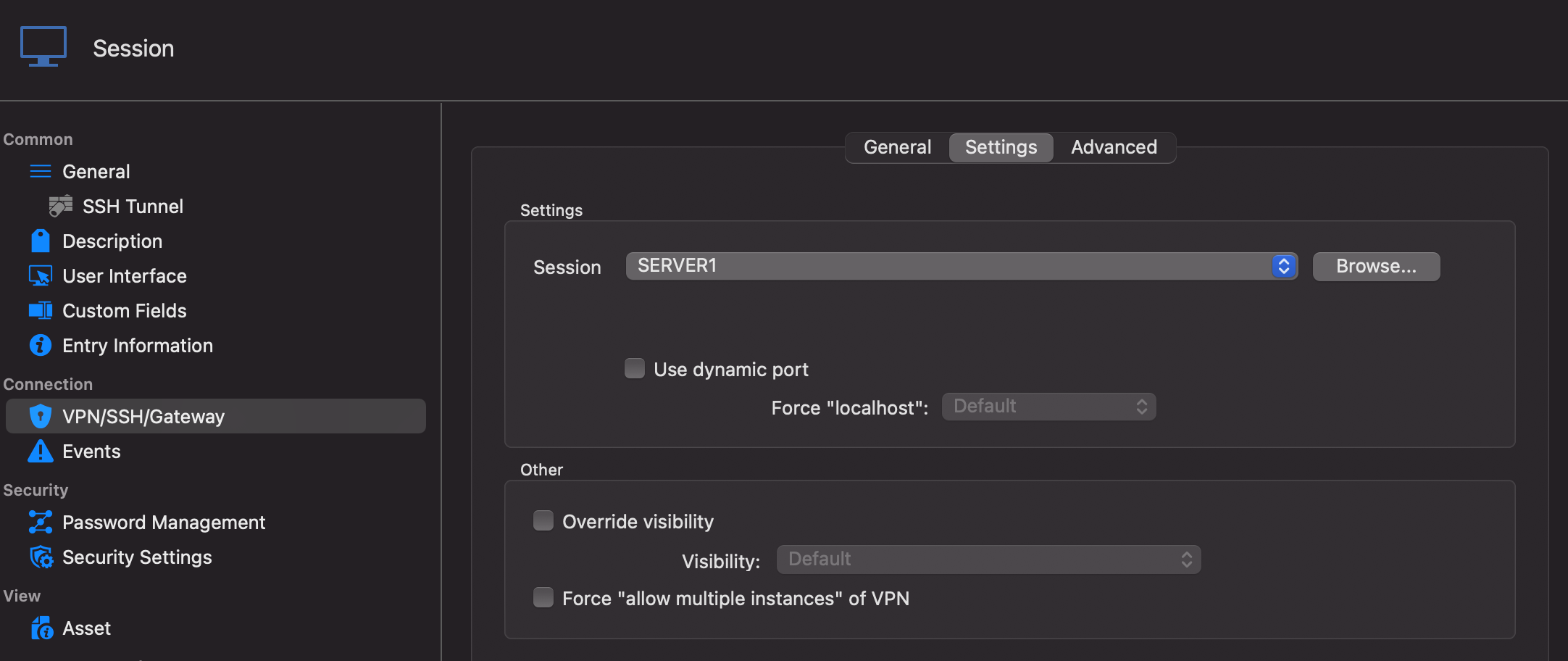
SERVER1 is just a normal SSH Tunnel (like SERVER2, but without the Gateway configuration).
CUSTOMER_2.png
CUSTOMER_1.png
SERVER2_2.png
SERVER2_1.png
All Comments (19)
Hi,
I think the "Use secure gateway" feature might not be what you are looking for. You would probably be better served with the "SSH Gateway (jump Host)" tab of the SSH Shell entry. Unfortunately, this tab is not available for SSH Tunnel and Port Forward entries at the moment in RDM Mac (they are in RDM Windows). And (in Mac again) it only supports one hop. That being said, we have a ticket opened for both of those issues. A ticket for which I will raise the priority.
If you have access to a Windows device, it might be a good idea to test this and see if it works for you.
What you're currently trying to do at the moment is something we call VPN Chaining by which one entry launch a VPN/SSH/Gateway entry that itself launch another VPN/SSH/Gateway. This is not currently supported in RDM Mac, though the option will be available in an upcoming release. That being said, "Use secure gateway" as not been designed to function in such a scenario.
Best regards,
Xavier Fortin
Hi Xavier,
Thank you for your prompt response.
I have installed the Windows version of RDM on a laptop and I'm trying to follow what you said.
I've configured SERVER2 as a SSH Shell, with a 'SSH Gateway (Jump Host)' with the SERVER1 configuration.
Opening this session works fine, I am able to connect to the SSH Shell of SERVER2, through SERVER1.
The last step is then to use the SERVER2 SSH Shell when connecting to the CUSTOMER server via RDP.
I created a new RDP entry and configured it with the hostname and credentials, but I do not have an option to use a 'SSH Gateway (Jump Host)' . Instead I have the same VPN/SSH/Gateway option that I have on the Mac, and I can't get this step to work.
Would you be able to maybe provide some screenshots of how you would set this up and I'll try and follow along?
Kind Regards
Jimmi Larsen
Yes, in the case of the RDP entry, you would use the VPN/SSH/Gateway tab and set your SSH Tunnel entry in it. With abstract value for which I do not know what has access to what, it's hard to say which value should be configured as the gateway and which one as the main host. You might need to play around with it. The tunnel remote host must point to the final destination (the host and port of the RDP session). The RDP session itself should be configured with the host and port configured in the "Local address" and "Local port". I'll try to setup a functioning example on my side.
Best regards,
Xavier Fortin
In attachment, you will find a file containing two entries that you can import. It's an RDP and a Tunnel. I've replaced the host that I used with the labels you've used in your first post (SERVER1 (SSH), SERVER2 (SSH) and Customer Site (RDP)) and I've also replaced credentials with placeholders (<username> and <password>). Technically, so long as SERVER1 has access to SERVER2, which in turn has access to Customer Site (RDP), it should work.
Best regards,
Xavier Fortin
Customer Site (RDP).rdm
Hi Xavier,
I tested your solution and I managed to get it working, so thanks for that.
However, with this solution, I need to create the SSH Tunnel entry for each customer server I want to connect to.
You have the RDP entry set to 127.0.0.1:3390 and the SSH Tunnel Remote host be CUSTOMER_SERVER:3389
We need to connect to 10+ servers on each customer site, so it's not really feasible to set it up like this.
Is it not possible to configure the SSH Tunnel to be dynamic so that it can be reused for multiple customer servers?
Otherwise, the only other solution I can think of is to setup a SSH Port forward instead, where we can configure all the relevant ports in one go.
Any suggestions will be appreciated :)
Kind Regards
Jimmi Larsen
Since with this, you are only using a single SSH entry, "Use secure gateway" might very well work (at least it seems to work for me). Simply change the tunnel to Dynamic, set the proper host in the RDP entry (the actual host to the RDP server) and check the "Use secure gateway" checkbox in the VPN/SSH/Gateway tab (of the RDP entry).
Best regards,
Xavier Fortin
Hi Xavier,
I could have sworn I had tried exactly that, but I couldn't get it to work. However, I just tried again and it's working perfectly!
Many thanks for your help with this, this is brilliant.
Final question, do you know when (roughly) this functionality (Jump Host) will be available for Mac?
Kind Regards
Jimmi Larsen
Hi,
I'm working on it at this very moment (I was already assigned to this ticket). It won't be in the next version (2021.1.5.0) since it's already being tested by the QA. It should definitely be available in the version 2021.1.6.0 which we will try to release in the upcoming weeks. So, around end of May to the beginning of June.
I'll post back here when this will be available.
Best regards,
Xavier Fortin
Hi Xavier,
Thank you so much for being so responsive, this is amazing service!
If you need any help beta testing this for Mac, I'm more than interested!
Also, I'll be spending some time setting this up on RDM for Windows,
will I be able to export the vault once done and import it into the Mac version when the new version (with Jump Host support) is out?
Kind Regards
Jimmi Larsen
Yes, RDM Mac and RDM Windows uses the same backend data. You could also share the same data source (by using Devolutions Online Drive for instance) without any issue.
I'm glad this works for you!
And please, do not hesitate if you have any further issue.
Best regards,
Xavier Fortin
Hi,
The version 2021.1.7.0 of RDM and RDM Free are now available. It's now possible to configure multiple Gateway in SSH Shell, SSH Tunnel and SSH Port Forward entries.
Best regards,
Xavier Fortin
Hi Xavier,
This functionality stopped working after the 2021.2.2.0 update released on October 7th.
I had to roll back to a previous version to get it working again and that was further complicated by the database upgrade.
I'm not sure exactly what changes have caused this to stop working, but I'd appreciate it if you could maybe have a look?
Kind Regards
Jimmi Larsen
Weird, the only thing that change on this that I am aware of is the support for the dynamic port.
I still have the test (Customer Site (RDP).rdm) configured in my datasource and it works properly with the latest version (2021.2.9.0) of RDM for me.
Do you know exactly what stopped working? Is the tunnel not establishing itself? Is the RDP connection not able to connect through it?
Best regards,
Xavier Fortin
Hi Xavier,
Thanks for coming back to me. From what I can tell, the SSH Tunnel is not connecting:
The flow is as follows: Mac -> Jump Host (With DUO Auth) -> Customer SSH Tunnel -> Customer RDP Session.
This is the SSH Tunnel config:

Kind Regards
Jimmi Larsen
Hi Jimmi,
Could you get us the session log for your tunnel? Simply enabled Session Logs from the Help -> Session Logs windows, launch your session, and find the log with the same name as the tunnel in the Session Logs window. It would be helpful if you could get us the log for the session not working (with RDM 2021.2+) and the log for the session working (with RDM 2021.1.10.0 or earlier).
Best regards,
Xavier Fortin
Hi Jimmi,
Could you get us the session log for your tunnel? Simply enabled Session Logs from the Help -> Session Logs windows, launch your session, and find the log with the same name as the tunnel in the Session Logs window. It would be helpful if you could get us the log for the session not working (with RDM 2021.2+) and the log for the session working (with RDM 2021.1.10.0 or earlier).
Best regards,
Hi Xavier,
I was just about to reply again... I actually just got it working.
I deleted the SSH Tunnel and re-create it again with the exact same config, and it works.
There must be some change with the Oct. 7th update that isn't updated for the existing SSH Tunnels that breaks them.
Kind Regards
Jimmi Larsen
If you still have a session not working, it might be worth it to export it, recreate it so it works, and export this one too and provide them to us so we can compare and see what the issue is. You can remove sensitive information.
Best regards,
Xavier Fortin
Hi Xavier,
I just enabled session logs for one of the SSH Tunnels that I haven't updated yet, it's stuck at sending kex init.
Funnily enough, this exact same thing happens when we copy a Mac RDM vault to Windows RDM.
The solution here was also to re-create the SSH Tunnels.
[11/22/2021 1:26:15 PM] Devolutions Protocols version: 2021.11.8.1 macOS
[11/22/2021 1:26:15 PM] Starting SSH, verbose level: 2
[11/22/2021 1:26:15 PM] Setting up connection
[11/22/2021 1:26:15 PM] Using jump host: 10.1.0.240:22, 0
[11/22/2021 1:26:15 PM] Using jump host: 10.101.13.240:22, 1
[11/22/2021 1:26:15 PM] Connecting to port: 22 (IP any)
[11/22/2021 1:26:15 PM] Connected to SSH proxy host
[11/22/2021 1:26:15 PM] SSH banner: SSH-2.0-OpenSSH_7.6p1 Ubuntu-4ubuntu0.3
[11/22/2021 1:26:15 PM] Sending kex init
[11/22/2021 1:26:15 PM] Received kex init
[11/22/2021 1:26:15 PM] Selected algorithms: curve25519-sha256, ssh-ed25519, chacha20-poly1305@openssh.com, chacha20-poly1305@openssh.com, implicit by cipher, implicit by cipher, none, none
[11/22/2021 1:26:15 PM] Sending Ed25519 kex init
[11/22/2021 1:26:15 PM] Received Ed25519 kex reply
[11/22/2021 1:26:15 PM] Successfully authentified server
[11/22/2021 1:26:15 PM] Sending new keys message
[11/22/2021 1:26:15 PM] Sending userauth service request
[11/22/2021 1:26:15 PM] Received new keys message
[11/22/2021 1:26:15 PM] Received extension info message
[11/22/2021 1:26:15 PM] Server accepts public key types: ssh-ed25519,ssh-rsa,rsa-sha2-256,rsa-sha2-512,ssh-dss,ecdsa-sha2-nistp256,ecdsa-sha2-nistp384,ecdsa-sha2-nistp521
[11/22/2021 1:26:15 PM] Received service accepted message
[11/22/2021 1:26:15 PM] Sending userauth init request
[11/22/2021 1:26:15 PM] Received userauth failure: keyboard-interactive
[11/22/2021 1:26:15 PM] Starting interactive authentication
[11/22/2021 1:26:15 PM] Sending userauth interactive request
[11/22/2021 1:26:15 PM] Received userauth info request: / {Password: }
[11/22/2021 1:26:15 PM] Sending userauth interactive response
[11/22/2021 1:26:18 PM] Received userauth info request: / {}
[11/22/2021 1:26:18 PM] Sending userauth interactive response
[11/22/2021 1:26:18 PM] Received userauth success
[11/22/2021 1:26:18 PM] User authenticated successfuly by password interactive
[11/22/2021 1:26:18 PM] Sending forward channel open request: 0/- 10.101.13.240:22
[11/22/2021 1:26:20 PM] Received global request: hostkeys-00@openssh.com , no need to reply
[11/22/2021 1:26:20 PM] Received channel open confirmation: 0/0 WS 200000/2097152 MPS 32000/32768
[11/22/2021 1:26:20 PM] Connected to SSH proxy host
[11/22/2021 1:26:20 PM] SSH banner: SSH-2.0-OpenSSH_7.6p1 Ubuntu-4ubuntu0.5
[11/22/2021 1:26:20 PM] Sending kex init
We would really need an export of a working and non-working entry to find the issue. You can send them to me directly to my email: xfortin@devolutions.net
Best regards,
Xavier Fortin