SSH: use standard (PC, not Apple) keyboard shortcuts on mac?

Hi, at work the management decided that imacs are nicer on the desk and when the customers visit the offices it's more pleasant to watch, even though 100% of my work is remoting in linux and windows servers.
Ok, let's use a $2000 thin client just because it's more pretty on the desk...
I hate the apple keyboard so I am using a regular USB PC keyboard, with ctrl, win, alt keys.
I also hate the apple shortcuts, so i am using karabiner to remap everything to PC standard.
ctrl is ctrl, alt is alt, win is win. I copy with ctrl+c and paste with ctrl+v.
I setup iterm2 to send ctrl to the machine, so I stop scripts with ctrl+c, copy with win+c
Now, when i use RDM, I always confuse which key is command and which key is option. I have to stop scripts with win+c. There's a way to use standard PC keys?
My workaround is "open external" and i setup to use iterm2, but I'd like to use the integrated one because otherwise if it gets detached and I open 10 windows, I lose track of where is where with the poor window management that macos has
All Comments (5)
Hi,
I'm not sure to follow you exactly? In what context do you want to use standard PC shortcuts? RDP sessions? If so their is a table in the Preferences (Types -> RDP -> Shortcuts) to change key combinations in RDP sessions. Though you would have to change configure them all manually.
Best regards,
Xavier Fortin
In RDP there's a way to switch the keys, but not in SSH
Indeed, because SSH is ultimately just a text view for which key presses are handled by the OS. By the way, the reason you have to stop script with Win+C is probably because of your setup with Karabiner. Even in macOS, the shortcut to stop a script in a terminal is Ctrl+C. But I'm guessing that you've inverted this in Karabiner (Command becomes Ctrl and Ctrl becomes Command), hence why it's inverted in a shell. To me, it would seem a bit superfluous to add another layer of key binding through all this.
I don't know how Karabiner works, but you could probably add an exception on Command+C and to not have to Copy with Command + C, you could configure it in the macOS preferences, like this: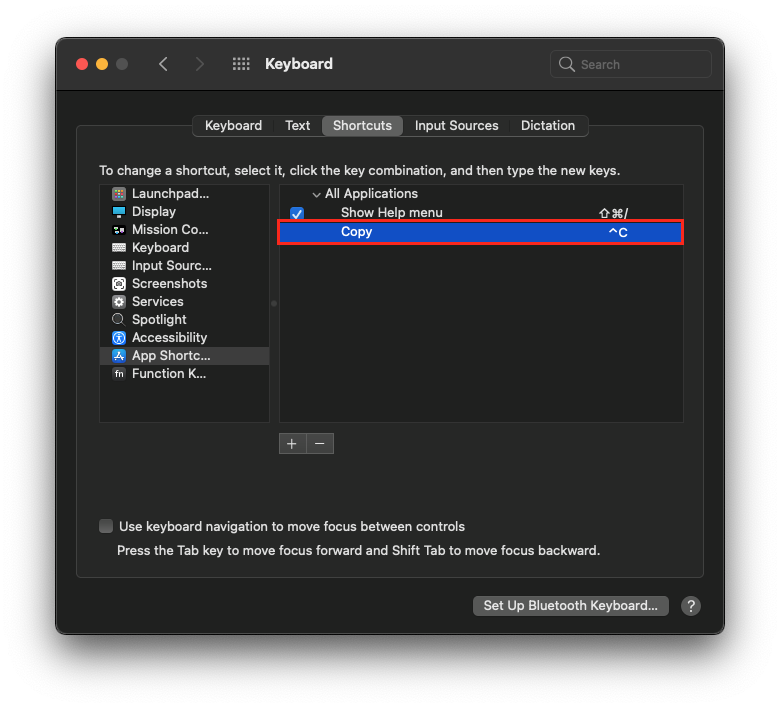
Although, this might not cover all cases.
Best regards,
Xavier Fortin
ControlC.png
Yes, but the problem is that apple switched the positions of ctrl alt and meta on the keyboard with their own weird positions, so when I press ctrl on my PC keyboard, macos thinks "in that position there's command" (or option? I never understood the difference the two different weird symbols)
For example by trial and error in iterm i did this:
and now it works correctly with a PC keyboard.
If i whitelist rdm in karabiner, then it will mess all the rdp and vnc connections
By default, without any third party app changing this in macOS, the only keys that are "switched" between macOS and Windows are the Command and Control keys. And I say switched between quotes because they are not really switched, it's just that common shortcuts in Windows mainly uses the Ctrl key (think copy, paste, etc.) while in Mac, they use the Command key. To make it more clear, from the left-most key on a Windows keyboard:
Shift Key   = Shift (⇧) Key
Ctrl Key    = Control (⌃) Key
Windows Key = Command (⌘) Key
Alt Key     = Option (⌥) Key
Where, in Windows, Ctrl is used as the "common" shortcut key, macOS uses Command.
The reason why I don't think there's a solution to your problem is because, using your case as an example, Copy in Mac is by default ⌘C while interrupting a process in shell is ⌃C. You've reversed those two, so you end up with ⌃C for copy and ⌘C for interrupting. No matter what you chooses to bind to ⌘ and ⌃, those two will always be inverted. Let's say we were to add a mechanism for you to specifically rebind ⌘C to ⌃C. Well, in this case, their would be a conflict between Copy and Interrupt, the issue is still not resolved.
Best regards,
Xavier Fortin