RDM 2021.1.25 64-bit does not allow to create/add Devolutions Online Drive
RDM 2021.1.25 64-bit does not allow to create/add Devolutions Online Drive

Hi all,
I just downloaded the ZIP package of RDM 2021.1.25 64-bit Free and I cannot create or add my existing Devolutions Online Drive. I successfully logon using the new process (Chrome opens and I do sign in), however, when I go to File > Data Sources and click on the + sign, I only see the following options - Password Hub Personal, Google Drive, SQLite and XML - see the attached screenshot; DOD is missing.
FYI, I configured it according to the Portable help section, the only deviation being that I extracted it on my local drive rather than using a USB flash (as I don't have admin permissions, I cannot install the MSI version on my PC; however, I expect the portable to be working just fine).
Any assistance would be appreciated! 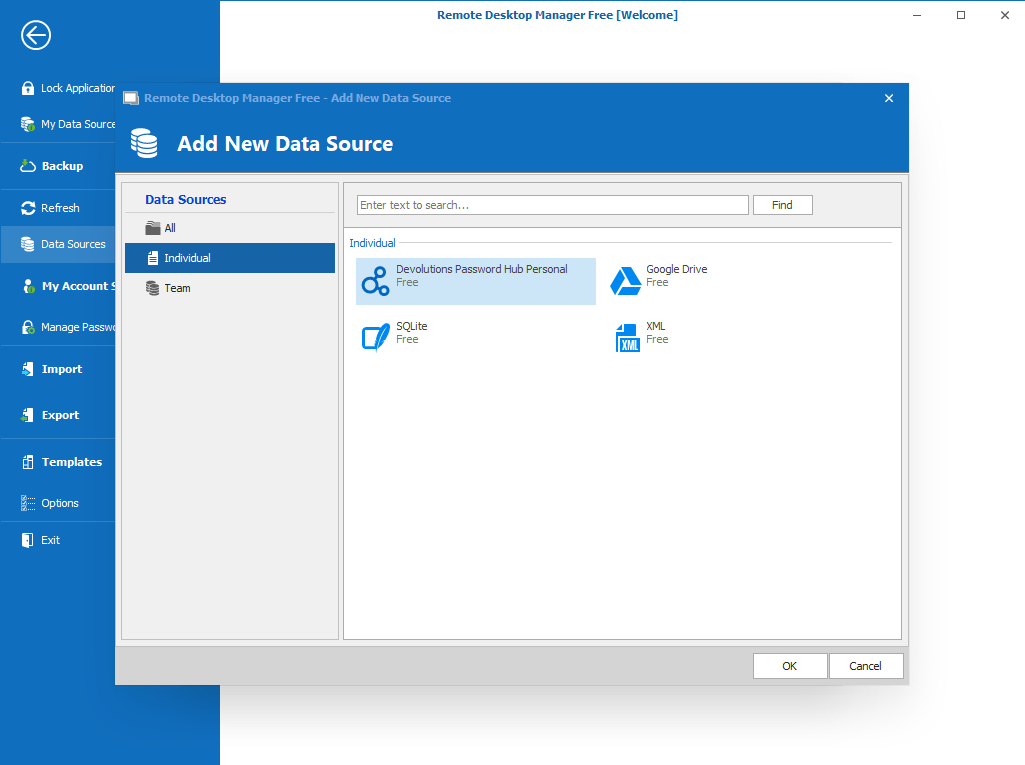
Best regards
RDM1.png
All Comments (8)
Hello,
This is quite strange.
We have tested a portable of RDM Free like you have on 4 different computers and we are not able to replicate your issue.
On a a side note, Dropbox datasource is also missing in your screenshot.
That being said, in the search field, if you type online, are you able to see the Online Drive datasource type?
In the Config folder that you have created for the portable mode, is there some *.lyt files in this folder? If yes, could you try to delete them please?
Best regards,
Jeff Dagenais
Hi Jeff,
Thanks for the prompt reply. On your marks, one by one:
- As you can imagine, I have tried the search field before posting :) However, it just filters the existing options. So, no, DOD does not appear that way. It does not appear if I go to All (rather than staying on Individual and Team navigation page options), neither.
- There were two .lyt files. I removed them and launched RDM again, but nothing changed - the same screenshot is still accurate.
I tried something else - removed the whole RDM folder altogether and started from scratch (extract from the zip). However, on the first page, I didn't log on but started with the third option (30 days trial of the Ent features, if I got it right). Unfortunately, nothing changed - same 4 options are the only available.
Is it possible for you to test using the same ZIP file that I downloaded - the URL is https://cdn.devolutions.net/download/Devolutions.RemoteDesktopManagerFree.Bin.2021.1.25.0.zip? It might sound pointless but I really cannot think of anything wrong I could have done in those 2-3 steps :)
And something else - is the list with the data source options populated through the installed binaries or is somehow downloaded from Internet? Is it somehow related to my Devolutions account? Based on my test with the 30-day trial, I don't think so (as I was not logged on for that test), but who knows...
Thanks again!
Hello,
The display of the datasource is populated from the binaries. It's not downloaded from the internet.
My test of this morning was also made with https://cdn.devolutions.net/download/Devolutions.RemoteDesktopManagerFree.Bin.2021.1.25.0.zip
Just in case, I tried it again and still working at my place.
I also tried to install RDM Free with the .exe and all the datasources we're present.
Do you encounter the same behavior with RDM Enterprise?
https://remotedesktopmanager.com/home/download
Best regards,
Jeff Dagenais
So, I tested on isolated standalone machine that is not part of our corporate infrastructure and not connected to the same network, using the same zip file. Now I do see the Dropbox and DOD options. Clearly there is nothing wrong with the binaries but something on my machine - a GPO, I would guess, or some other kind of centralized configuration management. Because of access restraints, I cannot check that, unfortunately.
I guess I will have to figure out another way of usage.
Thanks for your assistance!
Hello,
I had a chat with our engineering department and we have a GPO to disable the Online Account.
Is it possible that your organization has enabled some kind of GPO's?
For more information on our GPO, you can consult https://kb.devolutions.net/rdm_group_policies.html
Best regards,
Jeff Dagenais
Hello again!
I forgot to mentioned in my previous post that you verify if some GPO's are enable by going in Help -> Diagnostic -> Policy tab.
Best regards,
Jeff Dagenais
Hi,
As I mentioned above, it is quite possible. Again, I don't have permissions to validate this but since you confirm RDM has such a feature, I am 99,99% sure this is to be the case. I suspect this is done in order to restrict saved sessions and credentials to be kept within the corporate network. I would do it that way if I wanted to reach this goal, at least.
Again, thank you for your prompt support. I do appreciate it! And keep the good work with RDM, I've been using it since 2013-2014 and it's just the best RD manager available. Thumbs up!
Best regards
Edit: I just saw your follow up and checked in the Diagnostic > Policy section. This is indeed the case :) So it turns out that even if RDM is used as a portable software, it reads the GPO settings and the respective registry keys. Nice to know.
Best regards
Hello,
Thank you for your feedback and good comments, really appreciated.
Best regards,
Jeff Dagenais