Unable to connect to your Data Source

I am getting the attached error and would need some help. 
Thanks
All Comments (10)
I have the same issue since I upgraded to 2021.1.23.0.
Sometimes when I start RDM I get the error message below:
Devolutions.RemoteDesktopManager.Business.TryGoOfflineException: A connection was successfully established with the server, but then an error occurred during the login process. (provider: TCP Provider, error: 0 - The specified network name is no longer available.)
at Devolutions.RemoteDesktopManager.Business.DataSources.SQLServerConnectionDataSource.ExecuteScalar[T](String sql, IDbDataParameter[] parameters)
at Devolutions.RemoteDesktopManager.Business.DataSources.DatabaseConnectionDataSource.GetConnectionCacheID()
at Devolutions.RemoteDesktopManager.Business.DataSources.DatabaseConnectionDataSource.HasSecurityChanged()
at Devolutions.RemoteDesktopManager.Managers.ConnectionManager.c5ef36373244cdf2ba529a3f9d55c7fda(BaseConnectionDataSource c7f28727fc7a5daa94ba08f688b2a5781)
at Devolutions.RemoteDesktopManager.Managers.ConnectionManager.LoadConnections(BaseConnectionDataSource dataSource)
I can then go offline, but I am then unable to access my Private Vault for credentials. When I try to go online again, RDM hangs and I have to kill the process.
OS: Windows 10 Version 20H2 (OS Build 19042.928)
RDM version : 2021.1.23.0.
@davidfaleye,
What version of RDM are you running?
What type of datasource are you using? Is it SQL Server or SQL Azure?
Best regards,
Jeff Dagenais
Hello Jeff,
I am using the version attached and it is SQL Azure.
We have an issue updating to the newer version, but this case was just specific to a user and he claims it is intermittent 
Please have a look at the link below, it should help you resolve the issue.
https://docs.microsoft.com/en-us/troubleshoot/windows-server/identity/apps-forcibly-closed-tls-connection-errors#symptoms
Best regards,
Stéfane Lavergne
Hang on this might not be the correct link...
Stéfane Lavergne
So this error is considered a "transient error", RDM should automatically retry on most transient errors (unless disabled in RDM > File > Options > Advanced > "Disable resilient database connection handling"). These errors are due to a few things, the most common are
- Azure database is being moved from one physical server to another (internal Azure balancing, out of your control)
- Throttling of your Azure database (DTU maxed)
What can you do?
I would suggest you try to increase the DTU level of your Azure database. Especially if you are running Basic (5 DTU) or Standard S0 (10DTU). The lower-end compute instances are prone to theses issues. This won't prevent all possible "The specified network name is no longer available" errors but should greatly reduce occurrence.
Best regards,
Stéfane Lavergne
Hello,
We have the below settings set. Disable resilient database is not checked. 
Also we have DTU level set to 1 in Azure Database
This morning I also received another case from a user he is unable to connect.
"The past 2 weeks Remote Desktop Manager has been loosing connection.
Message 'Unable to Connect to your Data Source' appears. Credentials and Private Vault stops being available.
Hello,
Using SQL Server Management Studio from your workstation or the workstation of your colleague, are you able to authenticate properly on the database without any timeout?
Best regards,
Jeff Dagenais
Hello Jeff,
We are using Azure SQL not SQL Server Management Studio
You can connect to your Azure SQL Server/Database using SSMS (SQL Server Management Studio) just like you would a local server/database.
Must be configured as such for it to work via SSMS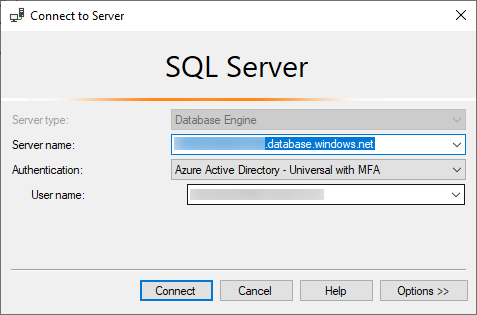
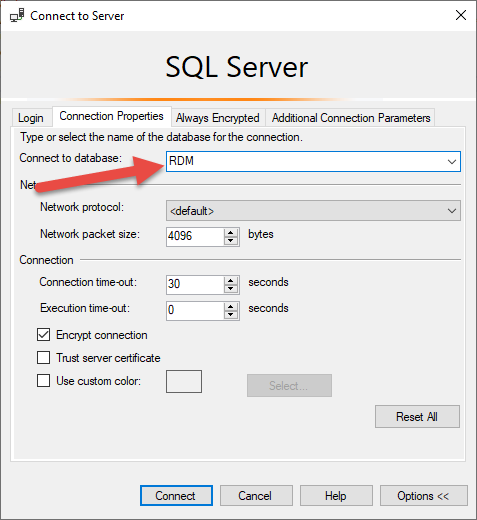
As for your issues, can you please try boosting the DTU from S1 (20DTU) to S2 (50 DTU) for a few days to see if that resolves the issues?
For the last error you can try forcing encryption and certificate trust? File > Data Sources > Edit > Advanced > More Settings
- Encrypt = true
- TrustServerCertificate=true
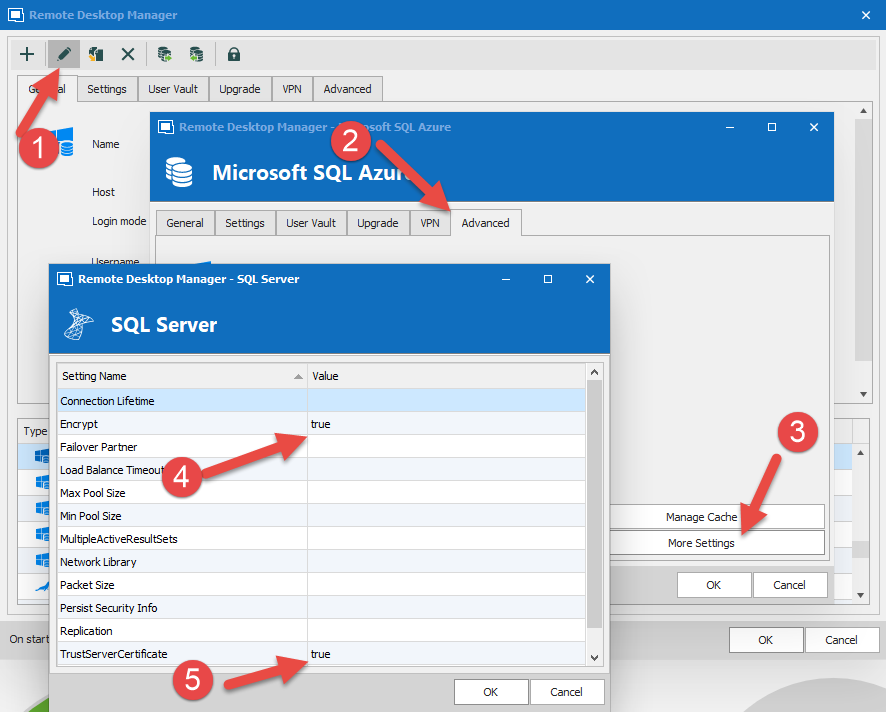
Best regards,
Stéfane Lavergne
2021-04-22_10-10-35.png
2021-04-22_10-10-48.png
2021-04-22_10-18-05.png