RDM doesn't catch clicks

..I just thought it's me being clumsy, but I am quite sure now, that RDM in the current version sometimes doesn't catch clicks in remote sessions (here: rdp) and instead clicks the window "behind" RDM sending RDM into the background and focusing the window behind.
anyone else sees this?
All Comments (17)
Hello,
We have made a change in RDM 2021.1.23:
https://cdn.devolutions.net/download/Setup.RemoteDesktopManager.2021.1.23.0.exe
It's available but not yet published on our web site. Could you try this version?
Regards
David Hervieux
after a day of usage, I think this release solved the problem, thanks!
after some days I must report: problem is not gone appearantly..
Hello,
Is it possible for you to try RDM 2021.1.25.0?
You can download this version here https://remotedesktopmanager.com/home/download
Best regards,
Jeff Dagenais
no improvement unfortunately
Hello,
Do you know if this only happen with an RDP connection?
Regards
David Hervieux
good question. it's possible, but I use the mouse mainly in RDP sessions. Will have an eye on it when I use web sessions in the next days..
I think we can assume, that it's RDP only..
Just to let you know Perler - I have had this problem for a long time. It took me forever to realise that it was RDM - I thought the same as you.
It isn't a big enough problem for me to have looked into it - I came here to look for the issue where you copy User/Pass but then something steals User and you end up pasting Pass into the username field. I remember seeing a post on it a few months ago, but now I can't find it...
Anyhoo - thought I should let you know you are not alone.
We are running 2020.1.20.0 - so a little bit behind...
ok, can you please have a deeper look into this? it happens quite often (over a full working day at least 10 times) and I see the day coming where this has a catastrophic effect where I want to click into RDM but click outside of it something like "shut down hyper v" of a client with 250 users..
Hello,
I will release the RDM 2021.127 version soon (already build) and after that I will try to add a special switch to deactivate some focus function in RDM. Will you be able to try this? I will send you a special build if you want.
Regards
David Hervieux
sure, I can give it a try..
Will it be a client only update?
I have just asked my RDM administrator to bring us up to the latest stable release - we should be able to test out a new version once we get to there.
Hello,
In the meantime could you try to set the waitprogress in the statusbar?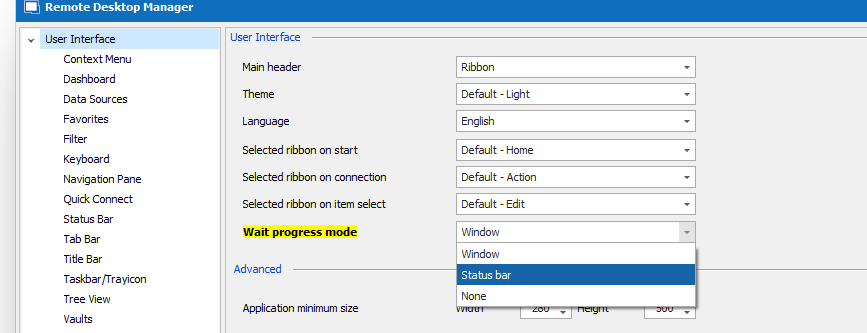
Regards
David Hervieux
Waitprogress.png
did it, no change..
Hello,
Is it possible for you to try RDM 2021.1.25.0?
You can download this version here https://remotedesktopmanager.com/home/employee tracking
Best regards,
Hello!
is there a version of Remote Desktop Manager that is compatible with 32-bit versions of Windows?
@gomezcarsonk,
In the installation folder of RDM, execute RemoteDesktopManager.exe. This will launch the 32bit edition of RDM.
RemoteDesktopManager64.exe execute the 64bit version.
Best regards,
Jeff Dagenais