VPN keeps settings after changing to VPN Link

Hi guys, any tips on this one?
In our > 1430 entries we are currently changing from entry-based VPN settings (either Custom VPN or Microsoft VPN) to a centralized VPN Link based on an entry.
When I add a VPN entry, it connects fine with credentials entered.
When I add a new RDP entry and connect it to the VPN Link entry, all still fine.
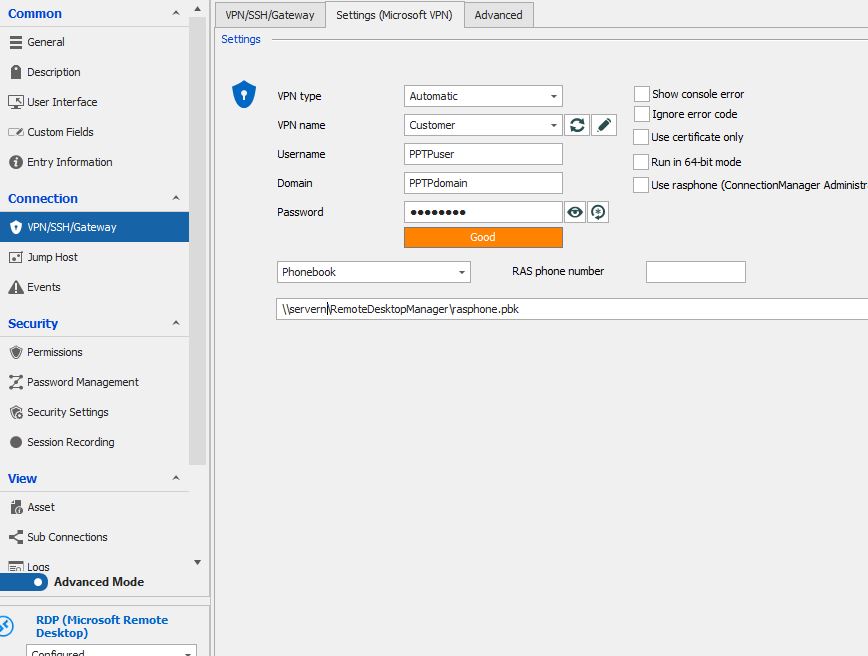
But when I modify an existing RDP and link it to the VPN entry, it fails on credentials. It looks like it sends the username, domain and password from the entry along, instead of using the VPN Link credentials.
Could you look into this?
Thanks!
Sander
(ps; running 2021.1.22.0 Enterprise)
All Comments (16)
Hello Sander,
Would it be possible for you to provide us a screenshot of the configuration of your RDP entry after making this change along with another of the error message you are receiving?
Also, since you are planning on moving from entry-based VPN to a centralize VPN entry, you may want to consider using the "VPN Groups" feature.
For more information on this feature, please consult this link https://kb.devolutions.net/rdm_vpn_group.html
Best regards,
James Lafleur
Hi James,
Thanks for the tip regarding the VPN Groups.
Attached the screenshosts. I've created a tiny script so you can see what is going wrong.
5 = faulty
6 = as it should be.
Thanks!
- Original entry with old VPN.
2. Modified entry with VPN Link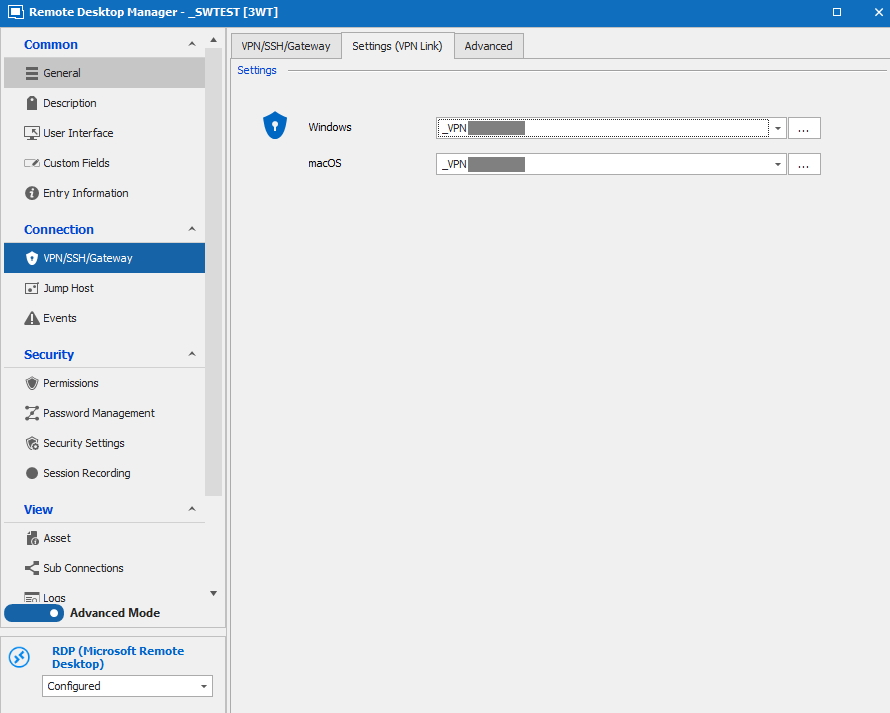
3. VPN Link details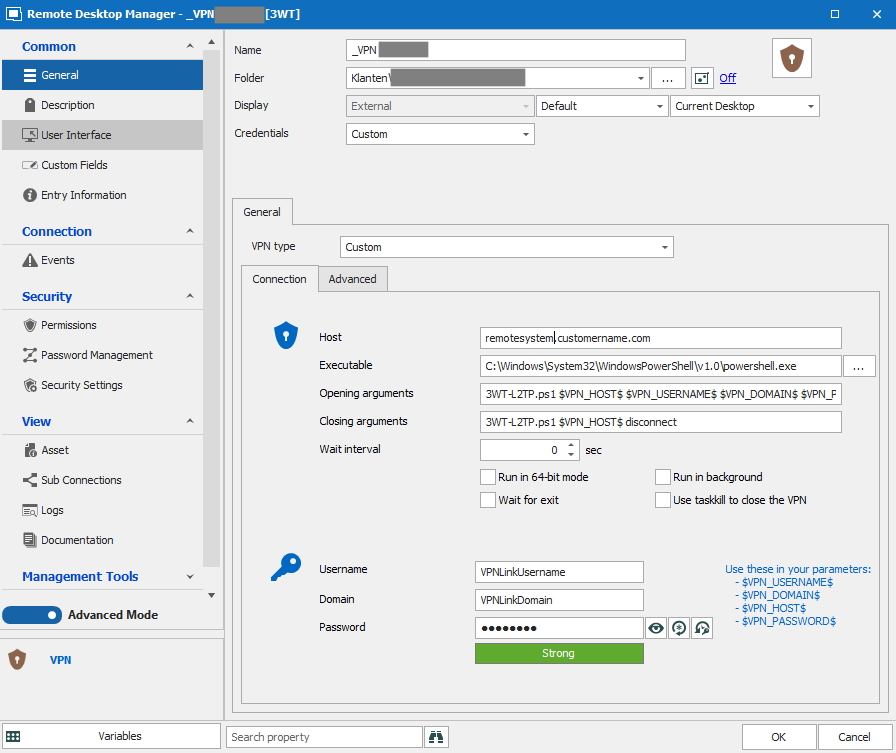
4. Script snip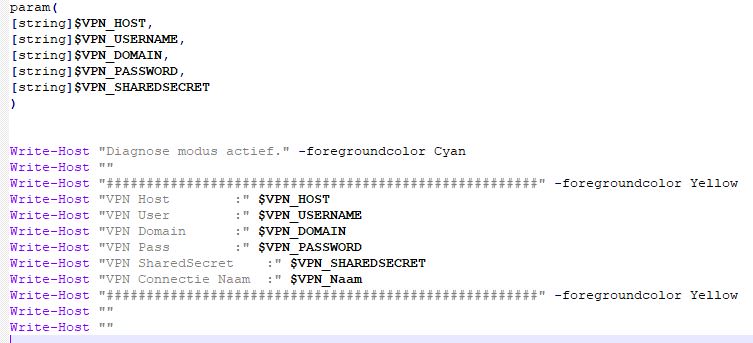
5. Script result when VPN Link is called from entry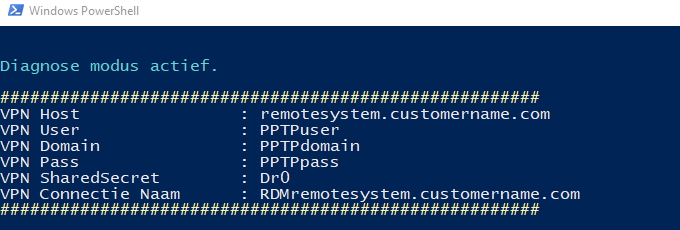
6. Same script result when VPN Link is started directly or through a new entry.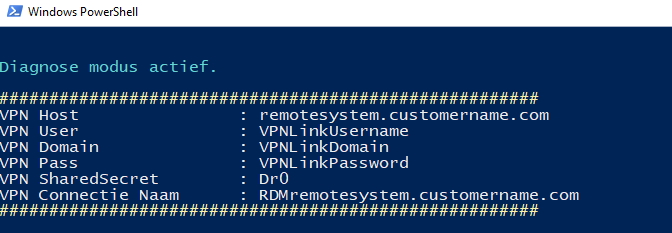
1-Microsoft VPN.JPG
2a-VPN Link.JPG
2b-VPN Link content.JPG
2c-Script snip.jpg
2d-Script result.jpg
3-Normal result.jpg
Hi James,
FYI; with version 2021.1.23.0 I have the same issue.
Sander
Hello Sander,
Thank you for your quick reply and for confirming that this issue persists with RDM 2021.1.23.0.
Since this issue only seems to occur if you modify an already existing RDP entry, I would like to see the XML of one of your old RDP entry and compare it with one from a newly created RDP entry to see what might be causing this change in behavior.
If it is ok with you, would it be possible for you to do the following:
1- Create a duplicate of one of your old RDP entry
2- Create a duplicate of one of your newly created RDP entry
3- Replace any sensitive data that you can find in both of these duplicates with test data
4- Right-click on each of these duplicates and use the Clipboard -> Copy -> Preview options to copy the XML of the entries in 2 separate files.
5- Send these files to me using the secure link I just sent you via private message
Doing so will allow me to compare both files and see which options could be causing this.
Thank you in advance for your collaboration!
Best regards,
James Lafleur
Thanks! Just did so.
Hello Sander,
You are more than welcome!
Thank you for these files, I will compare them and see what might cause this.
I will be in touch with my results shortly.
Best regards,
James Lafleur
Great James, thanks!
Hello Sander,
Sorry for the delay on this case, I had to test a few things before providing you a script.
That being said, I just sent it to you via private message. I would like you to run it on a duplicate of one of your already existing RDP entries to see if you are still experiencing the same issue when it is launched.
After comparing both of the XML files that you have provided me, I have found a few differences in the configuration of their VPN section. Since creating a new RDP entry and linking it to your VPN entry works, I have created a script that should apply these same settings to an already existing RDP entry.
Best regards,
James Lafleur
Hi James,
Unfortunatelly, the issue stays the same after adding the script as you requested in your PM.
It looks like the issue is that the parameters of the old VPN connection are still remembered.
In the XML files, these are rules 34, 37, 40 and 43 as far as I can see.
Could the solution be to clear these entries as soon as you choose another VPN type? Or is that way to easy?
Sander
Hello Sander,
Thank you for your quick reply and for performing this test.
I also think that this is what is causing this issue. For this reason, I have contacted our Engineering Department on that matter and a ticket has been opened with them to see what can be done. We will be in touch as soon as we will have an update on this case.
Best regards,
James Lafleur
Great, thanks a lot!
Hello,
A fix for this issue should be available starting from RDM 2021.1.30.0. The problem was that we did not clear the settings linked to the previously selected VPN Type. This can be seen in the XML you have provided us.
Once you have updated to the previously mentioned version of RDM, you will be able to edit and save your entries and effectively wipe away the remnants of your old setups.
Regards,
Michaël Beaudin
Hey Michael,
Unfortunately, with 2021.1.30.0 I still got the old settings...
Sander
Hello Sander,
I just wanted to make sure and confirm if you opened the properties of your entry and saved it by pressing the "OK" button? The change we made will make sure to clear the old data when performing a save action.
There is no way to clear all the old settings automatically so you will have to open the properties and do a save action on all your entries in which you wish to clear the old data manually.
I believe it should work as I have just installed RDM 2021.1.30.0 and I can clear the old settings properly.
If this still does not work we will need to investigate further.
Here are the results of my test sample :
Old entry :
After editing and saving with a linked VPN : 
Regards,
Michaël Beaudin
Hi Michael,
I'm sorry, you're right! After modifying the entry, it is working well.
Case closed!
Sander
Hello Sander,
That's great to hear!
If you experience any other issue please do not hesitate to contact us and we'll do our best to help out.
Regards,
Michaël Beaudin