Combine Credential-Entry and OTP-Entry
0 vote

We would like the Feature, that we can add an OTP to an Credential Entry.
Currently we have to create a "Username / Password" (Credential Entry) and "One-Time Password (OTP)" Entry to achieve this.
Would be greate if we can add the OTP to the "Username / Password" (Credential Entry) - or maybe add OTP as "Sub-Connection" to the Credential?
All Comments (11)
Hello Felix,
You mention being able to make the OTP be a subconnection to the credential, we actually made this improvement (allowing most entry types to have subconnections) in version 2021.1.22.0. Would you be able to test this and see if it works for your scenario?
Regards,
Hubert Mireault
Hi Hubert
Thank you for the fast answer!
I was using 2021.1.21.0 with the 22er Version I can add OTP as a Sub-Connection.
As a "workaround" this will work for us - if you can add OTP anyways to the "Username / Password" (Credential Entry) would be great :-)
Thank you & Regards
Felix
Hello Felix,
Glad this can be used as a workaround for you. I've opened a ticket to add OTP information to the Username/Password entry. I think it would be useful too, to have all of this information in one entry.
Regards,
Hubert Mireault
Hi Felix,
We have added OTP to credential entries internally. It should be available starting with version 2021.1.27.0
Regards,
Jean-Francois Duchesne
Hi Jean-Francois
Nice, many thanks!
I also love the feature, that we can view within "View Password" not only the PWD but also the OTP :-)
Thank you & Regards
Felix
Hello,
Quick question. Will all website entries that use linked credentials from the vault automatically pick up the new OTP value from the credentials entry?
Thanks!
Stan
Hello Stan,
Currently it's not taken into account automatically. I believe it should allow you to copy the OTP (select the entry > right click > copy OTP) but it won't be usable directly in the web entry. At the moment, you still need to enter the OTP settings in the web browser entry.
A little scoop, we're actually reworking how our OTPs will be linked to and interact with our entries for RDM 2021.2. This will make it so any session can have an OTP linked to it, separate from the "regular" credentials. In your case, you would need to link the same credential entry in both sections, since it contains both a credential and an OTP, to achieve what you want. Hopefully this will help improve your workflow.
Regards,
Hubert Mireault
Hi Hubert,
Thank you for responding to this tread.
It would be nice to link the credential once and have RDM recognize that it stores the OTP and self link it to the second place,
However setting up the same credential entry in both places would be easy enough.
can you confirm if the website entry will show the view/copy button for linked credentials in the Web interface?
Currently it shows this buttons only if the credentials are typed directly in the website entry but not if they are linked from another credential entry.
Thanks!
Stan
Hello Stan,
When you mean the "web interface", do you mean for example the web UI available on DVLS or Hub datasources, for example?
If that is the case, I'll make sure to verify with our DVLS and Hub teams but it should be possible to view/copy the credentials (including the OTP, with 2021.2) when they are linked and not entered directly.
Regards,
Hubert Mireault
Hi Hubert,
Yes I mean accessing https://server/dvls web page.
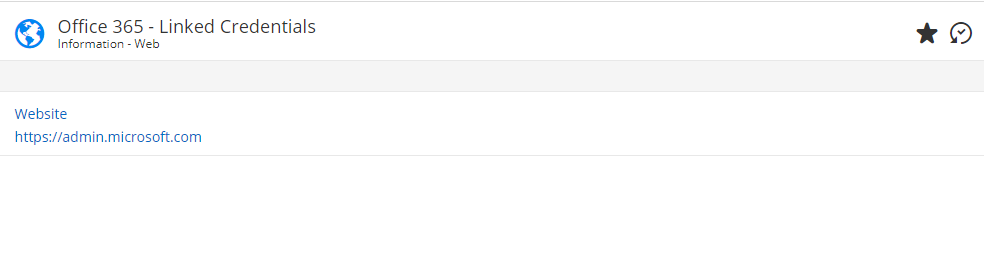
We are using Devolutions Server v2021.1.7.0 and currently if the website entry has linked credentials the interface doesn't show them on the web interface.
See attached screenshots for comparison between website entry with direct and with linked credentials.
Thanks!
Stan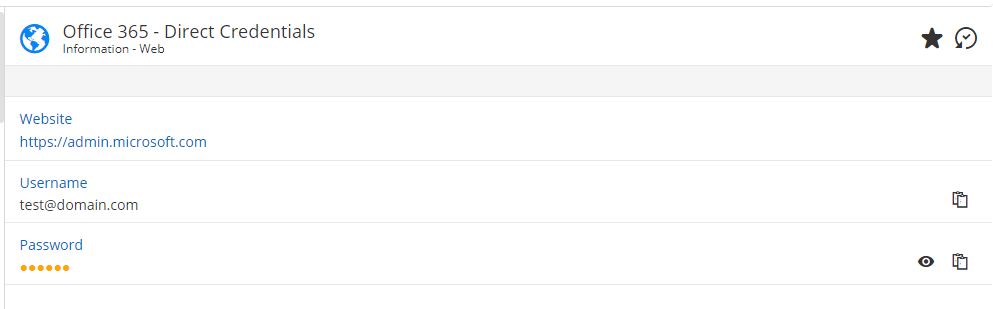
Direct Creds.png
Linked Creds.png
Hi Stan,
Currently the entry's dashboard does not show the linked items.
I will add it on our to-do list for the credentials and the OTP.
Regards,
David
David Savard