Command Shift Arrow Changes Remote Hosts when Editing Entry

The shortcut to move between connected hosts on a Mac (Command-Shift-[Left|Right]Arrow) switches desktops when editing entries instead of letting you move the cursor as you normally can on a Mac.
To reproduce, edit a host. Put the cursor in a text box (Name) and then press Command-Shift-Left, which should highlight all to the left. If you have multiple desktops open, it cycles between them instead.
All Comments (7)
Hi,
You can change (or remove) the shortcuts for the Select Previous/Next Tab menu items in the Preferences -> User Interface -> Shortcuts panel: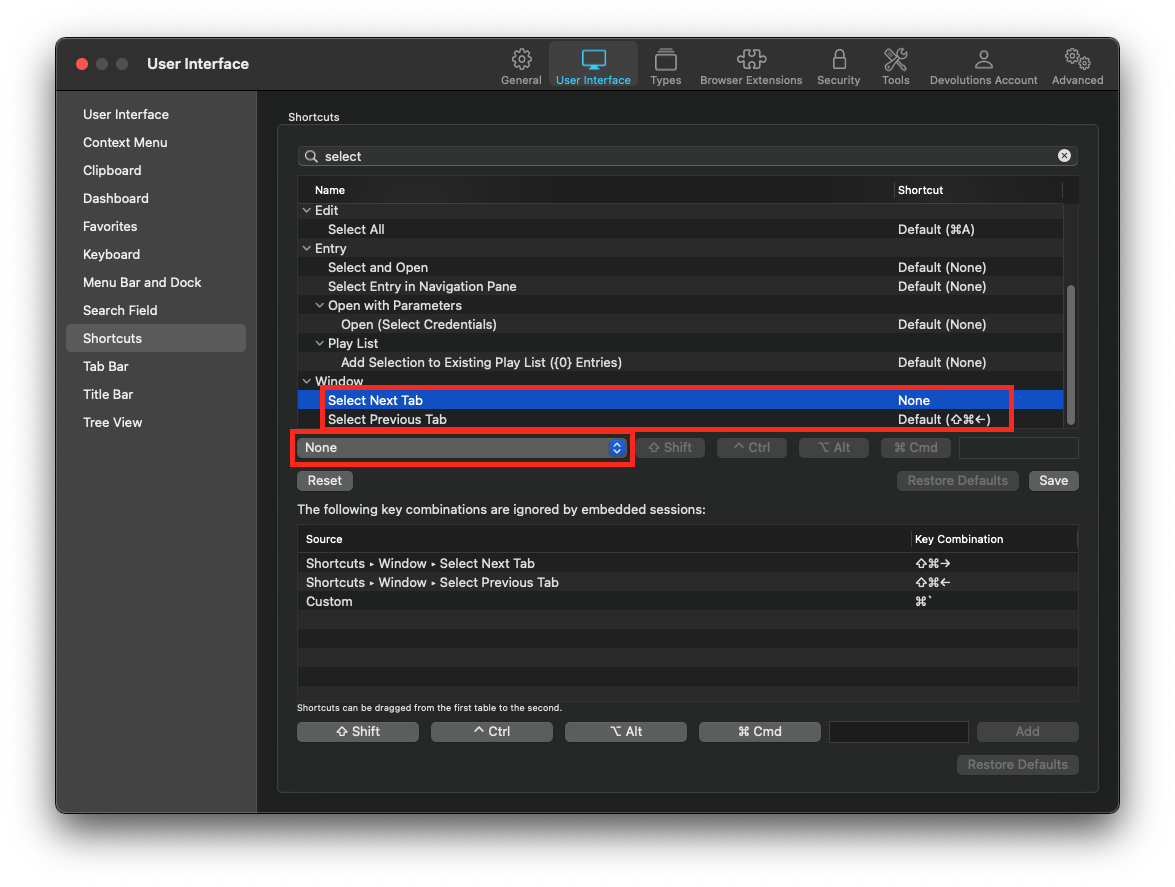
This should solve you issue.
Best regards,
Xavier Fortin
Shortcuts.png
Hi again,
I've also fixed it so the tab navigation shortcuts are inactive if a sheet is embedded in the window (e.g. entry settings view).
This will be available in the next release.
Best regards,
Xavier Fortin
that's the answer I was looking for and expecting from such a great product. thank you!
Hi,
Glad to hear it!
Do not hesitate if you have any other issues.
Best regards,
Xavier Fortin
Hi kknopp,
The version 2021.1.3.0 just got released. The Select Next/Previous Tab shortcuts should now be inactive when a sheets is shown over the Main Window (or over and undocked window).
Best regards,
Xavier Fortin
Installed and tested. All good now. thank you!
Hi kknopp,
Glad to hear it!
Do not hesitate if you have any other issues.
Best regards,
Xavier Fortin