RDM Not Flushing Active Connection Records

Hello,
Can anyone please advise if RDM has a known issue with not consistently flushing active connection records, when a user disconnects a session?
As below, see example of a user who connected on 8/04/21. They confirmed of course that they weren't still connected to the session 5 days later. It would be quite impossible actually, as the software VPN that user would've been connected to has an 8 hour timeout, even if they had carelessly left the RDM session open.
Strangest yet is that, after trying to connect to the remote server in question, I get two instances of this prompt 'This session is already opened...', both for the same user from the same date in time. Looking at the server logs with 'live session only' ticked and doing a manual refresh, the user entry from the 8th is still there. Even after close/reopen my RDM client, the results are identical.
I am unsure whether this is an isolated, freak incident affecting this one server, or if I will soon get reports of this happening all over the place (I've enabled the 'Warn if in use' prompt for 100+ servers).
Is this a known issue, and is there a preventative solution to ensure RDM accurately clears active sessions once the user actually closes them?
Note, I have manually solved this specific instance by right-clicking on the 'Opened session' row in the logs (see background of screenshot), and selecting the option 'Flag closed' on both rows. I no longer get the prompt after doing this, so I have successfully manually cleared the connection entry from RDM - But, ideally, I need RDM to do this consistently, automatically, for every server.
Any info the community can provide would be greatly appreciated.
Many thanks,
David _ Microsoft Teams.png)
2021-04-13 15_32_22-General (AUS IT Support) _ Microsoft Teams.png
All Comments (5)
Hello,
We've seen this issue in the past but were not able to pinpoint what could cause that behavior. A possible way to prevent this in the future would be to set an Automatic "Flag as closed" in Administration - System Settings : 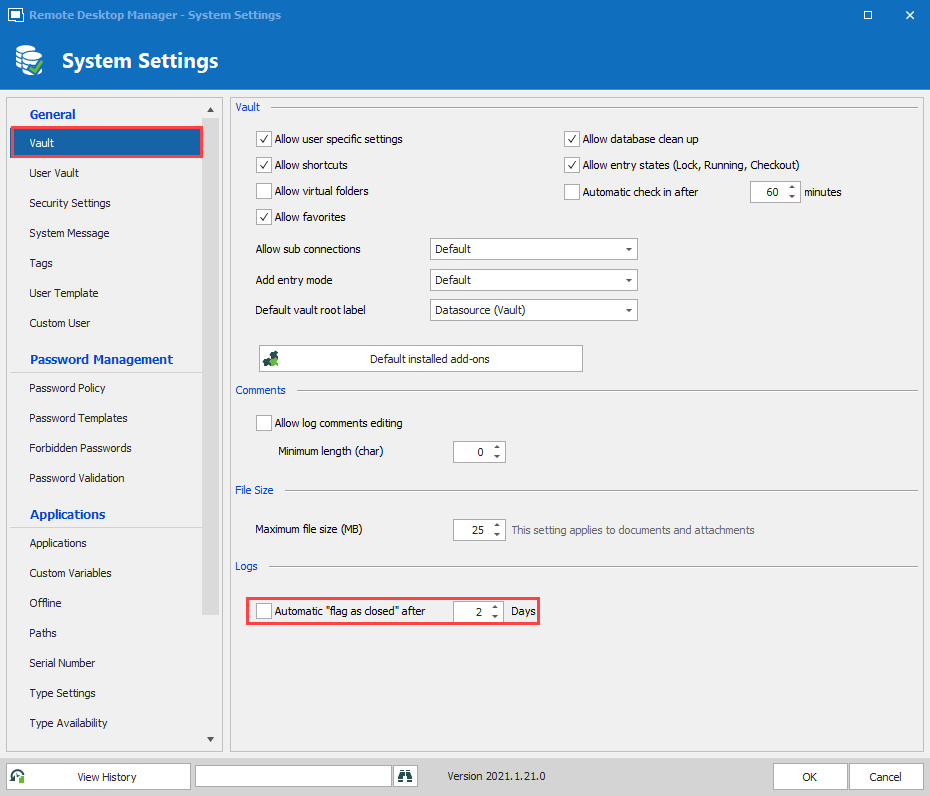
Best Regards,
Etienne Lord
flagasclosed.png
Thanks Etienne,
I only have indirect access to the Administration tab through another, so can't verify this personally - But I assume the lowest interval would be 1 day, and granularity of going to hours is not possible? (e.g. 0.1 days?)
Sadly, 24hrs of stale active connection logs will still leave 24hrs where our techs will unnecessarily call one another, asking to borrow a server, believing the other user is still logged on. The strangest thing is this issue is hard to replicate artificially; I can log onto any server, and while connected I'm in the active connection log, and as soon as I log out, it automatically clears me.
I will roll back this change.
Kind regards,
David
Hello,
I will see if there could be anything else that could be done about that, as you mentioned, the issue is not easy to replicate.
Best Regards,
Etienne Lord
Hello,
We will have a ticket open with our Quality Assurance team in order to see if they can reproduce the issue.
Best Regards,
Etienne Lord
Hello,
I forgot to ask, could you confirm your Data Source type?
Best Regards,
Etienne Lord