ribbon autohide broken?

after upgrading to 2021.1.20 I can't access the menus anymore.By default I have the ribbon hidden, but none of the menu entries does anything anymore
All Comments (5)
Hello,
Even if you click on the Blue top part of Remote Desktop Manager, the tabs doesn't appear?
If you make a right-click and check the Top Pane option, does it work? 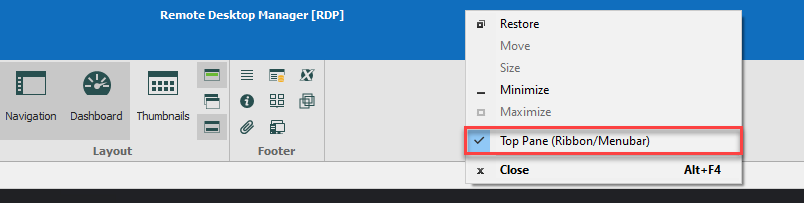
Best Regards,
Etienne Lord
toppane.png
ok, after some fiddling around and right clicking the top menu works now again. initially (after the update from 2020.x I suppose) it popped up (down) shortly and disappeared.
ah, ok, I see now. you can disable the top menu completely with unchecking the right click menu's entry but in this case, the auto hide selector button shoud disappeare as well I think. this confused me..
Hello,
You could try to perform a Window - Reset layout in Remote Desktop Manager to reset your UI and make sure that everything works fine. Otherwise, you were able to bring back your ribbon?
Best Regards,
Etienne Lord
thanks, everything is fine now.