Import Sessions (.rdm file) into MariaDB (Ver. 10.3.25) fails
Import Sessions (.rdm file) into MariaDB (Ver. 10.3.25) fails

Hi!
I'm trying to move the Session DB from DevolutionCloud to a Local MariaDB (version 10.3.25)
To do this I 1st creata the Export file (.rdm) and after I create an empty DB on My MariaDB database.
The DB initialization works fine.
But When I try to import the previusly exported DB - the IMPORT FAILS with this error (see attached file ).
I have no error if I try to import the same .rdm file on a MariaDB version 5.5.
Does the MariaDB 10.3 not supported for import sessions ?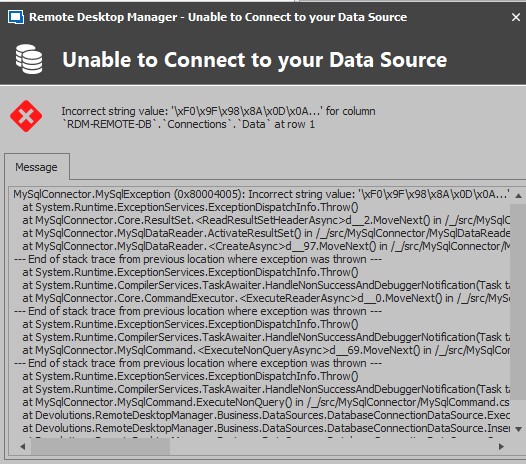
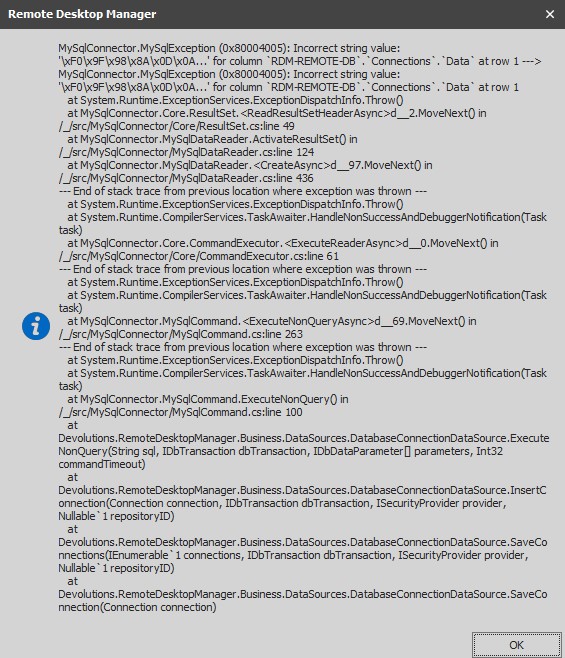
RDM Version 2020.3.29.0 (but tried also with 2020.3.25.0)
RDM-ImportError.txt
Screenshot_169.jpg
Screenshot_168.jpg
All Comments (9)
Can you please validate your character sets and collations on both MariaDB.
My guess is that the collations are different and importing the sessions fails due some sessions containing characters that are not supported on that configuration.
https://mariadb.com/kb/en/setting-character-sets-and-collations/
Best regards,
Stéfane Lavergne
My MariaDb data sources come from "Devolution OnLIne Drive" datasource.
The problem are some dirty char on "Devolution OnLIne Drive" datasource.
As I can see from Remotedesktop UI - I have a lot of this problem into session description.
For example:
So, the problem seems to be, first the collation of DevolutionOnlineDrive.. and as consequence, on the MariaDB...
How can I correct this ?
P.
Can you send me a sample of the text that should have been displayed instead of the "?????????"? If it's sensitive data, you can send me random gibberish of the same characters.
Devolutions Online Drive (DOD) should have no trouble with any character set so I'm curious to figure out what is going on.
My current guess is DOD ended up saving garbage characters when exported and imported are causing the MySQL data source to throw errors. Again, this shouldn't be the case.
I will investigate.
Best regards,
Stéfane Lavergne
Most of these char are special char from ITA keybord with accent like:
é, ó à ú etc...
P.
We are trying to reproduce the issue internally. Meanwhile can you please test exporting from your Devolutions Online Drive (DOD) and importing into a different DOD and into a local SQLite data source.
Best regards,
Stéfane Lavergne
Hi Stefane,
I made another test. Exporting the DB from DOD Source and Impoting int SQLite : Import was OK
The same export - Imported into the MariaDB 10.3 - give me ERROR
The Import into the MariaDB 5.3 Was OK too.
The problem seems related to the MariaDB Version 10.3
I found this post:
https://stackoverflow.com/questions/46802573/incorrect-string-value-error-python-mariadb
I do not know if is the same problem...
You can try changing the CharSet, we default to utf8 but you can try with utf8mb4 to see if it resolves the issue.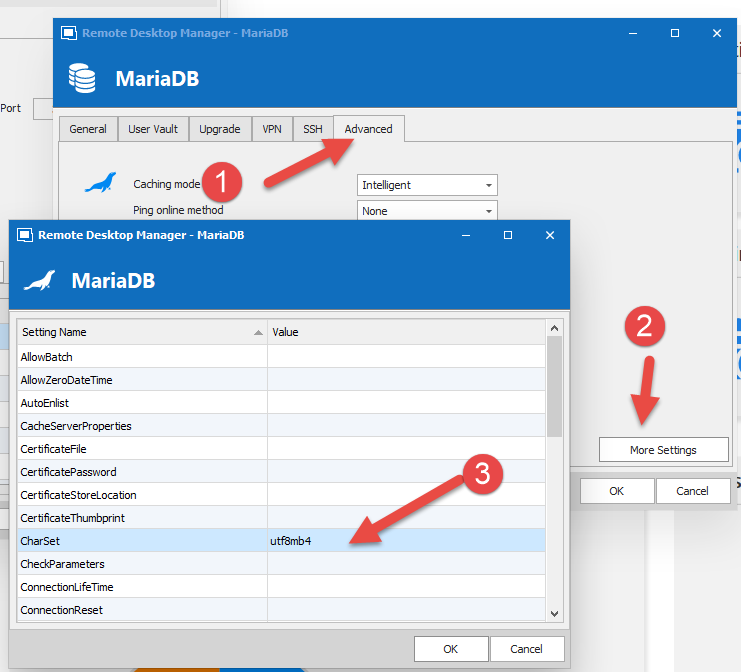
The other option is to compare the schema of both servers (MariaDB 5.3 & MariaDB 10.3)
Can do that by CTRL+click on the "Email Schema to Support" button. The CTRL will copy the text into your clipboard instead of sending the email.
Paste the values in any text compare tool (WinMerge for example) and check the difference in collation, this could also explain the issue.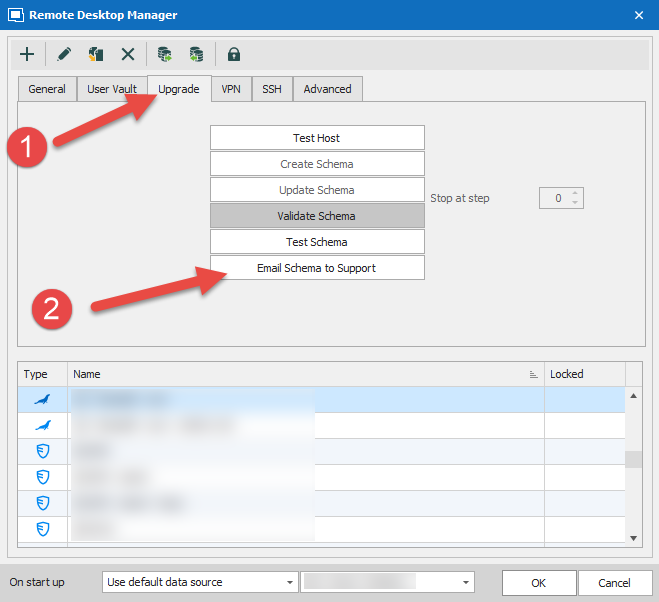
Stéfane Lavergne
CharSet.png
Schema.png
Hi!
Changing CharSet in advanced setting do not helps.
Comparing the DB Schema - highlight this:
MariaDB 5.3 (where import Works fine)
<Table>
<Name>AccessRequest</Name>
<Engine>InnoDB</Engine>
<Collation>utf8_general_ci</Collation>
<RowFormat>Compact</RowFormat>
<Columns>
MariaDB 10.3 (where import do NOT Works)
<Table>
<Name>AccessRequest</Name>
<Engine>InnoDB</Engine>
<Collation>utf8_general_ci</Collation>
<Columns>
In this case the : <RowFormat>Compact</RowFormat> is missing
This happens for all the tables..
In theory the row format should be Dynamic, we only output the value when not Dynamic, hence it's missing in 10.3 schema.
Could you compare the output on both servers the result of the following queries. It has to be a configuration issue so the question becomes which one?
show variables like "%char%";

show variables like "%collation%";
Best regards,
Stéfane Lavergne