Copy and Paste not working while Remote Desktop Manager is running
Copy and Paste not working while Remote Desktop Manager is running

Copy and Paste isn't working for me while Remote Desktop Manager is running.
I can't copy and paste on my local machine, or between RDP sessions.
As soon as I quit the application, local copy and paste works again.
I'm on Windows 10 20H2 and Remote Desktop Manager Free 2021.1.17.0
All Comments (11)
Hello,
If you head over to File - Options - User Interface - Clipboard - Advanced, what is your Clipboard copy method option set to?
Best Regards,
Etienne Lord
Hi, It's currently set to Legacy.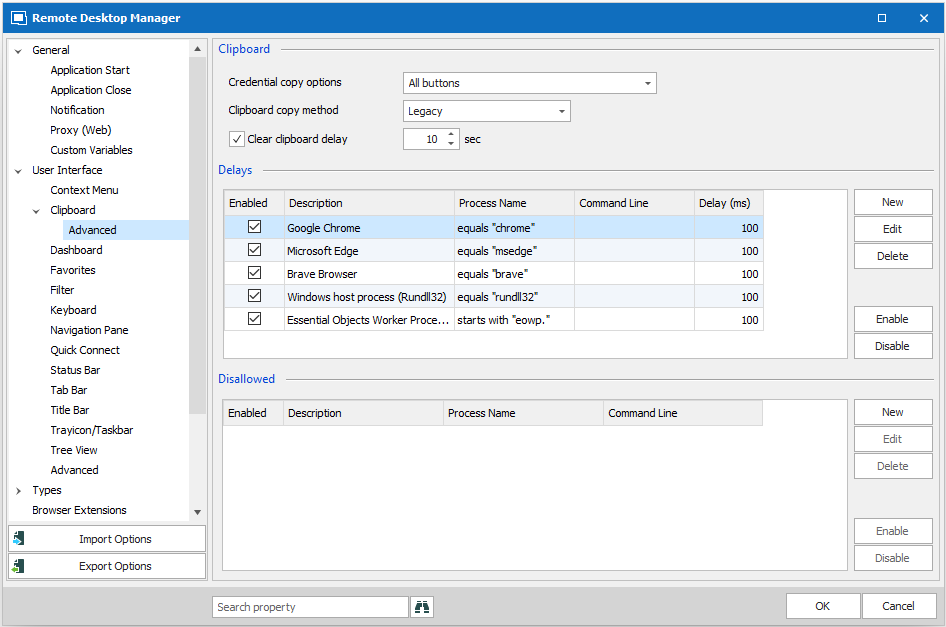
2021-03-26 09_36_14-Window.png
One other interesting thing is that I noticed when I have Remote Desktop Manager open, I get a Microsoft Office clipboard error. This error only appears when I have RDM open and have logged into an RDP session. In this situation, I was attempting to copy and paste data within an Excel worksheet on my local machine.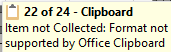
2021-03-26 13_53_39-^P ^b22 of 24 - Clipboard^b_^SItem not Collected_ Format not supported by Office.png
Hello,
We have a tool in Remote Desktop Manager to troubleshoot the clipboard issues, could you give it a try? You can refer to this topic : https://kb.devolutions.net/kb_clipboard_diagnostic.html
Best Regards,
Etienne Lord
Hi,
Just to make sure I understand your exact issue.
From what I can gather, you are not talking about the "Copy Username & Password", "Copy Username" or "Copy Password" buttons in RDM. Correct?
You are seeing issues which of the following scenarios? All?
- From RDP to different RDP
- RDP to same RDP
- Local to RDP
- RDP to local
- Local to local
Copy/paste is a very complex beast, I just want to make sure we understand your issue so that we can try to reproduce it.
Best regards,
Stéfane Lavergne
Any fix to this? I'm having the same issue with the latest release. If Remote Desktop Manager is running, no clipboard on the same machine, no clipboard between machines
OK I think I have it figured out. This only happened when I launched a Windows Server that was running Oracle VirtualBox. I'd have to suspect there's some kind of conflict going. If I run the virtual machines headless in VirtualBox I don't have an issue, if I launch them "Normal" *interactive* I have the problem. Hope this helps someone and helps a developer for the fix.
This is still a problem. Copying and pasting does not work (both on local machine and the machine I'm RDP-ing into) when RDM (latest available version as of today) is running. I have a RDP connection to a laptop running Oracle Virtualbox running a Windows Server 2022 VM.
Hello,
Could you try to use the clipboard diagnostic tool to see if the clipboard is being blocked? https://docs.devolutions.net/kb/remote-desktop-manager/troubleshooting-articles/clipboard-diagnostic/
Best regards,
Richard Boisvert
Estava com esse problema, fiz uma reconexão e voltou a funcionar.
I’ve run into something similar when using multiple clipboard integrations (RDP + Remote Desktop Manager + virtualization tools). Sometimes the Windows RDP clipboard monitor (rdpclip.exe) gets stuck or conflicts with other clipboard handlers, which can cause copy/paste to stop working both locally and inside RDP sessions.
Restarting the process on the remote machine often fixes it:
taskkill /f /im rdpclip.exe
rdpclip.exe
In some cases it can also help to reconnect the RDP session or check whether clipboard redirection is disabled by policy.
For anyone troubleshooting this today, this guide lists a few other common causes and fixes for RDP clipboard issues:
https://cloudzy.com/blog/copy-paste-not-working-in-rdp/
