Again: The Certificate for [domain] couldn't be verified

Hi,
from time to time we have a warning like this: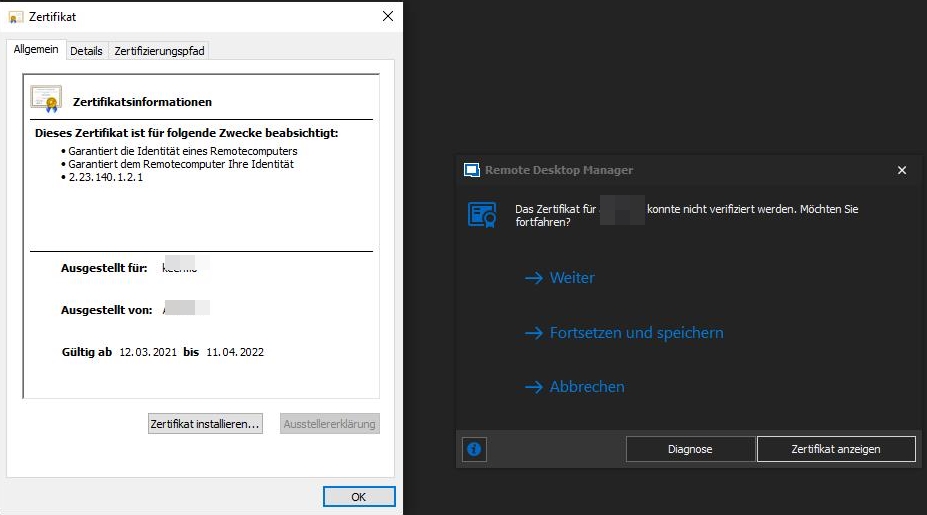
The .cer seems to be valid (tested via powershell), but I have no idea, where it has come from.
So - how may I find out, where this certificate is stored "inside" RDM?
Is it a certificate object? Is it an website-object? Is it legit? I have no idea of the relationship of this warning to RDM.
The existing discussions in this forum did not help me so far - so further help is appreciated.
Best regards,
Daniel
rdmwarning01.jpg
All Comments (15)
Hello,
Thank you for contacting us on that matter!
We have a knowledge base topic on the subject of these certificate prompts. I invite you to consult it :
https://kb.devolutions.net/rdm_certificate_validation.html
More specifically, once you have confirmed that the certificate is valid, you will be able to follow the instructions under the "Certificate Security Related Options" section to stop the prompts from popping up.
Don't hesitate to let me know if you have any additional questions on the subject!
Best regards,
Gabriel Degrandpré
Hello,
as far as I can see, the kb article does not answer my question, where the certificate "request" comes from.
It is an certificate regarding Amazon - but why does RDM connect to Amazon web-services?
Also it popped up suddenly.
Not, when opening a connection!
Just after RDM was started.
Best regards,
Daniel
Hello,
The validation of the certificate is made at the opening of RDM. This is why the prompt occurs at the opening.
The certificate is not store in RDM, but locally on your computer.
As explain in the KB provided above, is the validation successful or not? 
It's also possible to disable this validation in RDM as well. Let me know if it's something that you would like or not.
Best regards,
Jeff Dagenais
Hello Jeff,
a certificate on my local computer is the issue. OK. Understood.
But why do I see a warning inside of RDM, when starting and not anywhere else in Windows?
I do not see the context, why RDM shows a warning, but Windows does not. What has RDM to do with local stored certificates,
when just opening RDM?
KB: "When Remote Desktop Manager connects to a URL using the HTTPS protocol, it will validate the certificate using industry best practices"
And that is not the case - just opening RDM shows the warning. Not opening a website.
If it would happen, when I open up a website/URL from RDM, everything would be clear for me.
Is my concern understandable?
Best regards,
Daniel
Hello Daniel,
I understand your point. Since it is related to Amazon, do you happen to have any Amazon entries (Aws dashboard or S3 Explorer)? Could you also validate what version of RDM you are using (Free or Enterprise), as well as your data source?
If the certificate does not contain anything sensitive, could you send us a copy, it would allow us to investigate some more: https://api.devolutions.net/redirection/f621a158-4b6e-4752-8ecf-4c7d33fdbc57
Best regards,
Richard Boisvert
Hello Richard,
"do you happen to have any Amazon entries (Aws dashboard or S3 Explorer)?"
No - as far as I know. I don't use any Amazon services with my computer like AWS etc.
" Could you also validate what version of RDM you are using (Free or Enterprise), as well as your data source?"
- Enterprise
- 2020.3.26.0 64bit
I uploaded a screenshot of the certificate. I can't give you the certificate-file, because I have several Amazon related.
If a warning appears again, I could save the corresponding cert just-in-time.
Best regards,
Daniel
Hello Daniel,
I verified the screenshot of the certificate you sent us and it is for keen.io. We use keen.io inside RDM to collect data, similar to Google Analytics.
For example, this allows us to know how many users have installed RDM Free or RDM Enterprise.
Best regards,
Richard Boisvert
Hi Richard,
thank you. That clears things up a little bit.
Do you have a best-practice, how to act, when certificate warnings pop-up again?
I would prefer to decide, if allowed or not, but how may I, if my knowledge does not reach "inside" of RDM specifications?
Allways allow? Are there any vulnerability if doing so?
So, if I decide to stop the prompts from popping up within RDM, why is there even the posibility to let the certificates pop up - especially, when needed by RDM?
And: In which situations do certificates pop up, when not related to RDM?
Best regards,
Daniel
Hello Daniel,
Our best practices are in the link we had already sent you: https://kb.devolutions.net/rdm_certificate_validation.html
Once a certificate has been validated, you can use the Continue and Remember option to stop receiving the notification. If you ever want to review again those certificate, you can go under Files > Options > Security, as mentionned in https://kb.devolutions.net/rdm_certificate_validation.html?q=certificate#certificate-security-related-options
You could enable the Ignore application certificate errors option (same location as above) but it is not recommended, since you would never receive a prompt if a certificate is not valid.
If you wish, you can Disable telemetry and the Disable user gravatar (or use the No Internet Connection option), it would remove the need for those 2 certificates. In RDM, under File > Options > Advanced
If you wish to read more on your privacy, you can do so here: https://devolutions.net/legal
Best regards,
Richard Boisvert
Hello Richard,
it is getting to the point, but again - I think my core issue is not clear for you.
You have mentioned the same kb-articles multiple times, but they are so general, that one may not see the coherences.
It's clear to check, if a certificate seems to be valid, but without knowledge of the purpose, no one can tell, if it is legit.
Even if you point me a hundred times to the same kb-articles - they were not helpful (also not for my colleagues, which read through them), but you answer was.
It first got clearer as you mentioned "I verified the screenshot of the certificate you sent us and it is for keen.io. We use keen.io inside RDM to collect data, similar to Google Analytics." and the advanced options screenshot
Best regards,
Daniel
Hello Daniel,
I understand your concern, if you are unsure about why a particular certificate is used, you can always contact us https://devolutions.net/contact or write on the forums. I will verify with the engineering team if it is possible to specify why a particular certificate is used or being prompted directly from RDM.
The KB contains our general best practices regarding certificates and hence why it was referenced, but as you mentioned, it was not applicable for your request.
Best regards,
Richard Boisvert
Hi Richard,
thanks for your quick reply. The conclusion for me is:
- If we encounter a warning with an unknown certificate -> contact to Devolutions
- If we encounter a warning with a certificate related to a configured session/url/website inside RDM (by us), we could research the issue on our own
Good weekend and best regards,
Daniel
Hello Daniel,
That would correct on both accounts. We are always happy to provide information on a certificate used by our tool, and we provide tools to validate them on your end if necessary.
Have a great weekend,
Richard Boisvert
Hi,
This Mathieu Morrissette from the Devolutions Security Team.
I just wanted to let you know that we have made changes to the certificate validation mechanism in RDM 2021.2.9.0 and above that should solve issues some users were experiencing.
Let us know if you still have the certificate warning message.
Best regards,
Mathieu Morrissette
Hi Mathieu,
thank you for the update.
Best regards,
Daniel