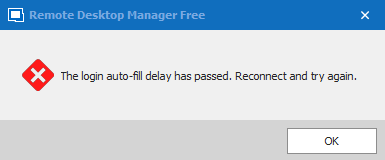
Web Login: The login auto-fill delay has passed

It looks like the web auto-login has recently changed, and not for the better. I have a bunch of saved connections to web pages using Chrome (ESXi servers, iDRAC, etc) and have the passwords saved. It used to work just fine. When the web session with the target logged out, i was able to hit the key icon in the tool bar and it would enter my credentials again and auto-login for me. Now as of a few versions ago, this stopped working and has effectively rendered the feature useless. It will not auto-fill passwords.
I frequently work with multiple servers at the same time and need access to the iDRAC and ESXi configuration pages. Over the course of the day, they are bound to log me out due to inactivity. When i found this feature in RDM, it changed the way i was able to work. I did not have to keep entering the same mundane password in 100's of times per day. Now that feature is broken.
The workaround seems to be to "reconnect" to the tab and it will re-login. This is very frustrating as it takes a lot more time to do so. And it effectively closes the tab and the reopens the tab which causes the entire working area to redraw and change focus. It's incredibly annoying to have to do that to multiple tabs at the same time. Objects are moving on the screen and the tab position is changing. On a side note, please fix this too. Keep the tab open....do not redraw the tab and open it as if it was new. Just refresh the tab where it is and reconnect. Leave the tab bar unchanged and just refresh the contents of tab. This happens for every type of tab that i've worked with (SSH, Chrome, RDP).
Please tell me how to fix this and go back to the way it was. 
2021-03-17_16-03-01.png
2021-03-17_15-37-48.png
All Comments (4)
Hello,
Thanks for contacting us.
For the auto-fill delay timeout, we added this in 2021.1 as a security improvement to prevent the credentials from being used if the tab was left opened while having the datasource disconnected. I understand that for your use case this is a big inconvenience. I've opened a ticket to change the default behavior of this security improvement. For your case, you won't have to change anything and things will go back as they were in 2020.3. The security feature itself will be moved to the vault settings as well as a GPO. I've already assigned a dev and we'll let you know in this thread when we have made the changes.
For the reconnect behavior, it's not that simple but if you only need this for a few entry types we can work on that. You mention RDP, SSH and Web, are those the entry types for which you'd like to see a new reconnect mode?
For RDP specifically, there already is an option to change how it reconnects. In the RDP entry, you can change the "reconnect mode" to one of four modes: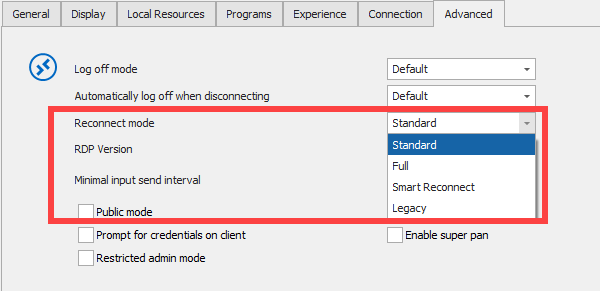
By default, "standard" should be what you're looking for, maybe your entry is configured on "full".
Regards,
Hubert Mireault
2021-03-18_8-00-07.png
Thank you for the quick response. Yes...RDP, SSH, Chrome are really what i need 99.99% of the time. I will check that setting out. Thank you for that. Does that only work for RDP though? Is there a similar setting for other connection types?
As for the security feature...i understand the point of it now. Thank you for the explanation. I'd be fine with changing my config to a lower security model. Just as long as i have that option and can set that globally, or at least batch edit that setting across all my sessions.
Thank you Hubert. I look forward to the next version soon! :)
I currently use RDM in portable mode (so the binaries/config syncs across dropbox). If i was to unzip the 2020.3 version into the folder and overwrite, would it effectively downgrade me to the older version?
Unfortunately only RDP has something to that effect already implemented, since the request never came up for other entries. I've noted in the ticket to focus on SSH and web entries (both web browser and websites).
As for downgrading when using a portable version, we recommend creating a different folder, and taking the .CFG file and copying it there (that file holds most of your configuration settings). It's to avoid possible issues regarding files that may be required by one version but not another. If you need any additional help on that end we'd be happy to assist.
Regards,
Hubert Mireault
Hello,
The "The login auto-fill delay has passed" message security feature will be hidden behind a system setting or GPO starting from RDM 2021.1.20.0. Unless you activate one of these options, you will not be prompted again.
Regards,
Michaël Beaudin