Share datasource id

We are using a shared database to store all rdm sessions so that all users have access to the same sessions if needed.
I'm looking at the advanced options to improve some complex connectivity issues that I'm trying to fix (ie: tunnel within tunnel) and was hoping to use command line to call other sessions in the Before Connect options.
However I have noticed that the datasource id is different for each user. Is this expected?
Is there a way to run the command line for each individual user to call the same session even though the datasource id is different?
The Database ID is the same for all users, it's just the datasource id and session id that are different.
"C:\Program Files (x86)\Devolutions\Remote Desktop Manager\RemoteDesktopManager64.exe" /DataSource:7bea5029-c29b-4637-b109-c9e605bc2222 /Repository:6f5d1225-6302-4079-9918-4be2a7b82999 /Session:3a762525-f342-494f-b173-da95f2e70d33
All Comments (11)
Hello,
What version of RDM are you using?
What type of datasource are you running exactly? Is it SQL Server, SQL Azure, MariaDB or MySQL ?
Best regards,
Jeff Dagenais
I'm running v2020.1.20 and using SQL Server as the datasource.
Hello,
It's possible to use the database ID instead of the datasource ID. To collect this information, edit your session and go in the Entry Information section.
The database ID is at the top. Using the Create desktop or Create web URL button should help.
Best regards,
Jeff Dagenais
Do I need to change the syntax as well for the command line option?
It doesn't work by swapping the value."ERROR: Data source not found!"
I changed /datasource to /database and that doesn't work either.
What's weird is when I copy using the WEB URL it works.
ie: This works
rdm://open?DataSource=BF54252B-87E7-4B7F-8B9B-E0429FEFD123&Repository=6f5d1225-6302-4079-9918-4be2a7b82999&Session=3a762525-f342-494f-b173-da95f2e70d33
This doesn't work
"C:\Program Files (x86)\Devolutions\Remote Desktop Manager\RemoteDesktopManager64.exe" /DataSource:BF54252B-87E7-4B7F-8B9B-E0429FEFD123 /Repository:6f5d1225-6302-4079-9918-4be2a7b82999 /Session:3a762525-f342-494f-b173-da95f2e70d33
What I also noticed is that the WEB URL automatically copies using the Database value, whereas creating the desktop shortcut uses the Datasource value and needs to change manually.
btw, I don't have 'Entry Information' in my version. It's all under 'Advanced '
Hello,
What version of RDM are you running?
What type of entry would you like to open with that method?
Best regards,
Jeff Dagenais
As above, v2020.1.20
It will be for RDP or SSH session. We also currently use it for AD sync sessions since we need to establish the ssh tunnel before we run the sync, otherwise it clears all entries.
Unfortunately this means only one user can use it since it links to the datasource id.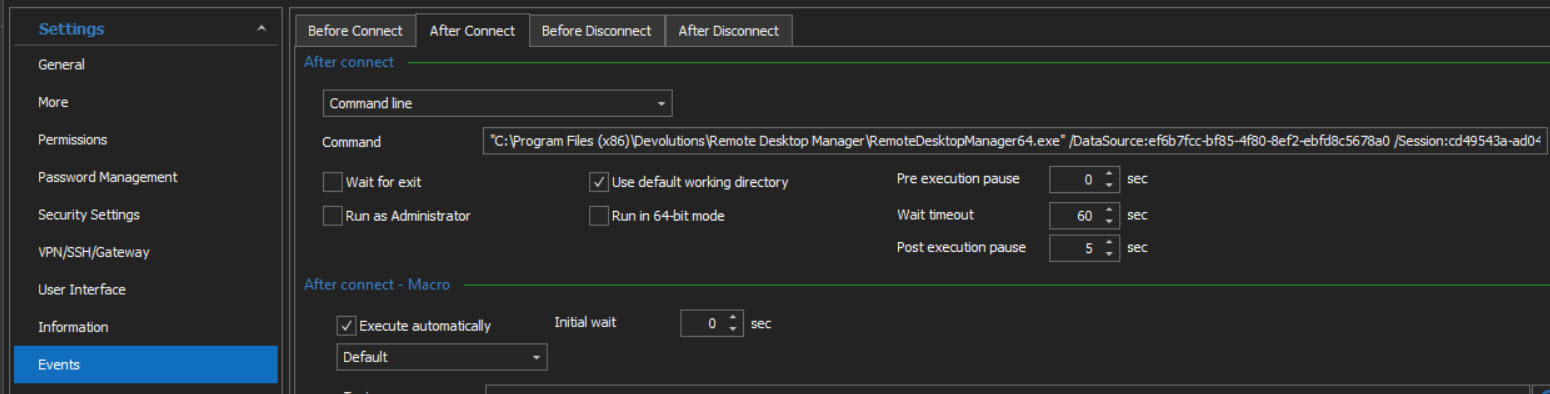
I was also trying to use this for multiple ssh tunnels (see https://forum.devolutions.net/topics/35355/multiple-ssh-tunnel-hops) although it seems that won't work as it opens a new RDM application each time anyhow.
2021-03-22_12-13-34.jpg
Hello,
In RDM 2021.1.16.0, there's a command line button as you can see below, however, it's not the databaseID, but the DatasourceID
I think that the issue is there. If the databaseID was copied, it will resolve your issue. 
Let me see what can be done with our engineering department and get back to you.
Best regards,
Jeff Dagenais
Hello,
I had a chat with our engineering department and could you try the same command line, but without the datasourceID argument ?
Let us know if it's working or not.
Best regards,
Jeff Dagenais
So instead of "C:\Program Files (x86)\Devolutions\Remote Desktop Manager\RemoteDesktopManager64.exe" /DataSource:7bea5029-c29b-4637-b109-c9e605bc2234 /Repository:6f5d1225-6302-4079-9918-4be2a7b82b99 /Session:f2ed07b3-e510-4b96-bd0f-bdbde5ce4b62
I should run "C:\Program Files (x86)\Devolutions\Remote Desktop Manager\RemoteDesktopManager64.exe" /Repository:6f5d1225-6302-4079-9918-4be2a7b82b99 /Session:f2ed07b3-e510-4b96-bd0f-bdbde5ce4b62
Unfortunately this also doesn't work. It still gives ERROR: Data source not found!
That's ok though as it doesn't perform as I need anyhow. I don't want it to open a new RDM application. I was hoping to open within the same application session.
Hello,
Thanks for testing.
I will check with the engineering department if something can be done for the second RDM opening.
Best regards,
Jeff Dagenais
Hello,
My brain was probably off last night and I forgot an option that you could enable regarding the opening of your RDM.
Could you go in File -> Options -> Advanced and check the option Allow Multiples instances. I think this is the option that you are looking for
On a side note, I read your post from the beginning to refresh my memory and you mentioned using this "script" method to launch a tunnel prior to the connection.
Have you tried to configure the tunnel in the VPN/SSH/Gateway section of your entry?
In the Type dropdown, select Session and then, go in the Settings (Session) tab to select the Tunnel that you would like to open prior to establish the connection

Best regards,
Jeff Dagenais