What is Azure AD host option?

In a RDP entry, there's an option to enable "Azure AD host". What does this do? Does it simply prefix your username with ".\AzureAD\" in the background? So rather than typing in this in the username field:
.\AzureAD\blah@domain.com
You only need to type:
blah@domain.com
?
--------------------------------------------------------------------------------------------------------------------
I'm always using the latest beta RDM x64 version.
Local data source.
All Comments (8)
Hello,
You are correct, the Azure AD host option takes care of the username formatting without having to specify the ".\AzureAd\". This also means that the username and domain can be entered in their respective fields.
Best regards,
Richard Boisvert
What do we have to change to make this work? At one point I had it working with all sorts of acrobatics around the RDP settings, and so forth. But that quit working months ago without warning.
I guess I'm looking for a document that shows *all* the requirements for being able to log on to a computer that's AAD-joined.
Hello,
What version of RDM are you currently using?
The Azure AD host option simply changes the username formatting, so if, for example, NLA has to be enabled (or not), it would still need to be manually changed in the RDP configuration. Once you find all the correct settings, you can then create an RDP template for your Azure AD joined machines.
Best regards,
Richard Boisvert
I am using 2021.1.36.0. Turns out I had to deactivate "Activate NLA" in RDM, properties, Connection tab, as NLA was disabled at my remote VM.
In this scenario my host computer is on a different domain, the remote computer is AAD-joined to a demo M365 tenant so it's not connected to our tenant.
Previous instructions I had gotten from the forum said to enable the Activate NLA setting. When I turn NLA on at the remote computer, I can't connect... maybe because they're on separate domains?
Just putting this here for anyone else who comes across it.
Hello,
Thank you for reporting back your findings!
NLA is often an issue when an RDP connection is failing, we often mention toggling the switch to see if it fixes the issue. As I mentioned, you can create an RDP template and use it for subsequent connections so you do not need to disable it every time. You can also do a batch edit to modify your current connections.
Best regards,
Richard Boisvert
Just thought I'd put in my 2 cents here. On the RDP connection in RDM on the Authentication tab settings ensure that Warn me is selected and Enable Network Level Authentication (NLA) is unchecked: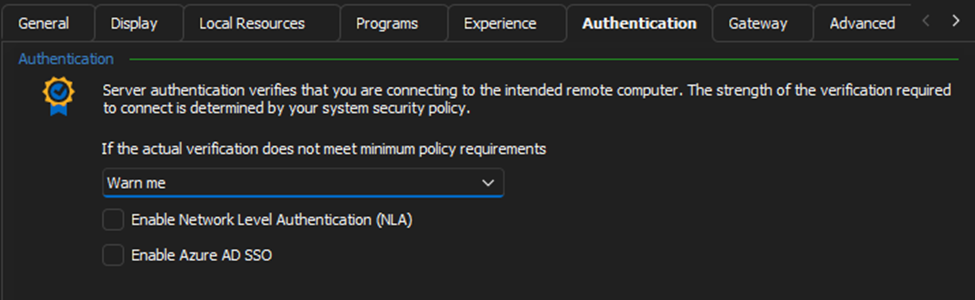
By selecting the Warn me option instead of leaving the Default (Connect and don't warn me) we get the opportunity for the security warning to display: 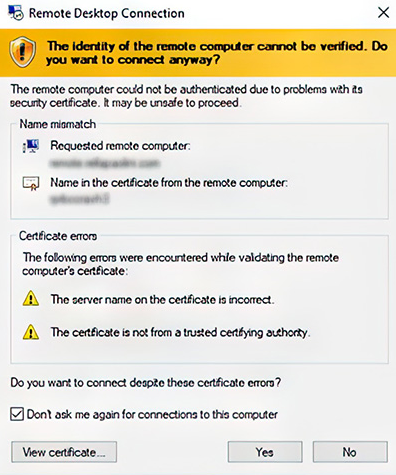
If the default option is left than the connection will fail with the usual authentication error:
53211b56-f10c-4eb0-8ad1-422e09ad3e49.png
d1164455-721b-4078-94c4-4d9e88d7e297.png
Oh yeah, thanks for that!
Oh yeah, thanks for that!
No worries Bro! ;)