Edit Clientname (hostname?) on RDP-connection

We're trying to use this to RDP with several devices, but the app we use on the other end needs a unique Clientname for each device using the application.Ive looked around to see if theres an option for this but i keep running around in circles and i cannot find useful info from googleing the issue because im not too sure im using the right terms here.
However, when I check Task Manager > users > Client name it says "localhost" this is the client name id like to change. Anyone know if theres an option for this?
Any help at all is greatly, greatly appreciated, and do let me know if you need more info and ill get back with as much as i can!
Thanks in advance!
UPDATE: If you are here for a solution to this - this has been resolved, see how to here: https://forum.devolutions.net/topics/35259/edit-clientname-hostname-on-rdpconnection#157163
All Comments (24)
well, how do you achieve this outside of RDM?
I've looked at possible fields in the RDP file format, as well as the many interfaces available to us, but nothing pops as being available for what you describe.
Maurice
Hello Maurice, and thank you so much for engaging!
Well, normally we'd use a windows mobile-device but we are switching to android. On windows mobile the client name would be the hostname of that handheld device. Same thing goes for when connecting from windows, on the remote destination your logins clientnamne will always be the hostname of your pc. But on android -for some reason- you can not use a unique id it allways gets set to (in my case model + osversion) TC5210, this wont work since were gonna have a few devices of the same model and all on the same os version. And after trying a few RDP-clients with no luck, "localhost" shows up in RDM, which leads me to believe that RDM is able to change the clientname, i just dont know if its editable for the user and if thats the case - where is the setting?
Since my post i've actually found an RDP-client that can manage to change the clientname, but that one seems... well lets just say its no where near as refined as RDM. Its called aFreeRDP and there you have Settings > Client > Client Name, whatever you put into here shows up as client name on the remote destination. but i hope that there's a setting in RDM that im yet to find so I dont have to use "aFreeRDP".
Im not too sure what happened here, I got an email stating that Samuel Dery replied to this thread but I cant find his reply here, thought I'd answer his questions here anyway;
Hello Samuel and thanks alot for the reply!
Im not at liberty to share screenshot of the problem inside the application since that contains sensetive data. But Im not alone having this problem, here's an old thread describing the issue; https://remotedesktop.uservoice.com/forums/272085-remote-desktop-for-android/suggestions/8120622-allow-entering-the-device-name-for-each-rdp-connec and some more info here: https://social.technet.microsoft.com/Forums/ie/en-US/0b4bd006-7440-4c6a-8b3c-17ccea9600d8/microsoft-rdp-client-on-android-quotclientnamequot-its-not-correct?forum=winRDc and here: https://social.technet.microsoft.com/Forums/en-US/5abca2ed-131b-412e-8e63-97b7ee9ed5ec/change-android-device-name-using-rd-client-is-it-possible?forum=winRDc
The last link describes my problem the best, as far as I can tell at least (as mentioned, this is not my specific area of expertise). Basically; We have an app on the other side that requires the connecting clientname to be a set value (that we predefine inside that app). There can only be 1 device with the same clientname connected at the same time and thereby we need to be able to set clientname on each device (RDM client) so we can have multiple simultaneous connections.
The other RDP-clients ive tested is both of the Microsoft RDP apps "remote desktop 8" and "remote desktop", "aFreeRDP" (mentioned above that actually have this option but lack quite a few important features), "aRDP Free" is another one, and of course "RDM".
Hi,
What is the option that you mentioned on "Remote Desktop 8"? Is it the "Friendly Name" option that can be set when you tap on "Show additional options?
Best Regards,
Nicolas Dufour
Hi Nicolas and thanks for the reply!
No, that option seemingly does nothing in regards to the client name.
Ok, so what is the option in "Remote Desktop 8" that you set for the client name to work?
Nicolas Dufour
Yeah, well thats just the thing, there is none. Not in Remote Desktop 8 or in any sensible RDP-client for that matter. The only RDP-client that offer this option (that i've found) is the above mentioned "aFreeRDP".
Ok, thank you for the info. We will investigate.
Best Regards,
Nicolas Dufour
Hi,
We have added your request to our todo list. We will let you know once it is done or if we encounter implementation issues.
Best Regards,
Nicolas Dufour
Thanks Nicolas!
Wow, this is amazing news!! Do you know any timeframe for a solution, like are we talking weeks or years?
We've come across this problem because we need to find a solution as soon as possible so it would be nice to know what kind of time we're talking. I fully understand that you cannot promise anything specific, just asking approximately how long you might think it'll take you know, weeks, months or years.
Thanks again! Really appreciate this!
Hi,
If everything goes well, we should be able to make it fit in the May/June release.
Best Regards,
Nicolas Dufour
Hey!
Revisiting this thread to see if something has happened, is there a fix for this to make it so it does not enter the RDP-session with "localhost" as clientname? I just tried and it seems to still be localhost and can't figure out how to change it, am I just missing the setting or is the change not yet implemented?
EDIT: I found the setting! This is just fantastic! Thank you so, so much for this feature, you guys are amazing!
Best Regards,
Filiph
Hi,
You will find this setting under:
1- Application settings
2- RDP settings
3- Client name
Best Regards,
Nicolas Dufour
I am unable to find how to get to this setting in RDM Version 2024.2.16.0 64-bit (Windows client) ?
This setting is for RDM Android. Are you referring to RDM for Android or RDM for Windows?
If you are referring to RDM Android, this setting is now under:
1- Application Settings
2- Sessions
3- RDP
4- Client name
Best Regards,
Nicolas Dufour
Is there any similar capabilities in RDM for Windows? or RDM for iOS?
We similarly have a remote accessible APP that relies on the Client Name to configure defaults for a give location (e.g printers, folder redirection etc)
This setting is for RDM Android. Are you referring to RDM for Android or RDM for Windows?
If you are referring to RDM Android, this setting is now under:
1- Application Settings
2- Sessions
3- RDP
4- Client name
Best Regards,
Hello
The official control / API provided by Microsoft on Windows doesn't give a way to override this value, unfortunately.
We do have a couple of possibilities of how this could work. I could easily expose this via FreeRDP - that's the same RDP backend that's used on our mobile apps, and it's an option in RDM Windows (in the RDP session "Advanced" tab, under "RDP Version"). Our FreeRDP integration on Windows is not quite as polished as on other platforms, as generally users will use the Microsoft backend on Windows. Maybe you can try it and see if it works well otherwise for you before we add the new setting?
We might also be able to achieve this with the Microsoft backend by using API hooking. I'll check with the relevant developer if that looks like a possibility.
Regarding this setting on iOS, there's nothing that prevents us from having it - I'll ask one of the mobile team to comment on that.
Please, let me know if something isn't clear or you have further questions
Kind regards
Richard Markievicz
Hi,
The Client Name setting is also available on iOS and can be accessed in the same way as on RDM Android.
Best Regards,
Nicolas Dufour
Hello once again
Further to what my colleague wrote above; another developer has already added the option we need exposed from the MS RDP ActiveX control, so we can now set this "hidden" option on Windows too.
We still need to hook that up to the RDM UI, I've made a ticket for that but we should be able to do it pretty quickly. I'll update this post once I've some more news.
Thanks for your patience
Kind regards,
Richard Markievicz
Hello again
I wanted to update you that I've added this option to RDM Windows, and it will be available on the next release. I'll try to update this thread once that's available.
In the meantime, please let me know any other questions or comments
Kind regards,
Richard Markievicz
Hello
Thanks for your patience. If you update RDM Windows to the latest 2024.3.15, you'll find this setting in:
File > Settings > Entry Types > Sessions > Remote Desktop (RDP) > "Override client name"
And it should work with embedded RDP entries (if you're using mstsc - the default - it also requires that API Hooking be enabled in the above-mentioned settings panel, but that is also the default selection).
This should be broadly the same as how that setting is implemented on RDM Mobile. Please, let me know if you have questions or other feedback.
Thanks and kind regards,
Richard Markievicz
I can't find on a given remote desktop session, where I can enter the override client name?
e.g MyHub (XXXXX) --> (><) RDP00123599.gov.au --> Properties
Hi,
Specific sessions cannot be overridden. Once set in the application settings, the client name applies to all RDP sessions.
Best Regards,
Nicolas Dufour
I found it - but it may benefit from a label - in Dark Mode the new [_____________] that appears next to it when you flick the select to "Yes" is not that obvious.
May infact be best to default set it (when blank) to the current computers client name - as users may want to the alter it to something similar for their internal client naming convention.
Example for us it would "DXC0231868" and the client I want to test as is "DXC0233444" to check how the software response and default get set etc.
cheers,
JonHD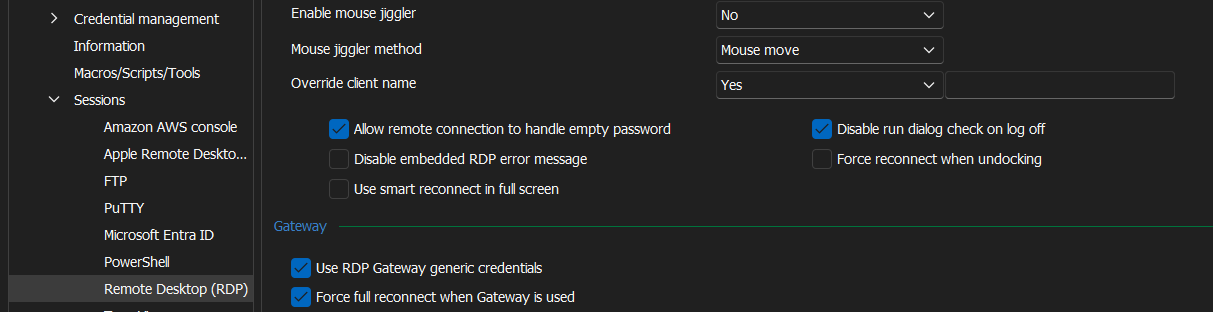
73864d9a-7f2b-4017-afe6-8cec8ce12853.png