DUO 2FA not working since update to version 2020.3.4.0

The 2FA windows appears clicking on "Push" let me receive my Duo message on the iphone, after accepting nothing happens. The 2FA windows stays open and seems waiting for confirmation. I waited up to 5 mins after confirming the login, nothing happend. If I choose SMS I instantly get my Code and authentication works like a charm.
On another mac running version 2020.2.0.0 the 2FA push with DUO works flawlessly.
Any advice what I´m doing wrong here?
Regards,
Andrew
All Comments (9)
Hi Andreas,
Do you remember the version you were using (that was working) before updating?
Best regards,
Xavier Fortin
Hi Xavier,
sure, it was version 2020.2.0.0.
Regards,
It stopped working directly after 2020.2.0.0 (i.e. started with 2020.2.1.0)? Or you've jumped directly from 2020.2.0.0 to 2020.3.4.0? I'm asking this just to see if I can narrow down where the issue might have started.
Xavier Fortin
Did some testing, installed all versions from 2020.2.0.0 to 2020.3.3.0 one by one - DUO 2FA is working well. Only version 2020.3.4.0 is faulty.
Solution: Do not update to version 2020.3.4.0 unless you are not using DUO 2FA.
Regards
Thanks for this! It is very appreciated, we will look into this.
Xavier Fortin
Could you reproduce the issue and, immediately after, send us your application logs (Help -> Application Logs -> Open).
You can send them to me directly: xfortin@devolutions.net
Best regards,
Xavier Fortin
Hi,
We might have a clue on the issue. Could you try changing the timeout in your DVLS configuration (from 5 seconds to 30 seconds for instance)? Here: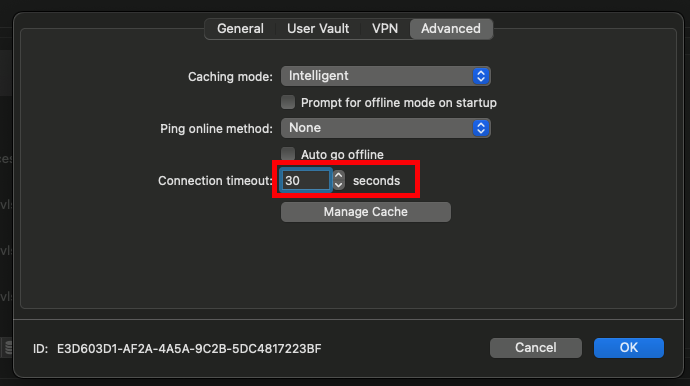
Best regards,
Xavier Fortin
DVLSTimeout.png
Hi Xavier,
you are absolutely right. Increasing the connection timeout to 30s did the trick :-). I confirm, DUO Push 2FA is now working again with version 2020.3.4.0.
Thank you for investigating.
Regards
Hi,
Glad to hear it! We'll still look into making this work even with lower timeout.
Do not hesitate if you encounter any other issue.
Best regards,
Xavier Fortin