Increase number of characters in Navigation Pane?

Is it possible to increase the number of visible characters in the tree view of the navigation pane? It looks like it cuts most of mine off after 11 characters although some show 13. The width of the navigation pane doesn't matter.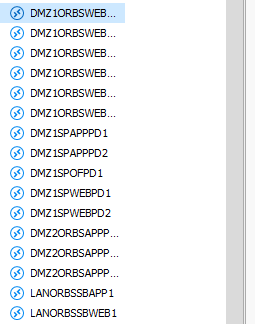
Navigation Pane.PNG
All Comments (6)
Hello,
At the top of the tree view, you can increase the size of the column (the line to the right of the name). You can also right click the column to select best fit to increase its size.
Best regards,
Richard Boisvert
Haha, thanks! Easy enough. My feature suggestion would be to have it default to Best Fit if you resize the Navigation pane
Hello,
Thank you for your response!
After doing some digging up, it seems we already have an option that should spare you the trouble of using Best Fit to readjust the size of your columns.
Under File > Options > User Interface > Advanced, if you enable the option "Auto size tree list columns", the columns of your Navigation pane should automatically adjust to avoid cutting off their content.
Best regards,
Gabriel Degrandpré
Sorry for digging this up again, but it seems it is not possible in the 2023.1.23.0 version anymore.
Or the naming changed, but i can't find it :)
Can you please tell me where to find this setting?
Many thanks.
Hello Matthew,
could you please try this setting, which can be found at User Interface => Advanced => Enable column auto size width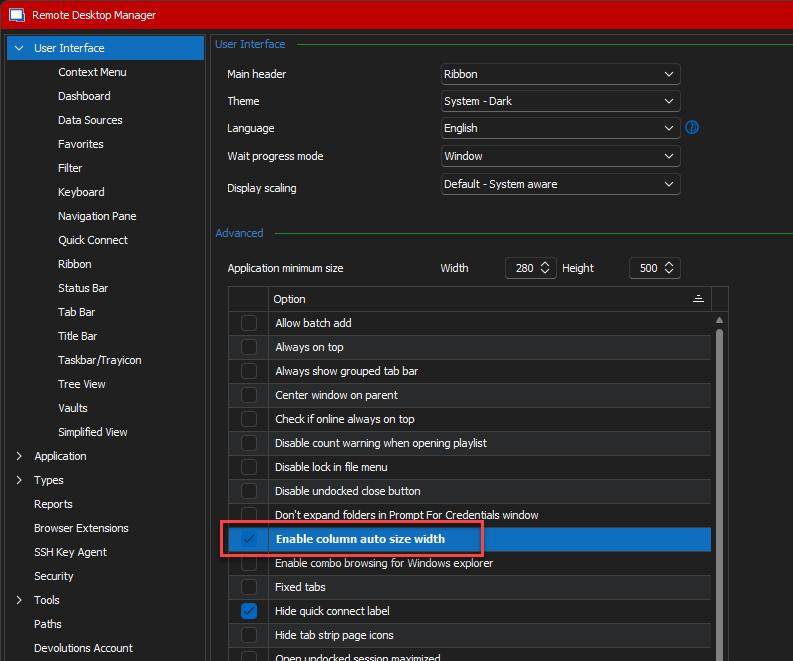
Regards,
Min
0bc1abfd-b79a-42d0-ae80-96370a4e85b0.png
Ahhh...damn :D
Thanks.
Somehow i overlooked the thin little line to manualy adjust the size.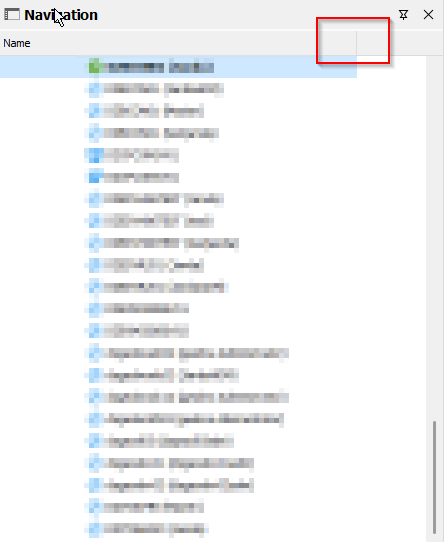
Because my navigation frame was thinner and the "colume line" was not visible.
Many thanks for the help and sorry for the stupid question.
ce7af61c-398d-429d-8913-fc530633e3ad.png