Tabs auto-switching

I opened a few browser based tabs, and click simultaneously links inside them.
When page loading finished, tabs starts auto-switching between each other. That jumping can be stopped by clicking tab title, but it's VERY annoying.
Ordinary browser never do it - it just silently finishing loading in background.
Please, fix that behavior.
All Comments (5)
Hello,
Thank you for contacting us on that matter!
Would it be possible for you to go under File -> Options -> User Interface -> Tree View and make sure that the option "Autofocus tab on item select" is unchecked? With this option disabled, you should be able to launch your web entries without having your focus go back to the one that finishes loading.
If that does not work for you, could you please tell me which version of RDM and what type of Data Source you are currently using? Are you on the Free or the Enterprise edition?
Best regards,
James Lafleur
Hello,
Our QA department has just informed me that they have been able to reproduce this issue when IE is used as the embedded browser in RDM.
A ticket has been opened with our Engineering Department in order to fix this.
In the meantime, the workaround is to use Chrome instead of IE as your embedded browser in RDM: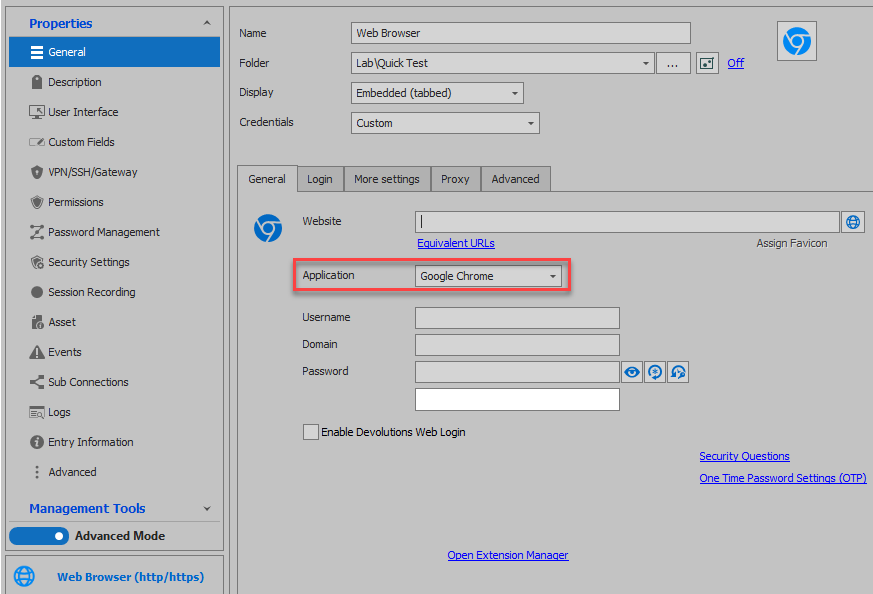
We will inform you once a solution has been found. Do not hesitate to contact us again if you have more questions on that matter.
Best regards,
James Lafleur
ChromeEmbedded.png
Disabling "Autofocus tab on item select" didn't help, still jumping.
Using Chrome helps, but Chrome doesn't have option to search page content (Ctrl+F), so it's not so convenient...
Hello,
Thank you for your quick reply and for this information!
In order to be able to use CTRL+ F, you will need to go in the properties of your Web Brower entry, under the "More Settings" section and check "Enable keyboard shortcuts":
Best regards,
James Lafleur
Thanks a lot, it works!