RDM - Chrome "EOWebBrowser" session no longer downloads files
RDM - Chrome "EOWebBrowser" session no longer downloads files

Hi,
I'm on RDM Enterprise 2020.3.23.0 x64 on Win10-1903. Since this "latest" update I've installed a new bug occurs. The feature where RDM displays the "download options assistant dialog" when a chrome web session has something to download triggered by the website appears properly and then - from all of a sudden - it does no longer appear. I could not find a fix for that, tried reboot of the computer, RDM restarts, creating a new chrome session entry --> no luck, problem persists.
I've found a workaround finally and that's why I guess RDM has a bug here that was not present in earlier releases. When I delete "%LocalAppData%\Devolutions\RemoteDesktopManager\EO.WebBrowser.Cache" completely while RDM is closed, the problem is fixed for an "undefined" amount of time until the issue comes up again. I opened RDM after purging the cache folder, clicked my chrome session, let it start a download and the dialog appeared just as expected.
Thanks for your help on fixing this.
Kind regards
All Comments (7)
Hello,
Thank you for bringing this to our attention!
We will do some tests to try to replicate the issue on our side to find its cause. We will let you know when development is made on this case!
Best regards,
Gabriel Degrandpré
Hello,
I tried to replicate the issue but I'm unable to get the same behavior as you so far. Just to narrow down my tests a bit, could you please provide me the link to a public website where the download eventually breaks for you?
Best regards,
Gabriel Degrandpré
My E-mail from Sent: Mon 1. Feb 2021 09:41 did not arrive here ...
Hi,
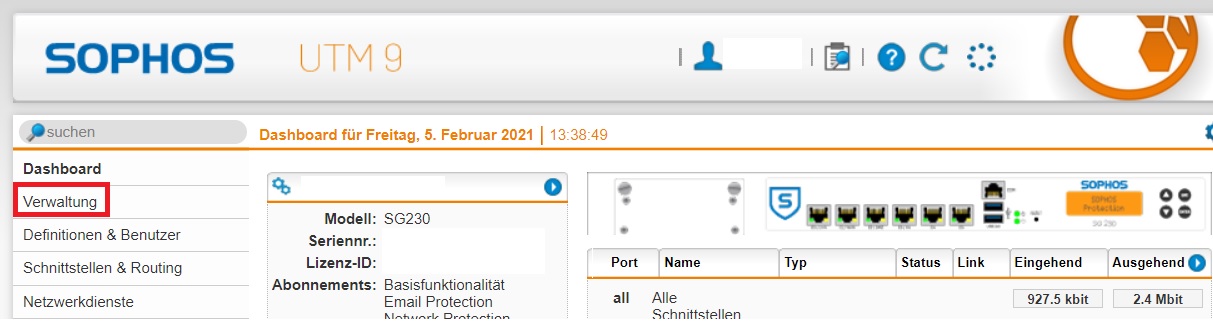
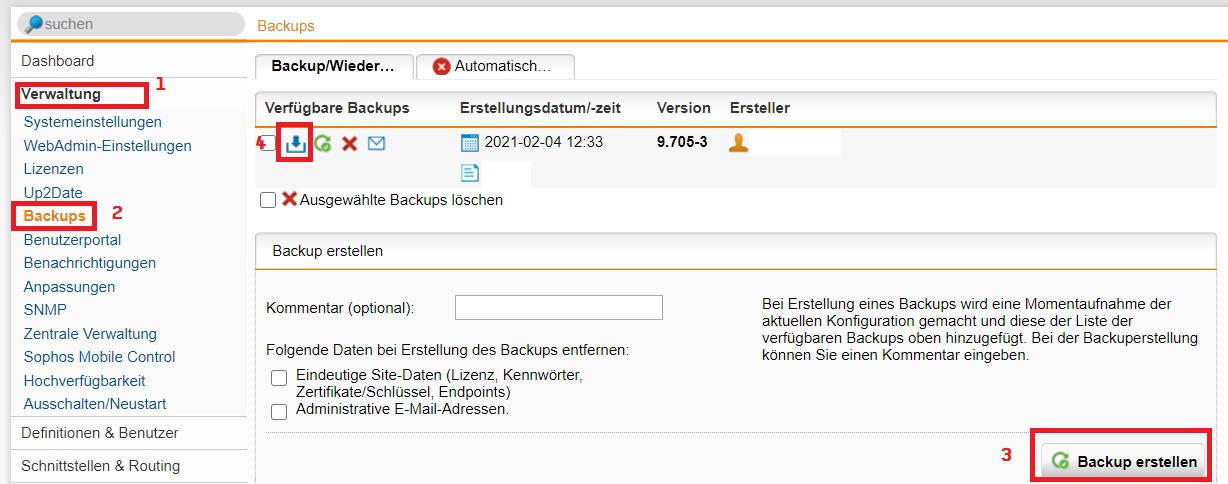
it's, for example, on the web admin interface of our Sophos UTM firewall. Unfortunately, I cannot grant you a login there. But you can download Sophos UTM Home Free at sophos' site, they'll email you a free license or you'll have 30 day trial and then just go to "Administration" / "Backups", click "perform backup" and then download the backup that was created and shown above that button. First time, it works, second time, too. About five more attempts -> permamently failing.
Link: https://www.sophos.com/de-de/products/free-tools/sophos-utm-home-edition.aspx
Thank you.
2.jpg
1.jpg
After deleting the EO.Webbrowser cache folder. the expected correct behaviour takes place when I hit the download button.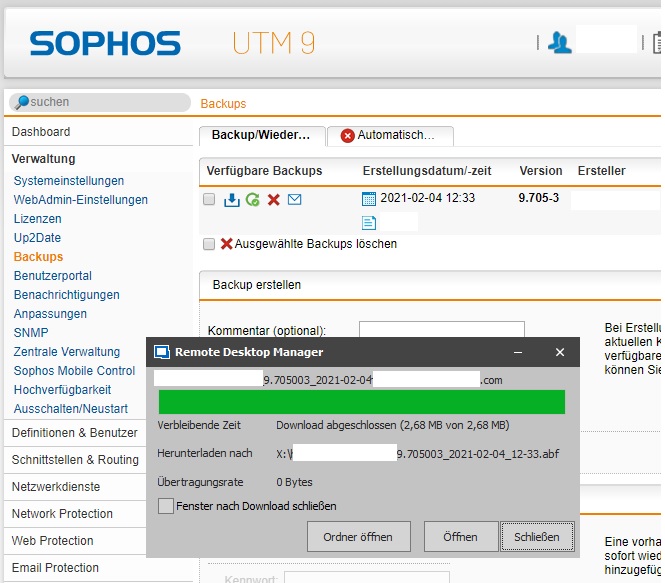
3.jpg
I've tried to reproduce it again but cannot. I didn't alter any session settings and did not upgrade RDM. I think the bug will hit again in a few days as I've already done the cache wiping manually 4 times. But I have no clue how the bug is triggered. When it happens, the download dialog of RDM just does not appear with no indication of any error. When I go to Chrome Browser outside of RDM then to verify if the firewall is sending the backup download correctly to the browser, I can download the file. It must be some bug introduced into RDM since the upgrade I last did (see first post).
RDM Enterprise 2020.2.16.0: Does not have the bug, always downloaded correctly over months.
RDM Enterprise 2020.3.23.0: Has this download bug with the windows not appearing until I clear the cache manually from Windows Explorer
Hello,
Thank you for the information!
I would be curious to know if the issue still occurs if you upgrade to the latest version of RDM, 2020.3.28.0.
You can download it using the link below
https://remotedesktopmanager.com/home/thankyou/rdmsetup
Best regards,
Gabriel Degrandpré
Ok, will upgrade to the latest version and report back if the issue occurs again.