Recently moved from old RDM Enterprise to RDM Free which is freezing daily.
Recently moved from old RDM Enterprise to RDM Free which is freezing daily.

Hi, I made the move last week and if I leave RDM free open and come back to my PC after a few hours RDM Free is frozen. I have to kill it using task manager. When I do kill it it freezes the whole screen for 5-10 seconds. I noticed in Task Manager there is a green leaf next to one of the RDM's "Windows Host Process (Rundll32) (32bit). I'm also seeing this message in the RDM logs from the help button. Not sure if it is related. Also I am on the latest Win 10 update
1/17/2021 5:57:04 PM2020.3.25.0 - 64-bitError SilentSystem.Reflection.TargetInvocationException: Exception has been thrown by the target of an invocation. ---> System.Reflection.TargetInvocationException: Exception has been thrown by the target of an invocation. ---> System.ComponentModel.Win32Exception: The current process has used all of its system allowance of handles for Window Manager objects
at System.Drawing.Icon.Initialize(Int32 width, Int32 height)
--- End of inner exception stack trace ---
at System.RuntimeMethodHandle.SerializationInvoke(IRuntimeMethodInfo method, Object target, SerializationInfo info, StreamingContext& context)
at System.Runtime.Serialization.ObjectManager.CompleteISerializableObject(Object obj, SerializationInfo info, StreamingContext context)
at System.Runtime.Serialization.ObjectManager.FixupSpecialObject(ObjectHolder holder)
at System.Runtime.Serialization.ObjectManager.DoFixups()
at System.Runtime.Serialization.Formatters.Binary.ObjectReader.Deserialize(HeaderHandler handler, __BinaryParser serParser, Boolean fCheck, Boolean isCrossAppDomain, IMethodCallMessage methodCallMessage)
at System.Runtime.Serialization.Formatters.Binary.BinaryFormatter.Deserialize(Stream serializationStream, HeaderHandler handler, Boolean fCheck, Boolean isCrossAppDomain, IMethodCallMessage methodCallMessage)
at System.Resources.ResourceReader.DeserializeObject(Int32 typeIndex)
at System.Resources.ResourceReader.LoadObjectV2(Int32 pos, ResourceTypeCode& typeCode)
at System.Resources.RuntimeResourceSet.GetObject(String key, Boolean ignoreCase, Boolean isString)
at System.Resources.ResourceManager.GetObject(String name, CultureInfo culture, Boolean wrapUnmanagedMemStream)
at Devolutions.RemoteDesktopManager.Forms.FrmWaitProgress.c49f0ccb73296dc8b9a91a4b256a04664()
at Devolutions.RemoteDesktopManager.Forms.FrmWaitProgress..ctor()
--- End of inner exception stack trace ---
at System.RuntimeTypeHandle.CreateInstance(RuntimeType type, Boolean publicOnly, Boolean noCheck, Boolean& canBeCached, RuntimeMethodHandleInternal& ctor, Boolean& bNeedSecurityCheck)
at System.RuntimeType.CreateInstanceSlow(Boolean publicOnly, Boolean skipCheckThis, Boolean fillCache, StackCrawlMark& stackMark)
at System.Activator.CreateInstance(Type type, Boolean nonPublic)
at System.Activator.CreateInstance(Type type)
at DevExpress.XtraSplashScreen.ThreadManagerBase.CreateForm()
at DevExpress.XtraSplashScreen.ThreadManagerBase.ThreadEntryPointCore(ThreadParameters params)
at DevExpress.XtraSplashScreen.ThreadManagerBase.ThreadEntryPoint(Object params)
at System.Threading.ExecutionContext.RunInternal(ExecutionContext executionContext, ContextCallback callback, Object state, Boolean preserveSyncCtx)
at System.Threading.ExecutionContext.Run(ExecutionContext executionContext, ContextCallback callback, Object state, Boolean preserveSyncCtx)
at System.Threading.ExecutionContext.Run(ExecutionContext executionContext, ContextCallback callback, Object state)
at System.Threading.ThreadHelper.ThreadStart(Object obj)
All Comments (29)
Hello,
Could you go in File -> Options -> Types -> Web and enable the option DisableRunDLL32.exe.
Let us know if that help or not.
Best regards,
Jeff Dagenais
Thank you, I will try that and post back here with an update.
~jim
Hi shop,
I'd like yo know which datasource you're using in RDM too.
Best regards,
Alexandre Roy
Hi, I'm using an XML file.
~jim
Can you please check in RDM under File > Devolution's Account if you are logged in? If so, logout to see if it reduces/stops the freezing.
Best regards,
Stéfane Lavergne
Hi,
I came back today and RDM Free was frozen again. Had to kill it with task manager. I checked File>Devolutions Account and I'm not logged in.
~jim
Frozen again this morning, here's a screenshot of task manager in case it helps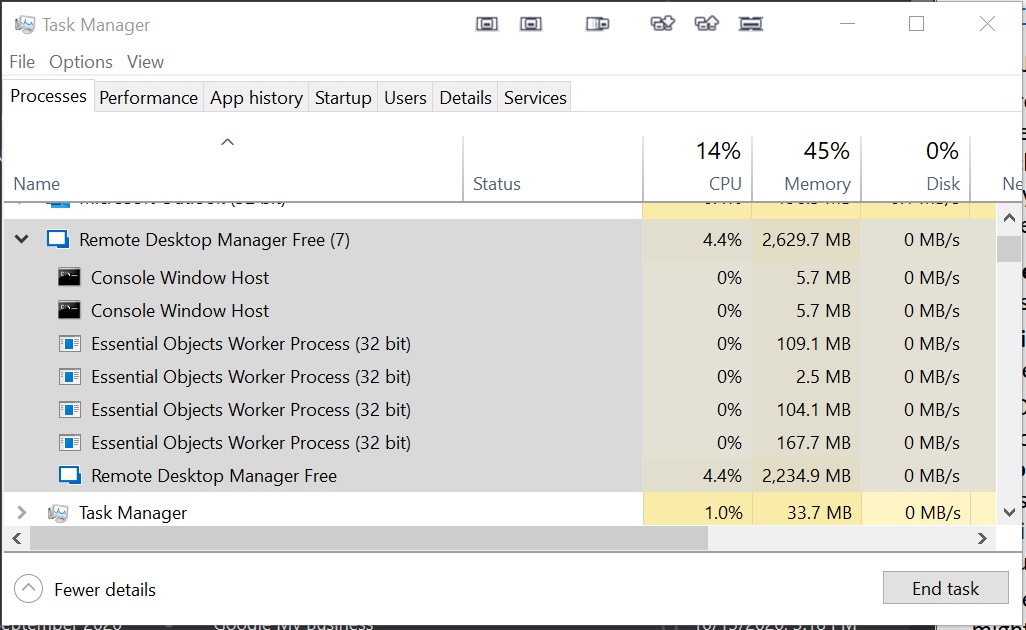
Clipboard01.jpg
hi shop,
Thanks I'll investigate what those essential objects are tied to.
regards,
Alexandre Roy
Are you leaving some Chrome embedded tabs open for a long time and is it possible to know which website you were on if that's the case ?
Regards,
Alexandre Roy
No, I rarely use Chrome. Firefox and now Brave mostly.
~jim
So you are using the web browser entry set to Firefox type as embedded in RDM?
Are you also using the thumbnail view feature under the Ribbon menu > View section ?
Regards,
Alexandre Roy
I'm not sure what this is "So you are using the web browser entry set to Firefox type as embedded in RDM?"
I do not use the thumbnails under the View section. It is not selected currently.
~jim
Im doing this screenshot quick because you are really responsive at the moment and thank you for that.
-The web browser firefox sessions are displayed in the treeview on the left and It's opened as a tab in RDM embedded am I correct ?. If I am I'd like to know which website are they open to if this is possible.
- The thumbnail feature is under View in the ribbon menu, and also open as an embedded tabs to monitor all other embedded sessions at the same time, sort of like a quick overview, if it doesn't ring a bell, you're probably not using it thus isin't the cause of the crash. I just really want to make sure that you're using firefox embedded browser for the moment and which website it is running on.
Best regards,
Alexandre Roy
Ok got it, thank you. On further inspection, I AM using Chrome unexpectedly. One of the things that is opened automatically is a Chrome browser tab that is pointed at the web page of a ScreenConnect server. Apologies for overlooking that.
~jim
Hello again,
Which patch/versions of windows are you on at the moment ?
Regards,
Alexandre Roy
Hi, I'm on Windows 10 Pro 20H2, OS Build 19042.746, Windows Feature Experience Pack 120.2212.551.0
Hello,
Thank you for your reply!
To gather more information about this issue, we would like you to follow this procedure which makes use of a tool offered by Microsoft's Technet, namely the Sysinternals suite. The tool that we need is procdump. It will monitor the application and create a dump file automatically in case it encounter a crash )-e) or hang (-h) for more than 5 seconds.
This suite can be downloaded using the following link: https://download.sysinternals.com/files/SysinternalsSuite.zip
Once it is installed, please do the following:
1-Create a batch file containing a command such as:
{TOOLS_PATH\procdump.exe -e -h -ma -g -x {DUMP_PATH} "{INSTALL_PATH}\RemoteDesktopManager.exe"
If the application becomes unresponsive, the tool will handle everything.
2-Send the dump file to us using the following secure link: https://api.devolutions.net/redirection/c50a4798-7fd9-44e5-a2a1-79a753a35c36
Also, I would like to know the following:
1- Have you configured an application password on your RDM instance?
2- When you return to your workstation, do you restore RDM from the tray icon?
Best regards,
James Lafleur
Hi,
I will get this set up and get back to you. I did do a test where I had RDM Free open but with no connections or links open. It still froze when I came back this morning.
1- I have not configured an application password.
2- I do not restore RDM from the system tray, I just unminimize it from the task bar.
Hello,
Thank you for this information, I will provide it to both our QA and our Engineering departments.
According to what we have gathered so far, this method might not provide us what we are looking for.
For this reason, could you please do the following instead:
1- Download Process Explorer here: https://docs.microsoft.com/en-us/sysinternals/downloads/process-explorer
2- Run RDM
3- Wait for it to freeze
4- Start Process Explorer (procexp.exe)
*If RDM is running with elevated privilege, then you will need to start procexp elevated
5- Find RemoteDesktopManager.exe in the tree
6- Right-click -> Properties -> Threads (tab)
6.1-Sort by CPU descending (should be the default sort)
6.2-Take a screenshot of that UI and send us this image
6.3- Select the top one in the list
6.4- Click Stack
6.5- Copy All and then send us the text
7- OK & OK
8- Right-click > Create Dump > Create Minidump
9- Send us the minidump via ShareFile link: https://api.devolutions.net/redirection/c50a4798-7fd9-44e5-a2a1-79a753a35c36
This will help us diagnose the issue.
Best regards,
James Lafleur
Hi,
I did do the first request using Procdump but the output never showed up after freezing. I restarted RDM Free and waited for it to freeze and followed the new instructions above.
I've attached two screenshots of the threads becuase it was so long. There is a pic from the top and from the bottom. The several screens of the middle were all the "TerminateOnAssert+0x67b0" statements.
I've also included a new screenshot of the task manager window for RDM Free
I uploaded the dump file at the provided link
Regards,
~jim
Clipboard01.jpg
Threads Bottom.jpg
Threads Top.jpg
Forgot to attach the stack output... here it is,
Stack for thread 96088.txt
Hello,
Our Engineering Department just informed me that they have made a fix in RDM 2020.3.27.0 that should at the very least reduce the number of freezes in RDM. For this reason, would it be possible for you to try this version and see if you are seeing any improvements?
RDM 2020.3.27.0 can be downloaded here:
https://remotedesktopmanager.com/home/thankyou/rdmmsi
Best regards,
James Lafleur
Hi,
I just installed this new version. I'll let you know how it goes.
~jim
Thank you! We will wait for your return
James Lafleur
Hello,
RDM 2020.3.28.0 has been released yesterday and this version contain enhancements regarding the freeze issue.
Could you give it a try?
You can download this version here
https://remotedesktopmanager.com/home/download
Best regards,
Jeff Dagenais
Hi,
As far as the RDM 2020.3.27.0 version goes, I haven't had it freeze up yet since installing and it would have definitely done so by now. So that's good news!
I just installed RDM 2020.3.28.0 and will let you know how it goes after a couple of days.
Regards,
~jim
Hello,
Thank you for your feedback! We are glad that you no longer are experiencing these freezes.
I will inform our Engineering Department.
Best regards,
James Lafleur
Hi,
Just a quick notice to say that its been two weeks and I have not had any problems with RDM Free freezing up on me. Thank you for working with me to get this resolved.
Regards,
~jim
Thank you for the feedback, It was a pleasure.
Regards,
Alexandre Roy