waykbastion stopped working in rdm

Hi,
for some reason the waykclient integration inside RDM Mac has stopped working with our waykbastion?
i can connect to the waykbastion no problem using browser
i can connect to the waykbastion entry inside RDM no problem as it lists all the computers in there groups
i can connect to the remote computer using the standalone wayk client for mac no problem
i can connect to the waykclient entry from inside RDM for Windows, no problem
however when i try to connect to a waykclient entry previously created (no problems before hand)
i keep getting an error saying 'ConnectCore failed: You do not have permission to connect to the target'
i am using the admin user with a valid waykclient licence assigned to it on our wayk bastion
RDM Mac 2020.3.4.0
devolutions/den-server:2.13.1-buster
devolutions/picky:4.8.0-buster
devolutions/den-lucid:3.9.1-buster
library/traefik:1.7
library/mongo:4.2-bionic
Regards
Simon
All Comments (22)
Hi,
ive checked the WaykBastion entry and it is showing
Account Status: the account (BLANK SPACE HERE) has been validated and should work properly
it seems to not be remembering the user that validated?
if i click the 'Clear Validation' button it changes to 'the account is not validated yet' as i would expect
but when i click the button now saying 'Validate wayk bastion' it just goes back to the original message of validated with the empty space?
i would of expected it to pop up the authorize window for me to login again?
Regards
Simon
Hi Simon,
This is weird, was it after an update of RDM Mac (2020.3.4.0 for instance)? I'm not aware of any changes on our part. Or maybe an update of the bastion?
Best regards,
Xavier Fortin
Hi Xavier,
im not 100% sure, i do so much, so quickly i lose track,
i have just download the old 2020.3.3.0 and tried that but that has the same issue and also showing the same messages about validation
so maybe its a wayk bastion issue?
but if it was waykbastion, wouldnt i have the same issue in RDM for Windows? and thats perfectly fine!?
Regards
Simon
but if it was waykbastion, wouldnt i have the same issue in RDM for Windows?
That is what I would expect too. I'll get in touch with the Wayk team to see if they can assist me with this.
Best regards,
Xavier Fortin
Hi Xavier,
i have just cleared all my browsers on my laptop of cache, cookies, local storage, etc,
and when i go to my waykbastion, it asks me to login in my browser!
but if i open RDM and then click validate after clearing the validation, it still says 'validated'?
again i would of throught it popped up with an authentication box?
Regards
Simon
Hi Simon
> however when i try to connect to a waykclient entry previously created (no problems before hand)
> i keep getting an error saying 'ConnectCore failed: You do not have permission to connect to the target'
Are you opening the session embedded, or external?
Regardless - can you check the login status in your WaykClient.app (i.e. open WaykClient.app, check Options > Connectivity and login to your Bastion. If you're already logged in here, please logout and back in again)?
One more thing - what's your Wayk Bastion version? We've recently released fixes around authentication.
Thanks and kind regards,
Richard Markievicz
Hi Richard
I'm opening it embedded, however if i open it externally, that opens up the waykclient app which works no problem
its only embedded that's having this issue
the version is listed in above comments but here again if needs be
PS Version 7.1.0
Cmdlet Version 2020.3.4
Docker Version 19.03.13
Den Server Image devolutions/den-server:2.13.1-buster
Den Picky Image devolutions/picky:4.8.0-buster
Den Lucid Image devolutions/den-lucid:3.9.1-buster
Traefik Image library/traefik:1.7
Mongo Image library/mongo:4.2-bionic
Regards
Simon
Hi Richard,
ok logging out of waykclient has now goofed that up completely!?
it now shows 'Invalid - Log out' in the waykclient
so i click logout then login and it just sits there saying 'Please login using your web browser' even tho it opened up the login in my browser and i logged in and then closed the tab as the webpage told me too?
Regards
Simon
Hi Richard,
so i tried rolling back the powershell version of waykbastion from 2020.3.4 to 2020.3.3, but thats impossible as its complaining of an address error whenever you try to login?
so looks like im stuck at 2020.3.4 of waykbastion now :(
{"timestamp":"Jan 15 19:00:09.938","level":"ERROR","message":"Unable to perform find in user collection: RepositoryError(MongoError(Error { kind: Io(Custom { kind: Other, error: DeserializationError { message: \"missing field `address`\" } }), labels: [] }))","target":"lucid::server::controllers::auth::account","span":{"id":"53c45ccf-6b26-4e1e-b4dc-e859f55aff44","method":"POST","path":"/auth/get-account","name":"request"}}
{"timestamp":"Jan 15 19:00:09.938","level":"WARN","status":500,"duration_ms":"1.465","target":"lucid::server::middlewares::logging","span":{"id":"53c45ccf-6b26-4e1e-b4dc-e859f55aff44","method":"POST","path":"/auth/get-account","name":"request"}}
Regards
Simon
Hi Simon
We're looking into the issue. I'll post back here when I have some information.
In the meantime, you should leave your Wayk Bastion at the latest 2020.3.4, that's no problem.
Strange that you were not able to log back in using WaykClient.app. Can you try logging out, closing the app out completely, relaunching and try again?
Thanks and kind regards,
Richard Markievicz
Hi Richard,
ive opened a separate issue for the logging in issues with waykbastion and waykclient in the waybastion forum, to separate all my problems im now having
https://forum.devolutions.net/topics/35069/unable-to-login-with-202034-waykclient
Regards
Simon
Hi Simon
Now that your Wayk Client login issue is resolved; are you able to connect to your Wayk machines using RDM?
(I ask because there are cases where RDM can use the auth token from the Wayk Client)
Thanks and kind regards,
Richard Markievicz
Hi Richard
fixed my jet-relay, all working with waykclient
and just tried RDM and boom thats now working too!
so im guessing maybe it was an issue with RDM trying to use the oauth.cfg that the local waykclient was using?
maybe RDM should be storing the oauth.cfg inside the waykbastion entry inside RDM?
(it would also sync between devices too! as i have spotted, i had to authorize my waykbastion entry on my Mac and my windows computers separately)
another weird thing i spotted was, RDM is still showing
Account Status: the account (BLANK SPACE HERE) has been validated and should work properly
where as on windows its showing like
Account Status: the account admin has been validated and should work properly
Regards
SImon
Hey Simon
Glad to hear that's working for you now.
Here's the background: the earliest support for on-premises Wayk Bastion in RDM used the OAuth tokens from Wayk Client. So, you had to be logged in with Wayk Client for your connections to work inside RDM.
Since then, we updated things so that the Wayk connections inside RDM could use the auth token from the Wayk Bastion entry instead (as you suggest). There remains a fallback to use the token from Wayk Client (if possible) - this is mainly for backward compatibility.
However, it looks like things are not working quite right in RDM for macOS, so it's only hitting the fallback (take the OAuth token from Wayk Client). That's supported by the username missing from the account status string.
I'll open a ticket and investigate the issue with the RDM macOS team.
Thanks again and kind regards,
Richard Markievicz
Hi Simon
There was a bug in the Wayk integration with RDM macOS that prevented it from using the authentication token from the Wayk Bastion entry; this is now resolved so look for that fix in an upcoming version.
I noticed a couple of inconsistencies in the UI on both macOS and Windows (for example, the one you pointed out with the validation message). We'll look into those separately but I don't believe functionality is impacted.
Thanks and kind regards,
Richard Markievicz
Hi Richard,
i wondered if the bug fix for RDM with the waykbastion auth has been released yet for MAC?
im still encountering this issue ever so often and its driving me insane!
Regards
Simon
Hi,
No official versions have been released yet. We've made major changes that needs coordinated releases across different produces and this made it more complicated to release patches. Which version of the product are you using, Free or Enterprise?
Best regards,
Xavier Fortin
Hi Xavier,
I'm running the latest 2020.3.4.0 Free Edition MAC,
I don't see a point paying at the moment for the Enterprise when its only for myself,
the free verson does me proud at the moment!
Regards
Simon
Thanks, I was only asking to know which one to send you. If you're using the Free, this makes things even easier. At the moment, you can change your update channel in RDM Free to include Beta versions. You should then be able to update automatically to 2021.1.0.0. Here's where to find this option: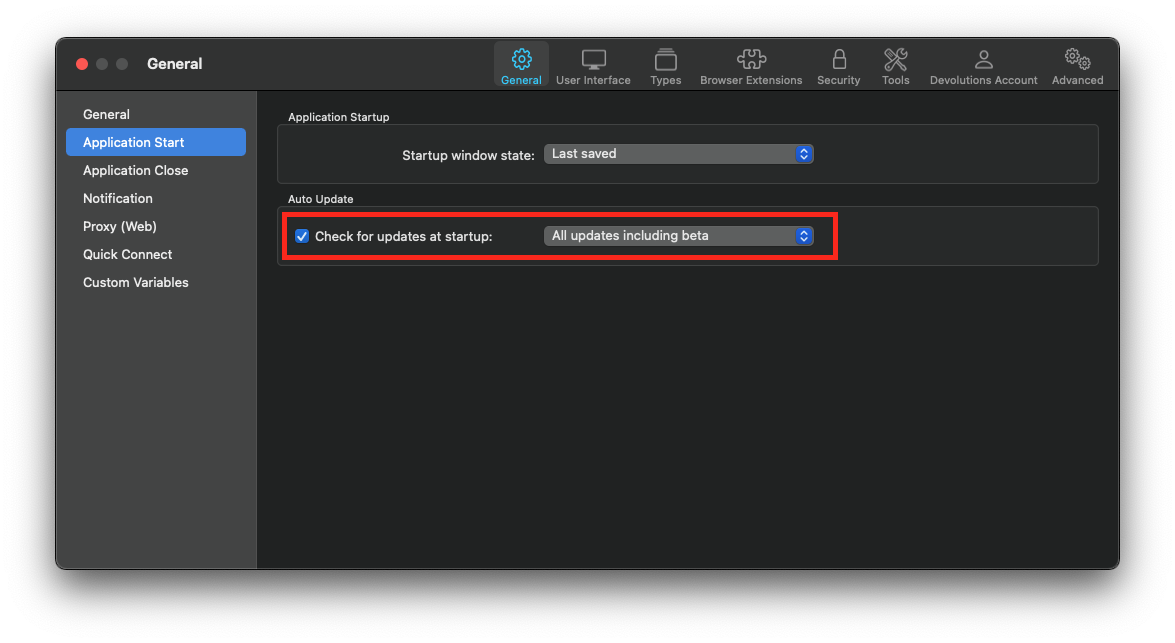
Best regards,
Xavier Fortin
BetaChannel.png
Hi
thank you, ive set it to beta and clicked check for updates
but now im getting 'An error occurred in retrieving update information. Please try again later.' when i click check for updates ?
Regards
Simon
Hmmm... This is troublesome. You can download it directly here.
Xavier Fortin
Hmmm... This is troublesome. You can download it directly here.
Thanks, downloaded no problem there and installed no problem
will use the beta for a week or so and hopefully no bugs with wayk bastion!