generate custom report with user and role information

I would like to create a custom report where I have a list of the roles and users as a list with reference to groups and connections in RDM. I can now generate a list from the connections with the corresponding permissions. But by doing it from the roles and users you can see per role or user which connections and groups are accessible. As an attachment the report that I can now generate but this is seen from the connections.
The script runs all connections through the line below. Is it also possible to go through the user list or role list in this way?
Foreach ($ connection in $ Report.Connections) {
I have already searched for list of instructions possible within the script. However, I cannot find much of this. Just an earlier post that includes an example permissions report.
I hope someone can give tips or examples.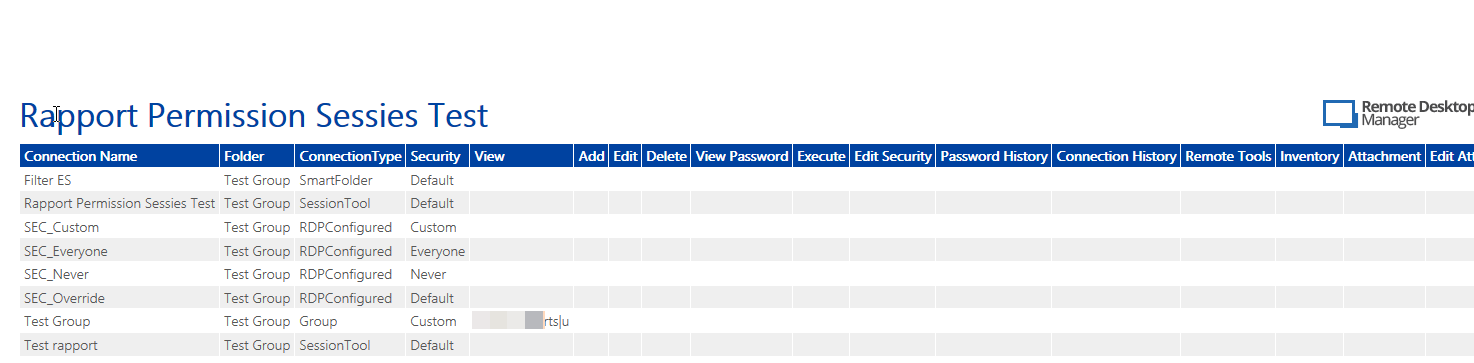
Snag_9d515b6e.png
All Comments (7)
Hello,
We'll get something your way shortly, just to confirm, you are not using Devolutions Server as a backend, right?
Best regards,
Maurice
Hello,
We'll get something your way shortly, just to confirm, you are not using Devolutions Server as a backend, right?
Best regards,
We don't use it as a server backend. Because we have many users and roles, such reporting is useful for control purposes.
Hello,
Just to confirm, your datasource is SQL Server, Azure, MariaDB or MySQL then?
Best regards,
Jeff Dagenais
Hello,
Just to confirm, your datasource is SQL Server, Azure, MariaDB or MySQL then?
Best regards,
It's a SQL server.
Best regards,
Hello,
Thanks a lot for your patience, I've been analyzing your request for a long time...
Turns out that the Custom Report is not likely to be the solution. In a few words, this kind of report is oriented toward entries and doesn't adapt for other objects like roles (now known as User Groups) or users...
At this point, and if it's no big rush. we can direct this towards the Feature Request section of the forum
Worst case scenario, I've come up with an idea to get this done with RDM Powershell module producing a CSV File.
Any thought?
Best regards,
Alex Belisle
Hi,
Thank you for thinking along.
I am very curious about the method via PowerShell I may be helped with that. Do you have a plan for that?
Best regards,
Hans Aerts
Hello,
Thanks for your patience, I wanted to provide you with an almost turnkey script, but time is going fast!
So, I decided to give you what I've got so far, maybe you can complete, or at least you can tell me if we're on the right path...
It would look like this:
# create a report based on users and roles that will liste the folders and sessions that are refering to it
# Import-Module
# Set-RDMCurrentDataSource
# Set-RDMCurrentRepository
# Update-RDMUI

$roles = Get-RDMRole

foreach ($r in $roles)
{
    $View = Get-RDMSession | Where-Object{$_.Security.Viewroles -contains $r.Name}
    $Add = Get-RDMSession | Where-Object{$_.Security.Permissions | Where-Object{($_.Right -eq "Add") -and ($_.Roles -contains $r.Name)}}
    $Edit = Get-RDMSession | Where-Object{$_.Security.Permissions | Where-Object{($_.Right -eq "Edit") -and ($_.Roles -contains $r.Name)}}
    $Delete = Get-RDMSession | Where-Object{$_.Security.Permissions | Where-Object{($_.Right -eq "Delete") -and ($_.Roles -contains $r.Name)}}
    $ViewPassword = Get-RDMSession | Where-Object{$_.Security.Permissions | Where-Object{($_.Right -eq "ViewPassword") -and ($_.Roles -contains $r.Name)}}
    $Execute = Get-RDMSession | Where-Object{$_.Security.Permissions | Where-Object{($_.Right -eq "Execute") -and ($_.Roles -contains $r.Name)}}

    $EditSecurity = Get-RDMSession | Where-Object{$_.Security.Permissions | Where-Object{($_.Right -eq "EditSecurity") -and ($_.Roles -contains $r.Name)}}
    $ConnectionHistory = Get-RDMSession | Where-Object{$_.Security.Permissions | Where-Object{($_.Right -eq "ConnectionHistory") -and ($_.Roles -contains $r.Name)}}
    $PasswordHistory = Get-RDMSession | Where-Object{$_.Security.Permissions | Where-Object{($_.Right -eq "PasswordHistory") -and ($_.Roles -contains $r.Name)}}

    $RemoteTools = Get-RDMSession | Where-Object{$_.Security.Permissions | Where-Object{($_.Right -eq "RemoteTools") -and ($_.Roles -contains $r.Name)}}
    $Inventory = Get-RDMSession | Where-Object{$_.Security.Permissions | Where-Object{($_.Right -eq "Inventory") -and ($_.Roles -contains $r.Name)}}
    $Attachment = Get-RDMSession | Where-Object{$_.Security.Permissions | Where-Object{($_.Right -eq "Attachment") -and ($_.Roles -contains $r.Name)}}
    $EditAttachment = Get-RDMSession | Where-Object{$_.Security.Permissions | Where-Object{($_.Right -eq "EditAttachment") -and ($_.Roles -contains $r.Name)}}

    $Handbook = Get-RDMSession | Where-Object{$_.Security.Permissions | Where-Object{($_.Right -eq "Handbook") -and ($_.Roles -contains $r.Name)}}
    $EditHandbook = Get-RDMSession | Where-Object{$_.Security.Permissions | Where-Object{($_.Right -eq "EditHandbook") -and ($_.Roles -contains $r.Name)}}
    $EditInformation = Get-RDMSession | Where-Object{$_.Security.Permissions | Where-Object{($_.Right -eq "EditInformation") -and ($_.Roles -contains $r.Name)}}

    write-host $r.Name
    $View
    write-host "-----------"
    $Add
    write-host "-----------"
    $Edit
    write-host "-----------"
    $Delete
    write-host "-----------"
    $ViewPassword
    write-host "-----------"
    $Execute
    write-host "-----------"

    write-host "-----------"
    $EditSecurity
    write-host "-----------"
    $ConnectionHistory
    write-host "-----------"
    $PasswordHistory
    write-host "-----------"

    write-host "-----------"
    $RemoteTools
    write-host "-----------"
    $Inventory
    write-host "-----------"
    $Attachment
    write-host "-----------"
    $EditAttachment
    write-host "-----------"

    $Handbook
    write-host "-----------"
    $EditHandbook
    write-host "-----------"
    $EditInformation
    write-host "-----------"

}
Please let me know, I'll adapt if needed.
Best regards,
Alex Belisle