Image paste in documentation / Link copy
0 vote

Hi,
We've been looking at migrating our technical documentation from a custom Notes database to RDM so we can have everything in one location, including passwords, sessions and documentation.
However one problem that we have is that we have lots and lots and lots of images, screenshots etc in our current documentation, and having to save each as a file to then upload it into RDM so we can use it in the documentation is not feasible, it'll simply be too annoying and noone will migrate their documentation.
Is there any way that the markdown editor could get image paste support so we could just go into one document, hit CTRL-A, CTRL-C and then just CTRL-V it into the RDM documentation?
If it could handle attachments like that as well I'd be extremely happy but thankfully I think we have a more manageable number of file attachments if that is too complex.
Also, we have alot of links between different sections of the documentation, is there any way to get a simpler function to create a link to a documentation entry (preferably directly to that page - like if we could get a "Copy Link" like there is a "Insert Link" function) that we can then just paste into another one?
All Comments (14)
Hello,
Thanks for the requests! I'll go over your requests in order:
- For the image pasting in documentation, we'll have to investigate and see if it's possible to do that with what we currently use. I have opened a ticket.
- For the attachment uploading, do you mean in the attachment tab? If so, you can already drag and drop your files from your computer into the window and it will upload them automatically:
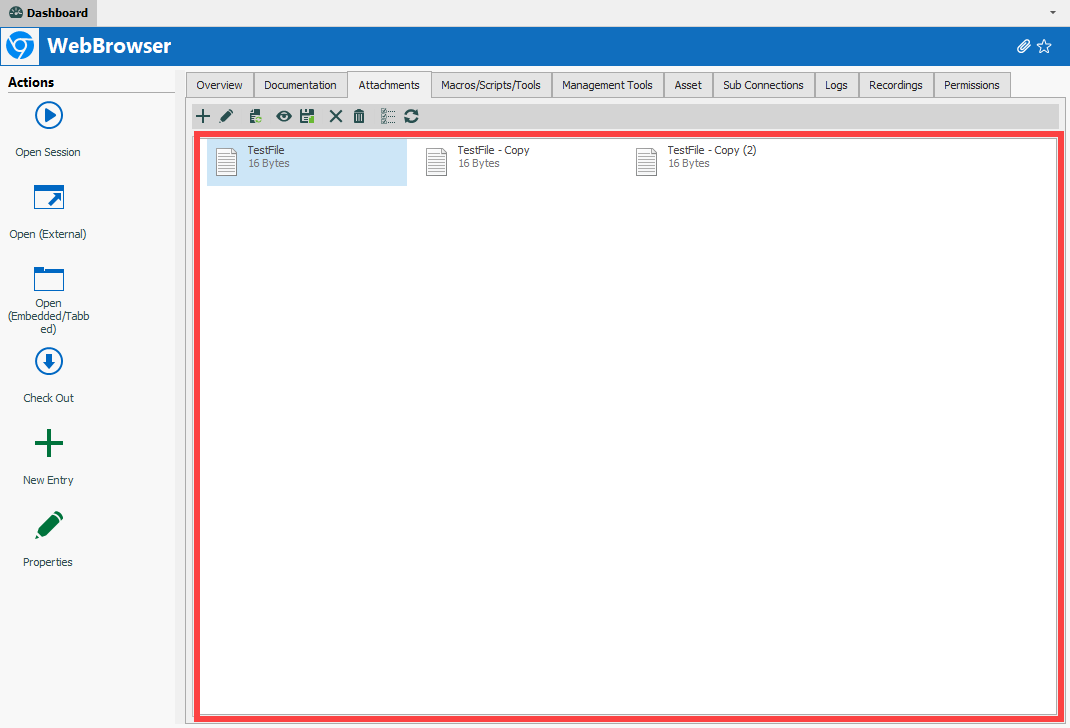
Does this work for you?
3. For the page linking, I've opened a ticket to add a "copy link to page" button.
Regards,
Hubert Mireault
2021-01-15_8-44-58.png
Hi Hubert,
Thanks - didnt know that drag n drop worked for attachments - that'll work for us.
The page link functionality will be good as well, looking forward to hearing what you come up with regarding the image pasting.
Regards,
Johan
Hello,
We've implemented the "copy link" feature, it will be available in version 2021.1.3.
Regards
Jonathan Del Signore
The paste feature for images appears to work (and save) in the documentation editor, it just doesn't display in the viewer. Seems this could be an easy fix? Or allow an option to default to the editor view.
Hello Ryan,
We haven't started working on the image pasting yet, but it's on our radar. We'll take a look at the viewer control we're using and come back to you as soon as we have an update on whether or not it supports images.
Regards
Jonathan Del Signore
Hello Ryan,
We haven't started working on the image pasting yet, but it's on our radar. We'll take a look at the viewer control we're using and come back to you as soon as we have an update on whether or not it supports images.
Regards
Hi Jonathan,
any update about image pasting?
It will increase a lot the adoption of RDM inside my company.
Regards
Marco
Hello Marco,
We didn't get a chance to look into that yet, but we'll try to include it in our next roadmap.
Regards
Jonathan Del Signore
Hello Marco,
We didn't get a chance to look into that yet, but we'll try to include it in our next roadmap.
Regards
Thanks Jonathan, please let us know when added in the roadmap
Regards
Marco
Hello,
We have revamped our documentation editor for RDM 2022.3, coming later this year. With this comes better support for copy-pasting images, among other improvements.
Regards,
Hubert Mireault
Hi Hubert,
thanks for your feedback.
Just one additional question: will you update / improve also the "Documentation Search form engine"?
At the moment, the researched text must be content in the documentation title.
It could be very useful if it will can be searched also inside the documentation
Regards
Marco
Hello Marco,
What RDM version and what datasource are you using? From my tests on RDM 2022.2.20.0 under SQL Server, the documentation search looks both in the page titles as well as the content. I think there is an issue with the documentation search when on DVLS as a datasource, which we will look into.
Regards,
Hubert Mireault
Hi Hubert,
I did some tests again.
My scenario:
RDM: 2022.2.20.0 64-bit
DVLS: 2022.2.8.0
Something is changed.
With old versions (I don't remember which specific version, maybe 2022.1.X) the "documentation search form" didn't give answer when I was researching a keyword not present on documentation page title.
At the moment, the "documentation search form" answers with all pages, even if a page doesn't contain (in the title and/or in the object) the keyword
Thank you for the confirmation. I have the same issue as you on DVLS. I have opened a ticket and the DVLS team will let you know once there is a fix, as it should be server-side that the issue is located.
Regards,
Hubert Mireault
Hello Marco,
Thank you for your patience.
The issue has been resolved internally and the fix will be in DVLS version 2022.3 that should be released in November.
Best regards,
Érica Poirier