RDM - Cant Login to Devolution Account

Hy,
iam using RDM on my Desktop, but now i whant to install it on my surface pro aswell.
But i cant login to my devoloution account, for my DB on the Devolution Drive.
I am using the last RDM Free Version, and an my Windows Login is an AAD Account.
Any Ideas and hints.
Tried to find an Solution but didnt found something.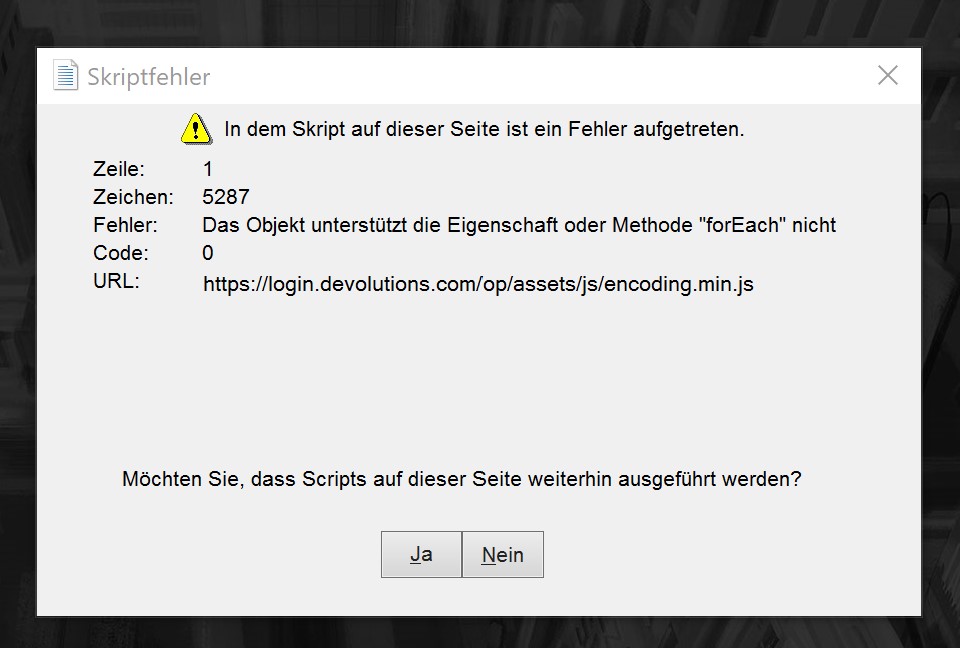
RDM Connect.jpg
All Comments (3)
Hello,
Thank you for contacting us on that matter!
Some users have been experiencing the issue you just reported. While our engineering department is working on solving this error, we have a workaround that should solve the problem.
1- Go to https://account.devolutions.com/security/app-passwords and use the "+" sign to create an application password.
2- In RDM, go under File ->Devolutions Account -> Use Application Password
3- Enter the email address of your Devolutions Account along with the "Application Password" you have configured at step #1.
You should then be logged into your account.
Best regards,
Gabriel Degrandpré
Thx, worked.
Hello,
In the past, you had encountered an issue with the authentication on our cloud portal via RDM because of errors with our Internet Explorer implementation. This is now resolved in RDM 2021.x, since the authentication method is now completely changed. You can download the proper version (free or enterprise) here https://remotedesktopmanager.com/home/download . Please note that if you are running an advanced datasource, a database upgrade is required - https://help.remotedesktopmanager.com/database_upgrade.html
If you we're using the Online backup with Devolutions and that you had switch to a local backup as a workaround, you can reactivate the Online backup by going in File – Data sources – Edit – Backup tab and select Online backup.
Best regards,
Jeff Dagenais