Looking for some Tab bar customizations

Hi!
Actually I would like to make RDM look similar to MS RDCM. I love the combined navigation panel and dynamic "connected" group docked to the left.
When I open some amount of tabs, tab bar becomes more than one line height. I would like to limit tab bar to one line. How to do it?
Is it possible to use tab bar docked to the left or to the right with horizontal alignement for names and limit it to one column too?
When I disable tabbed windows and try to use right-click menu on "opened session", that menu is completely different than right-click on tab name. How to find that menu, than tabs disabled?
All Comments (8)
Hello,
Thank you for contacting us on that matter! Let me address your questions one point at a time.
- In order to see a list of your active connected sessions, you can click on the "play" button at the bottom of the Navigation pane :

- If you prefer to limit the tab bar to one line, you can go to File > Options > User Interface and activate Use tab strip overflow (Disable multiline tab pages). This option is at the very bottom of the User Interface options list
- The same options that are displayed when right-clicking the tab of a running session can be found under the Actions tab in the top ribbon. Note that the Action tab will only show up when focused on a running session.

For your third request, "Is it possible to use tab bar docked to the left or to the right with horizontal alignement for names and limit it to one column too?", to be honest I'm having a hard time picturing what you are looking for exactly. Just to make sure I understand your request, would is be possible to provide us a screenshot from RDCManager of what you are looking for?
Best regards,
Gabriel Degrandpré
Sure! This is one of the best features of RDCManager — one place for all.
This panel has static width and doesn't change the right(main) window size.
1 — Dynamic group.
2 — Static list of folders and records
When I open any connection from my list(2), that connection changes its icon and appears in "Connected"(1) list
Right click menu behavior is the same for this groups.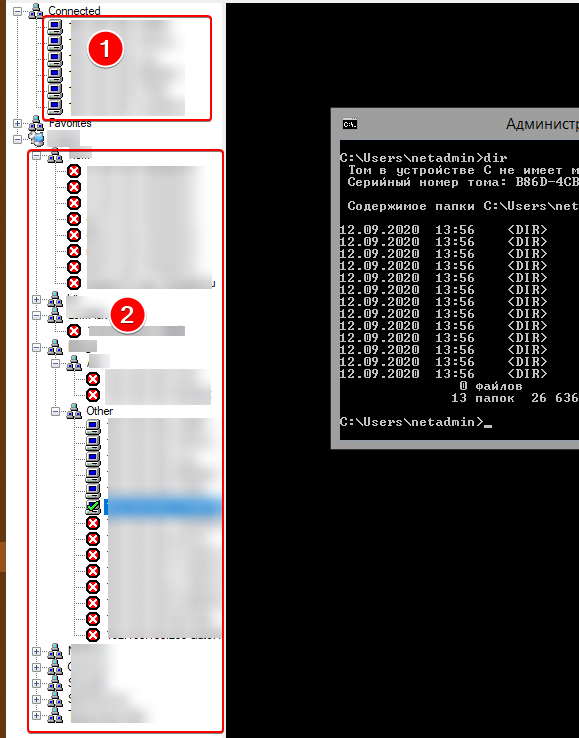
2020-12-23_21-31-27.png
Hello,
Thank you for your response. I don't believe it is currently possible to display running sessions in the entry list in the Navigation pane. For this reason, I have contacted our engineering team to see if it would be possible to implement it in a future version of RDM. I will get back to you as soon as I get their response.
Best regards,
Gabriel Degrandpré
Is there any news for me?
Hello,
For now, we have no update to provide on that matter.
We will be in touch as soon as there will be development on this case.
Best regards,
James Lafleur
Hello,
After consulting our Engineering Department, they mentioned that as a workaround, you could go under The "View" section of your ribbon and use the "Tab Groups" panel. 
While it is not the same tree you will be able to see only the sessions that are currently open. From there, you should be able to drag and drops these sessions to move them where you want in your UI.
Best regards,
James Lafleur
After consulting our Engineering Department, they mentioned that as a workaround, you could go under The "View" section of your ribbon and use the "Tab Groups" panel.
It looks promising! I'll see...
You might also want to take a look at the Thumbnail feature found under the same section.
Let us know if that works for you!
James Lafleur