Cannot use Dropbox as Data Source: Upgrade your Browser

Hi
I'm using Dropbox as a Datasource. Today i reconfigured my Datasource and a Popup for "Dropbox Usage Confirmation" appeared.
Unfortunatly the Page only Displayed "Upgrade your Browser" and some Links to Edge, Chrome and so on...
How can i use Dropbox as Datasource now?
Regards,
Michael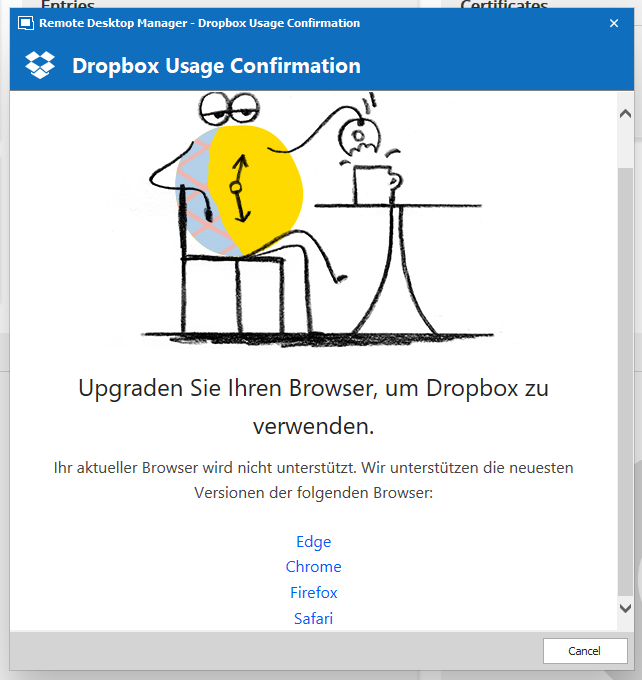
2020-12-22 23_53_33-.png
All Comments (5)
Hello,
What version of RDM are you running?
If you configure your RDM in english via the File - Options menu, is it working?
Best regards,
Jeff Dagenais
Hi Jeff
Wow, you are really fast ;-)..
I'm using Version 2020.3.23.0 64-bit (the newest possible i think?)
RDM is already in English, i did try it with German, but same message.
I also tested started as 32bit, same error.
Kind regards,
Michael
Hello,
I know that we are using an API from Dropbox fro this, but it could be related to the browsers on your workstation as well.
Do you have Internet Explorer configured and running on your computer?
Best regards,
Jeff Dagenais
Hello,
Please ignore my previous comment.
It seems that you are not the first one reporting this issue. I found out a ticket already opened to our engineering department regarding this.
The ticket is RDMW-6642.
As of now, the workaround would be to create a XML datasource and inside the path field, configure the path to get the XML stored on your dropbox.
Best regards,
Jeff Dagenais
Hi Jeff
OK, i will use the Dropbox on my PC with the local path to the file for now.
As i have two Accounts with Dropbox this could be a bit complicated as i think i can only use one Dropbox Account on my PC.
But as only one Account (Datasource) has that Problem with that Popup it should work for now.
Kind regards,
Michael