Migration RDM/DVPS - Reset default permissions

Hello,
I am currently migrating my RDM installation to RDM with Devolution servers.
At the same time I'm migrating the Domain authentication to O365.
I exported my RDM vault and imported it into Devolution servers.
I call DVPS with the RDM client.
The old permissions (default and custom) remain after this operation. My permissions are mainly on folders.
I want to delete all of my old permissions to redo them cleanly.
I can't do it.
I tested with the default permissions of the vault, the batch edit, the multiple selection...
I have more than 1000 folders
I can't delete the permissions or set everyone back to default read.
Your help will be appreciated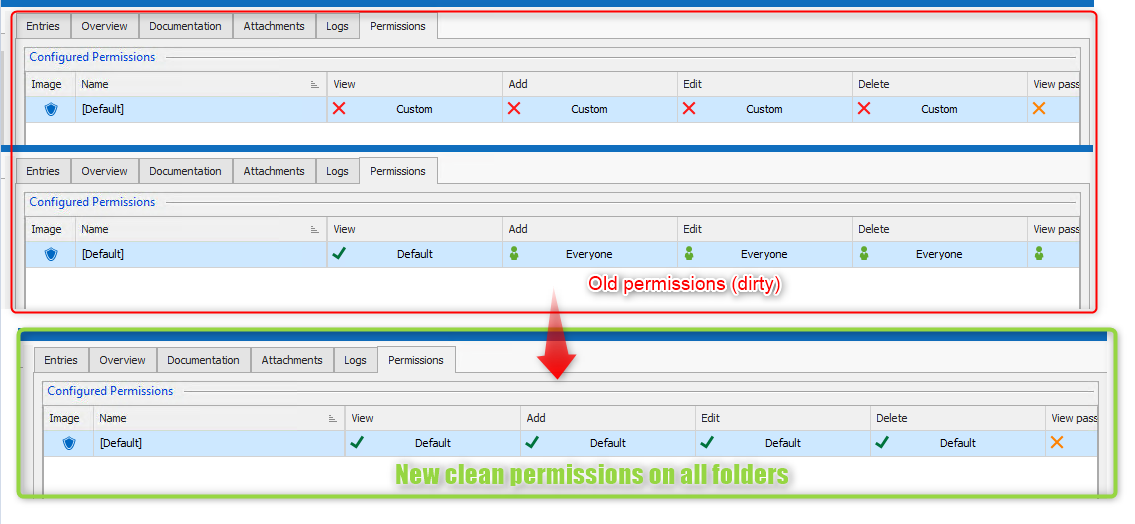
2020-12-22_09h41_00.png
All Comments (7)
Hello,
The simplest way would be to expand all entries (ctrl +) or right-click and select Expand All. You can then select them all (ctrl + a) and unselect the vault (1st item in the list)

You can then do an Edit - Batch Edit - Edit Entries (General Settings)...
Finally, set the Permissions to Inherited
You can then modify the permission on the folders as needed, and they will inherit the permission you set at the vault level.
Best regards,
Richard Boisvert
This is what I do... I just did it again in doubt.
But no permission is overwritten.
I'm in enterprise edition 2020.3.23.0 64Bits
I made a profiling but I don't see the permissions action appearing.
is there a profile level to set to debug ?
Hello,
You can set the Profiler to 1 to get the debug information, you can also uncheck the Auto Clear. You should see several SaveConnection after you apply the permissions override to inherited.
To troubleshoot, can you apply to just 1 folder to see if it applies, and if it does, select 2 folders and try the batch edit with those 2.
Best regards,
Richard Boisvert
Ok i see
I have the RDMS.SaveConnection after clic on batch edit.
I took a test connection that I put in custom permissions;
I launch the batch edit on the expanded folders.
The connections are well edited.
But not the folders permissions.
And all my permissions are just on the folders.
On the other hand if I manually edit one folder, I can modify the permissions.
But i have many.......
Hello,
My apologies, you actually need to go into advanced search to apply the permissions to the folders, if you select them in the navigation pane, it will only apply to their content.
If you click on the ... after the search, you can select Advanced Search...
You are then able to specify the Connection Type - Folder
You can then select them all (ctrl+a), and then a batch edit and set the permissions to inherited. You should be all set after!
Best regards,
Richard Boisvert
It works!
thank you for your help
Hello,
I will create an improvement request to include the folders with the Batch Edit Permissions.
Regards
David Hervieux