Forcing a password template

Disabled
When trying to force a password template from within RDM, is there a way to allow exceptions on a specific folder?
https://help.remotedesktopmanager.com/file_template_passwordtemplates.html
For example, sometimes we have apps which do now allow a certain combination, which we want to to specifically as a one-time exception exclude?
All Comments (17)
Hello,
Thank you for contacting the Devolutions service desk!
It is possible to configure an exception to the enforced default template. In the properties of an entry or Folder, you can go to the "Password Management" section and change the Template mode to Custom to apply password template settings different from the enforced default.
Don't hesitate to let me know if you have any additional questions on the subject!
Best regards,
Gabriel Degrandpré
Thanks!
Is there any way via permissions to prevent a standard user from selecting a different template? Otherwise, it seems to contradict the requirement?
Hello,
This is not possible to specifically restrict this but if you user does not have the Edit right, he will not be able to edit the minimal requirements. This feature is to ensure that at least one policy is applied.
Regards
David Hervieux
Meaning that if my user has the edit permissions to edit the password, he can circumvent the requirement? If so, then how is worth anything?
Just to see if this could help with a simple solution. Do you think we could just disable the custom if you are not administrator?
Regards
David Hervieux
I think that would make sense.
I will explain the use case:
- Admins want to enforce password complexity
- Once in a while, there are some apps that can't take complex passwords, so as a one-time exception, we want to allow the exception
Hello,
Hubert is double checking to confirm but I think that mislead you. Force default template could only be overridden by the Administrator.
Regards
David Hervieux
OK, thanks, that makes sense. I tested and indeed a regular user cannot override.
Hello,
I investigated a bit, from what I can find setting the system setting for "force default template" is what we want here. If you go in System Settings and configure your required template with 'force default template' checked: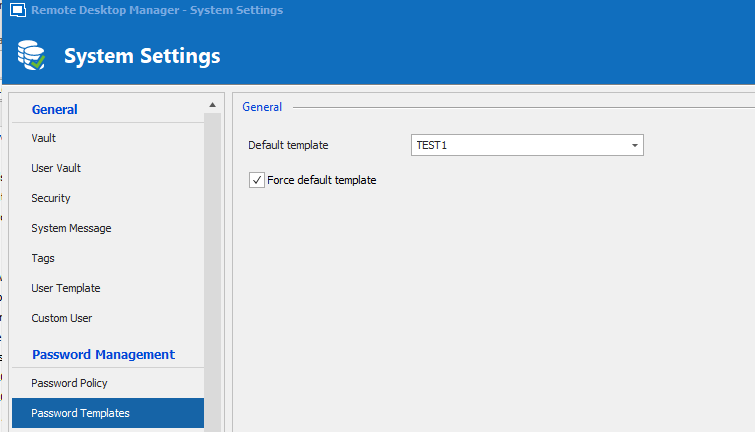
The goal of that option is to force this password template to be used throughout the datasource, and not have it be changed unless you're an administrator.
However, there is an issue with it, from what I can tell, and it's that it isn't enforced in the entry itself, only in the Password Generator. From our perspective that's a bug, so we'll open a ticket to fix that.
After the fix, the following textbox would be disabled unless you're an administrator: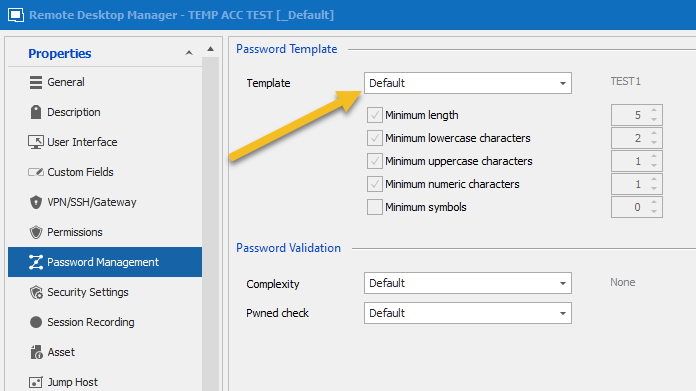
Do you think with this change it will cover all of your needs?
Regards,
Hubert Mireault
2020-12-22_10-57-23.png
2020-12-22_10-53-48.png
Yeah, if you can please let us know when it gets fixed and it which version, thanks!
No problem, we'll update this thread once we have a fix ready.
Regards,
Hubert Mireault
Letting you know this will be available starting from RDM 2021.1.0.0, which is planned to release early next year.
Regards,
Hubert Mireault
>>RDM 2021.1.0.0, which is planned to release early next year.
any news when the release will be out?
Hello,
RDM 2021.1.12.0 is already available as a BETA version on our website, however, prior to make you upgrade your current version, I would need to know if you are using Devolutions Server or SQL Server or anything else as your backend datasource.
In fact, what type of datasource are you using?
Best regards,
Jeff Dagenais
We're using SQL Server, but I wouldn't want to upgrade until the production release is out.
Hello,
No problem. The official release should be next week if everything goes well with the engineering department as well as the QA team.
Be aware that a database upgrade is required when you will install this new release and everyone would need to upgrade because there's a lot of changes at the user vault/private vault level. The upgrade process could be found here https://help.remotedesktopmanager.com/database_upgrade.html
Best regards,
Jeff Dagenais