Multiple Session connection options per Entry
0 vote

We're looking for a way to have a single Entry in our Data Source list, but with multiple connection options. An example would be a server entry, but the ability to connect to that server via RDP, SSH, or VMWare console without having to have multiple entries for each connection type. Possibly have a default connection type so when you double-click it connects via RDP, but right-click you have the option of RDP, SSH, or VMware console. Something like that.
All Comments (1)
Hello,
Thank you for contacting us on that matter!
In order to achieve this, I would recommend that you opt for one of these scenarios:
1- Create a Template under File -> Templates and add it under the Macro/Script/Tool section of your Dashboard. This method will allow you to quickly select the entry you created in your Navigation pane, then go under the Macro/Script/Tool section of your Dashboard to apply the Template on the connection and launch it with these settings.
To do so, please refer to this link: https://kb.devolutions.net/rdm_add_a_template_as_a_custom_tool.html
2- Create a Template with the desired setting, select the entry you created in your Navigation Pane, right-click on it and use the "Open with Parameter "-> "Open with Template" feature: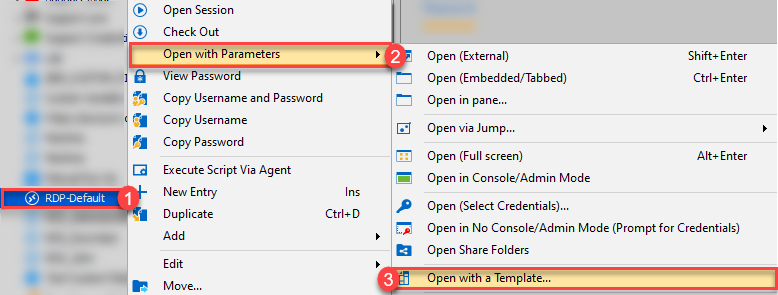
Doing so, will allow you to select the Template you created under File -> Templates -> Manage Templates.
Best regards,
James Lafleur
OpenTemplate.png