Database session
0 vote

On each server we manage we sometimes have to make changes in the database of that particular server. We use Navicat of DBeaver for such actions. It would be great if these tools could be added as a session in Remote Desktop manager.
All Comments (6)
Hello,
Do you know if they support some parameters in command line? We need an entry point to call an applications.
Regards
David Hervieux
I suppose you can find the answer more quickly then me here:
https://github.com/dbeaver/dbeaver/wiki
https://www.navicat.com/manual/online_manual_new/en/navicat/win_manual/
Navicat is the best tool but DBeaver is free.
I found some more tools here:
https://www.slant.co/options/198/alternatives/~dbeaver-alternatives
https://zeemly.com/p/navicat/alternatives
Bonjour,
Nous serions aussi intéressé par l’intégration
de DBeaver dans RDM, pour nous permettre de filmer les sessions sans ouvrir de
jump.
Pour le lancer j’utilise cette ligne de commande dans les
évènements après l’ouverture de session du jump :
"C:\Program Files\DBeaver\dbeaver.exe" -nl fr
-con "driver=oracle|name=$CUSTOM_FIELD5$|port=$CUSTOM_FIELD4$|database=$CUSTOM_FIELD1$|user=$CUSTOM_FIELD2$|password=$CUSTOM_FIELD3$|autoCommit=false"
Merci par avance,
Cordialement,
Baptiste Marchand
Hello,
We've added support for the DBeaver entry (to be enabled in the Add-on Manager). It will support connecting to a database as well as some advanced settings. It might be complex to find the Driver ID for the connection string, you can find it by going in Database-> Driver Manager -> Edit (the desired database type) -> Description ID. We have also included a link to DBeaver documentation to help clarify certain settings. Here is a screenshot to visually help finding the Driver ID. It should be available for the 2022.3 version.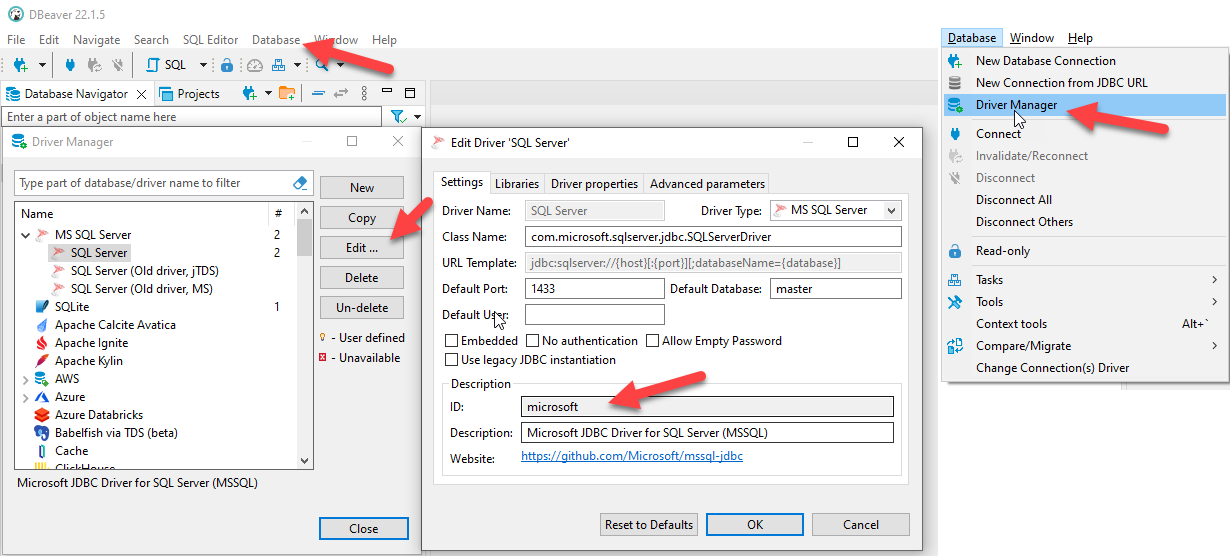
Regards,
Jafran Majeau
DBeaverDriverID.png
Thanks for adding this! I updated RDM to the lastest version but i don't see the addon in the Add-On manager. What is the name of the addon?
Hello Dennis,
The DBeaver add-on will be available in RDM 2022.3. This version has not been released yet.
I recommend consulting our release notes to be informed once this version is available:
https://devolutions.net/remote-desktop-manager/release-notes
Let us know if you have more questions!
Best regards,
James Lafleur