How do I save passwords for my RDP connections?

I keep reading posts saying to go to help and diagnostics to see if password remembering is not allowed by my administrator. There is no diagnostics when I go to help. I've always been able to save my passwords using mstsc.
All Comments (17)
Hello David,
Thank you for contacting us on that matter!
Are you launching your RDP connection using the embedded or the External display? As for your credentials, they can be saved directly in the properties of your RDP entry in the "username" and the "password" fields of the entry.
Best regards,
James Lafleur
I guess I'm launching it embeded in the Devolutions Remote Desktop Manager. I see the username and password field. If I leave it as default, the password field is greyed out. If I uncheck "store password locally", then I can put a password there. But if I click ok and try to connect, it's still prompting for a password.
Hello,
What version of RDM are you running?
Could you post a screenshot of the prompt that you receive?
Best regards,
Jeff Dagenais
RDM Version 2020.3.16.0 64-bit
Attached is the pop-up I get when I try to connect to a server...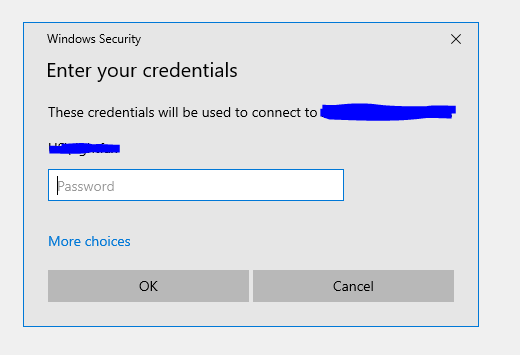
Capture.PNG
Hello,
Would it be possible for you to provide us a screenshot of the properties of your RDP entry?
You can either add it in your next reply or send it to my via private message.
Best regards,
James Lafleur
Attached is an image. See how the first password field is greyed out?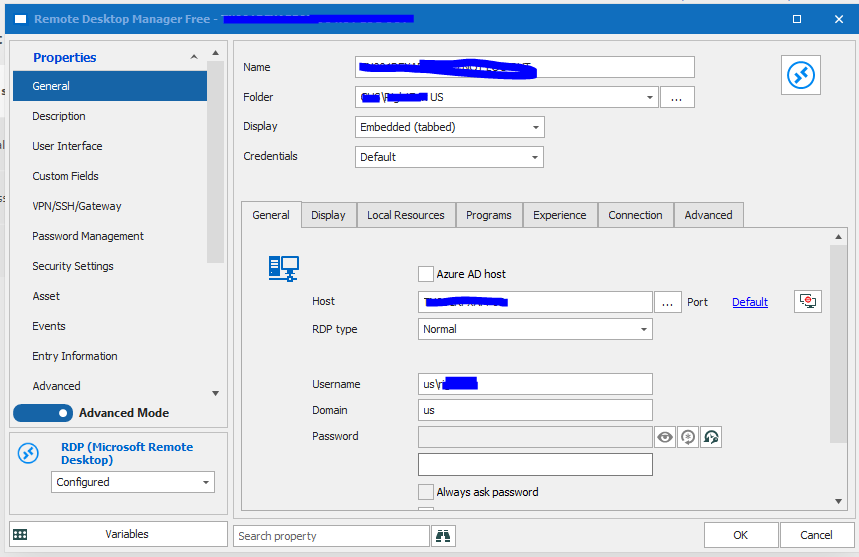
Capture2.PNG
Hello,
The password field is greyed out because the option "Store password locally" is checked.
Could you please uncheck this option and enter your password directly in your RDP entry instead?
Best regards,
James Lafleur
I had already tried that. I just did it again. I put in the username and password. It takes it. But, when I try to connect to the rdp session, it's still prompting for a password.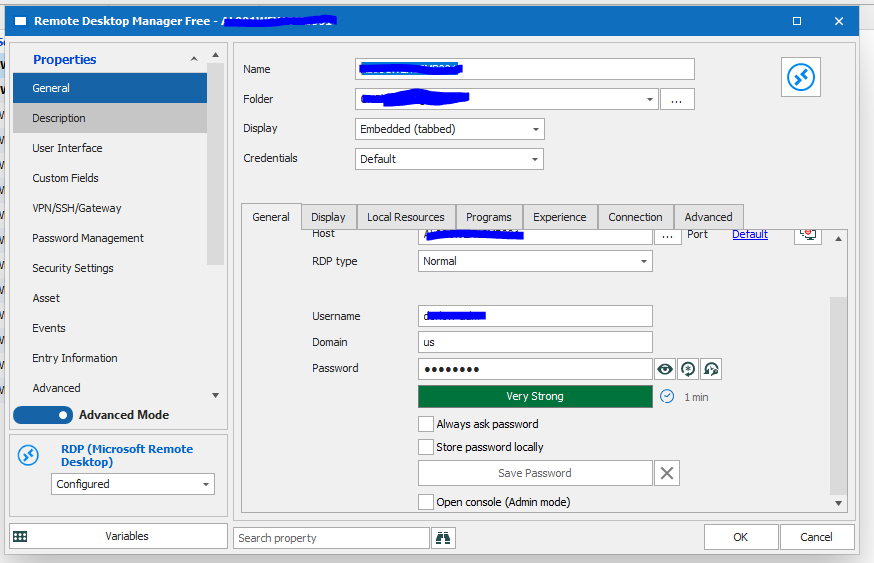
Capture4.PNG
Hello,
In that case, could you please go under the "Connection" tab and toggle the "Activate network level authentication NLA (SingleSignOn)"?
If that does not work for you, I suspect that this issue might be caused to the fact that another set of credential is saved in your Windows Credentials Manager for this remote host.
Since RDM first goes through this location to launch RDP connection, the credentials you have configured in your RDP entry will be ignored if you have credentials for this remote host in your Credentials Manager.
For this reason, please go in your Credentials Manager and see if you have any credentials for your remote host? If it is the case, please delete them and see if you are able to connect to your remote host from RDM without further issues.
Best regards,
James Lafleur
It's already checked. The passwords are not saved in credential manager. (I just checked...) But, it doesn't make any sense in my case that it would be. The reason I'm using Devolutions now is because we just got new laptops for work. I've never signed into these servers on the new laptop until I installed Devolutions. On my old laptop, I used Microsoft's remote desktop connection manager which worked well. But they stopped developing it years ago and it's becoming increasingly difficult to find or use it. So, I decided to look for a different tool for remote desktop connections. I did use the export of the rdp sessions from rdcman to import into Devolutions. Not sure if that has anything to do with it.
Hello David,
Thank you for your swift reply and for performing these verifications.
Out of curiosity, could you please create a new RDP entry in RDM pointing to the same remote host and see if the behavior remains the same?
Best regards,
James Lafleur
Ok, recreating it worked. It remembered my password. Kind of isn't cool though because I have a lot of servers I manage and I'll have to recreate every one of them... unless that leads you to a different idea how to fix the existing servers.
Well, I just tried again changing an existing rdp session and now it's working. Not sure what I did differently this time... but it seems to be remembering the passwords now. Well, before I was trying to get the passwords to propagate down through the folders... now I'm setting it directly for the servers, which is kind of a pain.
Hello David,
Glad to see that your RDP connections are now working! Now that this is done, you can set your entries your RDP entries to "Inherited" and store your credentials in their parent folder to propagate your passwords down through the folders and entries.
Here is a brief overview of how it should look like:
1- Parent Folder:
2- RDP Entry:
3- In the Dashboard Overview, you will see that the entry that currently has the focus in your Navigation Pane (RDP Inherited) inherits its credentials from its parent folder: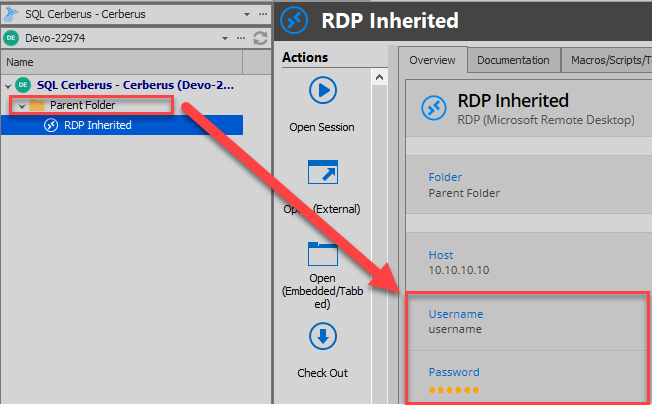
I hope that helps!
Best regards,
James Lafleur
Overview.png
Ok, now I messed it up. I somehow undocked the navigation pane on the left side. If I right click on the top bar, as long as I dont let up on the right click, I see an option to doc as tabbed document. but as soon as i lift up from clicking, the context menu disappears. If I hold it down and go over that option, it does nothing.
Hello David,
Could you please go under the Window section of RDM's ribbon and use the "Reset Layout" option to restore RDM's UI to its default layout?
In doing so, your navigation pane will be restored to its default location.
Best regards,
James Lafleur
awesome, that worked!