Searching in navigation pane is very slow

For most of the time where we've used RDM (which is a great product, that we love) searching has been a very slow process. It's bearable but generally slow. We've for a long time blamed the RDS servers from where we run RDM as a RemoteApp or the SQL server behind the database. But now a colleague of mine show me how to search across all vaults. If I enable this and search, the results are pretty much instant. Doing an advanced search is also very fast, but searching thru the navigation pane can take between 5-10 seconds before it shows the results. Sometimes even longer.
Some of use use "press enter to search" which can help avoid RDM beginning to search when we're halfway typing in the search critiria but it's also slow. 

Nothing is checked under the "include X information".
Anything we can try?
All Comments (15)
Hello,
Thank you for contacting us on that matter!
In order to help me determine how your search speed could be improved, I have a few questions on your RDM environment.
- What version of RDM do you currently use?
- If you look under File > My Data Source Information, what is the version of your database?
- How many entries do you have in your vault?
- Do you use multiple vaults or only one?
Best regards,
Gabriel Degrandpré
Hi Gabriel,
- We're running 2020.1.20.0. Bit more outdated than I initial figured, if I'm being honest, but we do usually not upgrade unless there's quite good reason. Have searching been adressed in recent versions?
- Database is v1.592
- How do I tell?
- We do have multiple but 99% of the items are located in one vault.
Hello,
Thank you for your response! You can find your vault's entry count under Help > Diagnostic > Data Source on the "Entries/Items" line :
Best regards,
Gabriel Degrandpré
I dont see it
Regardless - any suggestions as to why "all vaults"- and advanced search is faster than regular searching in the nav pane?
thanks,
Hello,
Please go in Help -> Support. From there, you will find Diagnostic.
Best regards,
Jeff Dagenais
Hello,
Please go in Help -> Support. From there, you will find Diagnostic.
Best regards,
Alright
Repositories:         3
Entries/Items:     8891/8891
  Sessions:        2776
  Data entries:      25
  Credentials:     4779
  Sub connections:  187
  Documents:         72
  Contacts:           0
  -->Sub total:    7839
Hello,
Thank you for your swift reply!
In order for us to diagnose this slowness, would it be possible for you to go under Help -> Profiler and set the Profiler level to 1?
Once this is done, move the Profiler window aside and try to use the search field at the bottom of your Navigation Pane once more.
In doing so, a log should be created. You can provide it to me via private message or attach it to your next post.
Best regards,
James Lafleur
Hello,
Thank you for your swift reply!
In order for us to diagnose this slowness, would it be possible for you to go under Help -> Profiler and set the Profiler level to 1?
Once this is done, move the Profiler window aside and try to use the search field at the bottom of your Navigation Pane once more.
In doing so, a log should be created. You can provide it to me via private message or attach it to your next post.
Best regards,
Here you go!
Main thread (UI)
----------------------------------------
TreeView.LoadConnectionList...
    GetGroupInfos : 1 ms
    BeginUpdate...
        LoadConnectionInTreeNode : 2387 ms
        PreCreateGroups : 0 ms
    BeginUpdate : 2402 ms
TreeView.LoadConnectionList : 2406 ms
SelectionChanged : 126 ms
TreeView.LoadConnectionList...
    GetGroupInfos : 0 ms
    BeginUpdate...
        LoadConnectionInTreeNode : 2352 ms
        PreCreateGroups : 0 ms
    BeginUpdate : 2366 ms
TreeView.LoadConnectionList : 2366 ms
SelectionChanged...
    LoadConnectionList : 3 ms
SelectionChanged : 114 ms
TreeView.LoadConnectionList...
    GetGroupInfos : 0 ms
    BeginUpdate...
        LoadConnectionInTreeNode : 2046 ms
        PreCreateGroups : 0 ms
    BeginUpdate : 2050 ms
TreeView.LoadConnectionList : 2050 ms
SelectionChanged...
    LoadConnectionList : 1 ms
SelectionChanged : 59 ms
Searching isn't particularly slow today, it varies a lot. Sometimes it can take 7 to 11 seconds. I get it could be anything; slow SQL server, slow terminalserver that runs the actual rdm process but what I wonder is how searching can be so instant when used advanced or "all vaults"-search functions.
Any idea :-/?
Hello thm,
If possible, I would invite you to upgrade your RDM to the latest version of RDM. Our engineering team has implemented some improvements to the way RDM searches to speed up the process, so the issue should be alleviated by upgrading.
Since you use SQL Server as your data source, there are a few points I would like to raise considering the upgrade to make sure everything goes smoothly.
- Upgrading RDM will also necessitate an upgrade of your database version. We recommend to perform the upgrade outside of production hours, while no other users are connected to the database.
- Before upgrading the database, we also strongly recommend making a backup of the database, just to be safe.
- In order to make sure that your users also upgrade their version of RDM (to make sure their instance of RDM stays compatible with the database), you may want to configure a minimal allowed version of RDM to the same version as you. I invite you to consult our help topic on the subject for more information.
https://help.remotedesktopmanager.com/datasourcesettings_versionmanagement.html
Setting a Minimal Version will prompt your users to upgrade to the version set when they try to connect to the database. This will prevent them from trying to connect with an outdated version of RDM.
You will be able to download the installer for RDM 2020.3.19.0 using the link below :
https://remotedesktopmanager.com/home/thankyou/rdmsetup
Don't hesitate to let us know if you have any additional questions!
Best regards,
Gabriel Degrandpré
We've updated to 2020.3.19.0 and seemingly it hasn't made a difference in searching.
Again, it's instant when using "search in all vaults" - how come? What's the difference?
One obvious difference I can think of is the info about who is active on the servers in question, but I've tried disabling this as well without any difference.
Hello,
I suspect that one or more variables are applied in the search. Could you post the search option like this?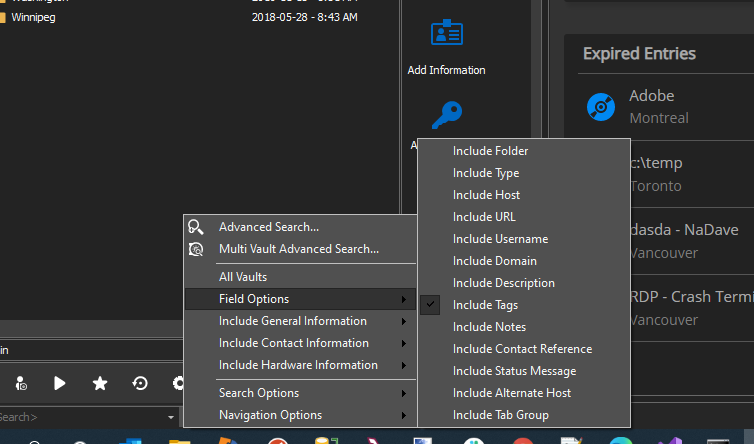
Regards
David Hervieux
SearchOptions.png
We only have (or well, I only have) "include folder" checked. 
Searching without it yields no difference.
Again, I'm wondering - is it supposed to be instant? If not, how come searching with "all vaults" enabled is pretty much instant?
Hello,
Is it possible to send us a small video of the issue so that we can evaluate the slowness regarding the search in the navigation pane?
Best regards,
Jeff Dagenais
Hello again,
Like I mentioned, I suspect that some variables are applied during the search on the client side and not in the multi vault search. That's why I have added a new profiler information in RDM 2020.3.22 (just released this version).
Could you open the Profiler dialog in Help, clear the text and apply the filter please. You will be able to post it. I'm trying to find where the time is wasted for the search.
Regards
David Hervieux