Import XML removed?

I just upgraded to the 2020.3.16.0 version. It appears that import from XML has been removed. Am i missing something?
I can export my connections to XML, but i can't import them on a different install/user.
I have some scripts that create XML files based on a project that has a bunch of ESXi servers, iDRACs, and Windows VMs. I have the script create the XML file and i easily import it into RDM using the import feature. Now that feature seems to be gone with 2020.3.16. It worked great in 2020.2.19.
Has this feature been removed? or just moved elsewhere?
version 2020.2.19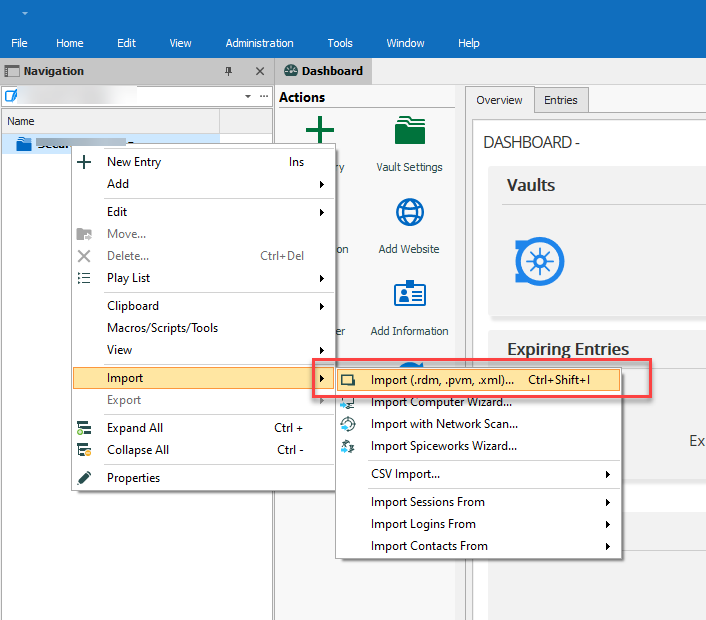
version 2020.3.16 - Missing import from XML. Can only import from RDM now. 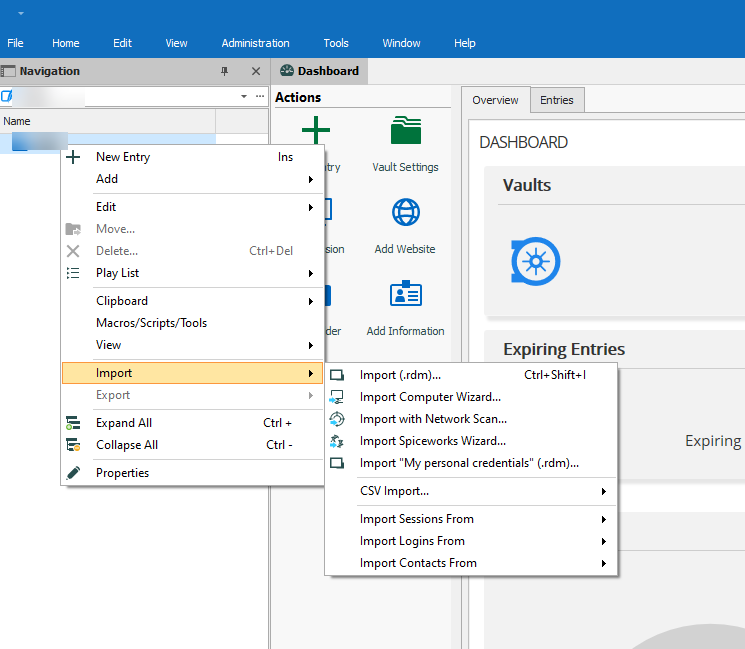
2020-11-12_23-09-20.png
2020-11-12_23-08-03.png
All Comments (4)
Hello,
We will take a look, I don't think that's intended.
Regards,
Hubert Mireault
Also you should be able to import your file if you change the extension to ".rdm" as a workaround at the moment. Could you test this and confirm?
Regards,
Hubert Mireault
OK...crisis averted. :) I was able to import by renaming the XML to *.rdm. I didnt think to do that. Apparently the import picks up the file and reads the format regardless of extension. But, the import dialog box blocks you from importing any other type of file--it *must* be .RDM. It would be nice if the dialog box allowed you to select "other *.*" and i didnt have to rename the files. Either way, not a show stopper.
Hopefully its a simple change in the GUI. Looks like it's not a fundamental change in the code.
Thank you for the quick response!
Glad this works for you!
I've also made the change internally to add the "all files" option in this filter. This will be available starting from RDM 2020.3.18.0.
Regards,
Hubert Mireault
